
Rayman 3
Forum rules
Please keep the forum rules and guidelines in mind when creating or replying to a topic.
Please keep the forum rules and guidelines in mind when creating or replying to a topic.
-
bunnieblaster

- Posts: 812
- Joined: Thu Mar 22, 2007 4:43 pm
- Location: The Netherlands
- Tings: 6995
Re: Rayman 3
It's a cd by one of the composers of the Rayman 3 soundtrack
-
raymanrules77

- Posts: 105
- Joined: Thu Mar 20, 2014 5:17 pm
- Location: Sweden
- Contact:
- Tings: 8762
Re: Rayman 3
Ok so I just got a laptop and I wanted to play Rayman 3 but many textures are missing and I have tried different settings and switched between the 2 graphics cards on my laptop. I have also tried RibSharks Better Rayman 3 mod but it did not help.
I hope there is a fix to this, here are my 2 GPU's: Nvidia Geforce GT 650M 2GB and Intel HD Graphics 4000
I hope there is a fix to this, here are my 2 GPU's: Nvidia Geforce GT 650M 2GB and Intel HD Graphics 4000
-
PluMGMK

- Posts: 40533
- Joined: Fri Jul 31, 2009 9:00 pm
- Location: https://www.youtube.com/watch?v=cErgMJSgpv0
- Contact:
- Tings: 136731
Re: Rayman 3
A lot of people seem to be having such issues lately. I hear upgrading the graphics drivers sometimes seems to solve it, though if you've tried two GPUs that doesn't sound very plausible.  Can't hurt to try though, since if it's a new laptop it probably didn't come with all the latest updates installed anyway.
Can't hurt to try though, since if it's a new laptop it probably didn't come with all the latest updates installed anyway.-
raymanrules77
- Posts: 105
- Joined: Thu Mar 20, 2014 5:17 pm
- Location: Sweden
- Contact:
- Tings: 8762
Re: Rayman 3
Well this is a used computer and it does not have any software for updating drivers to my knowledge.
-
PluMGMK
- Posts: 40533
- Joined: Fri Jul 31, 2009 9:00 pm
- Location: https://www.youtube.com/watch?v=cErgMJSgpv0
- Contact:
- Tings: 136731
Re: Rayman 3
You should be able to get the latest NVIDIA driver directly from their website.
-
raymanrules77
- Posts: 105
- Joined: Thu Mar 20, 2014 5:17 pm
- Location: Sweden
- Contact:
- Tings: 8762
Re: Rayman 3
Ok i both installed Better Rayman 3 again and updated the drivers and there are more textures but still some are missing. Are there any special settings i should try? Also, i'm not sure what resolution my computer screen is but i just picked 1920 x 1080 32bit.

Re: Rayman 3
https://www.youtube.com/watch?v=i_6gshbVFxE
do you mean this kind of missing textures, like the one in the video? (fast forward to 5:13) if so, changing the value of TnL to 0 in the ubi configuration file (looks like a normal txt file, but it has a gear icon next to it) should fix it for you. If there are other texture errors than that, sorry, but I can't help with those.
do you mean this kind of missing textures, like the one in the video? (fast forward to 5:13) if so, changing the value of TnL to 0 in the ubi configuration file (looks like a normal txt file, but it has a gear icon next to it) should fix it for you. If there are other texture errors than that, sorry, but I can't help with those.
-
raymanrules77
- Posts: 105
- Joined: Thu Mar 20, 2014 5:17 pm
- Location: Sweden
- Contact:
- Tings: 8762
Re: Rayman 3
It's not as bad as that shown in the video but still similair. Where is the ubi config file? I can't find it
-
PluMGMK
- Posts: 40533
- Joined: Fri Jul 31, 2009 9:00 pm
- Location: https://www.youtube.com/watch?v=cErgMJSgpv0
- Contact:
- Tings: 136731
Re: Rayman 3
I'm not sure, but I think you should be able to change it from Better Rayman 3's configurator. If not, it should be somewhere underneath %APPDATA% (I guess C:/Users/<YOUR NAME>/Application Data).
-
raymanrules77
- Posts: 105
- Joined: Thu Mar 20, 2014 5:17 pm
- Location: Sweden
- Contact:
- Tings: 8762
Re: Rayman 3
TnL is set to 0...
rip
rip
-
Master

- Posts: 53544
- Joined: Sun Aug 21, 2011 10:14 am
- Location: Somewhere specific, I'd assume.
- Tings: 468320
Re: Rayman 3
Throwing out random suggestions at this point, are you playing the CD or GoG version of R3? Is it possible you might be missing some items or for there to be some corrupted files?
-
raymanrules77
- Posts: 105
- Joined: Thu Mar 20, 2014 5:17 pm
- Location: Sweden
- Contact:
- Tings: 8762
Re: Rayman 3
GoG version, maybe i should try to reinstall?
Re: Rayman 3
Well, if it doesn't work now, than reinstalling can't cause more problems, so I guess you should go for it
edit, just so I don't double-post:
If you hadn't deleted it yet, you should check if TriLinear is set to 0 as well in your ubi.ini file. It should be under c:\programs\windows\ubisoft... Actually it's the same file, so I just write the path, to be sure. If this doesn't help either/it is set to 0 too, then go ahead, and reinstall it.
another edit, sry for the storm, but I've found a possible solution:
So I've read that, there are programs with integrated Intel graphic cards. So what you should try (If you hadn't already) is to change Vertex Processing Mode to Software in your intel settings. You should be able to do this by:
-right-clicking on your desktop
-choose Graphic Properties
-it should bring up the intel control settings
-go to the 3D menu on the left
-click Custom Settings
-find Vertex Processing, and change it from default to software setting
-click apply, close the window
And that should be it. It's not my solution, I've found it on a forum, but wiki also says that, it works. (Haven't tried it personally, so don't know if it still works)
edit, just so I don't double-post:
If you hadn't deleted it yet, you should check if TriLinear is set to 0 as well in your ubi.ini file. It should be under c:\programs\windows\ubisoft... Actually it's the same file, so I just write the path, to be sure. If this doesn't help either/it is set to 0 too, then go ahead, and reinstall it.
another edit, sry for the storm, but I've found a possible solution:
So I've read that, there are programs with integrated Intel graphic cards. So what you should try (If you hadn't already) is to change Vertex Processing Mode to Software in your intel settings. You should be able to do this by:
-right-clicking on your desktop
-choose Graphic Properties
-it should bring up the intel control settings
-go to the 3D menu on the left
-click Custom Settings
-find Vertex Processing, and change it from default to software setting
-click apply, close the window
And that should be it. It's not my solution, I've found it on a forum, but wiki also says that, it works. (Haven't tried it personally, so don't know if it still works)
-
raymanrules77
- Posts: 105
- Joined: Thu Mar 20, 2014 5:17 pm
- Location: Sweden
- Contact:
- Tings: 8762
Re: Rayman 3
My computer is in Swedish so it was hard to find the settings but i managed to get to the 3D settings but there is no vertex processing option.
I wish i had the DVD version with me so i could try that.
I wish i had the DVD version with me so i could try that.
-
NyaNyaLily

- Posts: 5059
- Joined: Wed Jan 14, 2015 5:53 pm
- Tings: 25298
Re: Rayman 3
I'm pretty sure that the ubi.ini file is located in "C:\Windows\Ubisoft\"raymanrules77 wrote:My computer is in Swedish so it was hard to find the settings but i managed to get to the 3D settings but there is no vertex processing option.
I wish i had the DVD version with me so i could try that.
-
raymanrules77
- Posts: 105
- Joined: Thu Mar 20, 2014 5:17 pm
- Location: Sweden
- Contact:
- Tings: 8762
Re: Rayman 3
I already disabled TnL on that.
Re: Rayman 3
Yep, but have you checked if TriLinear is disabled as well? And if you can send a screenshot to me of the 3D settings menu as well, maybe I can help you find Vertex Processing.
-
PluMGMK
- Posts: 40533
- Joined: Fri Jul 31, 2009 9:00 pm
- Location: https://www.youtube.com/watch?v=cErgMJSgpv0
- Contact:
- Tings: 136731
Re: Rayman 3
RibShark's patch reconfigures the OS to look in %APPDATA% instead of C:\Windows.CHRdutch wrote:I'm pretty sure that the ubi.ini file is located in "C:\Windows\Ubisoft\"raymanrules77 wrote:My computer is in Swedish so it was hard to find the settings but i managed to get to the 3D settings but there is no vertex processing option.
I wish i had the DVD version with me so i could try that.
-
raymanrules77
- Posts: 105
- Joined: Thu Mar 20, 2014 5:17 pm
- Location: Sweden
- Contact:
- Tings: 8762
Re: Rayman 3
Ok both TriLinear and TnL is disabled.
Here is 3D menu: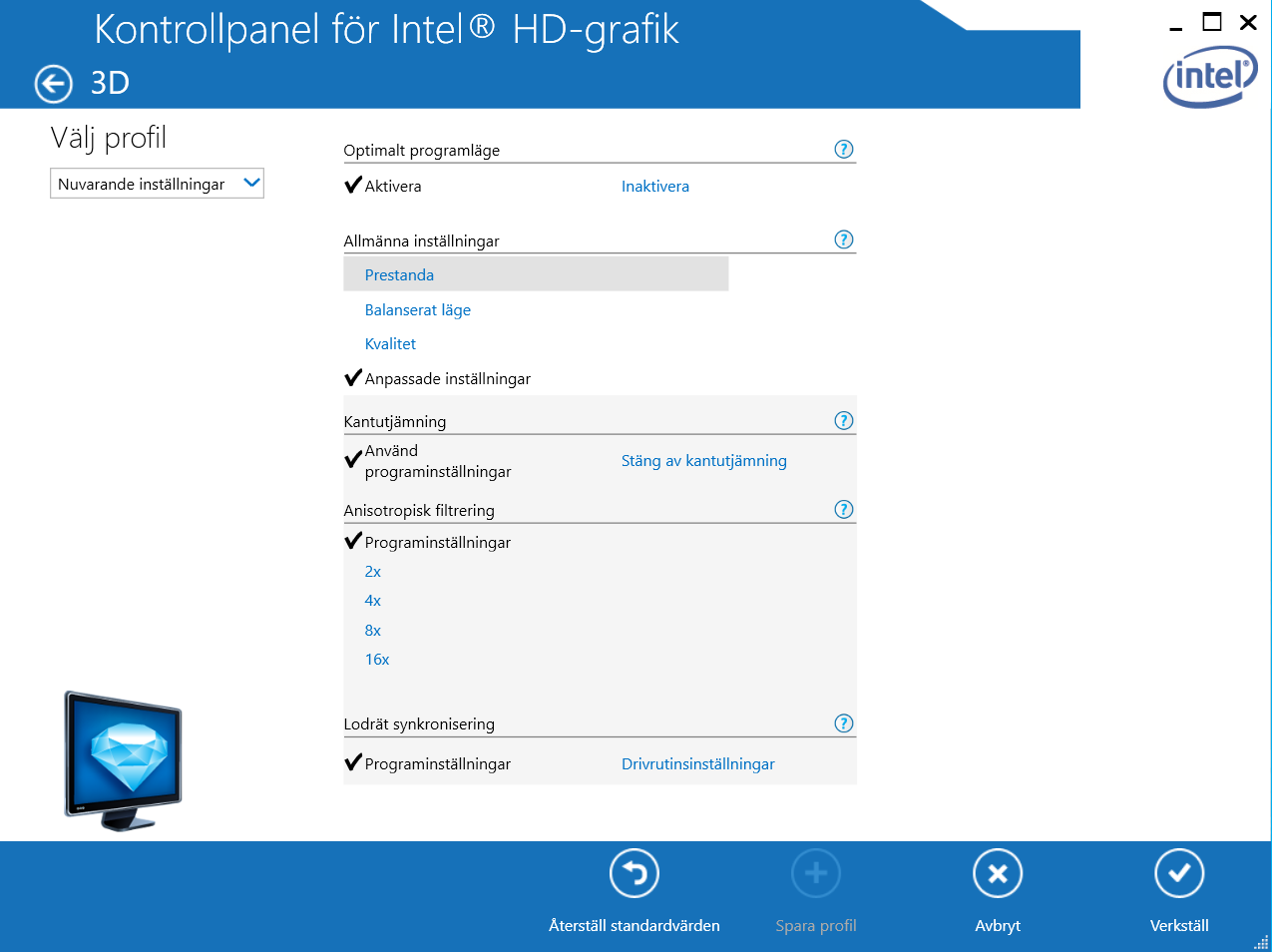
Edit: fixed image
Here is 3D menu:
Edit: fixed image
Re: Rayman 3
Umm sry, but I guess you forgot to upload the image At least it doesn't show image for me 
At least it doesn't show image for me