Page 6 of 34
Re: Rayman 3: Widescreen Patch
Posted: Wed Feb 18, 2015 6:47 pm
by RibShark
Let's not turn this into a meme train, please.
Anyway, for me at least, Windows 8.1 automatically detects the game requires DirectPlay and installs it for you before starting the game for the first time. If that isn't the case, bare with me and I'll try to find a fix.
Re: Rayman 3: Widescreen Patch
Posted: Wed Feb 18, 2015 6:54 pm
by NyaNyaLily
Well it asks to install directplay but fails miserably
Re: Rayman 3: Widescreen Patch
Posted: Wed Feb 18, 2015 6:55 pm
by Harpic fraîcheur
Use my method. =P
Re: Rayman 3: Widescreen Patch
Posted: Wed Feb 18, 2015 6:56 pm
by RibShark
CHRdutch wrote:Well it asks to install directplay but fails miserably
Try this. Press Win+R, then type OptionalFeatures into the box and press OK. Once everything loads, check the box next to "Legacy Components", then click OK. Now try running Rayman 3.
Re: Rayman 3: Widescreen Patch
Posted: Wed Feb 18, 2015 7:09 pm
by NyaNyaLily
same deal :C (directplay refuses to install)
Re: Rayman 3: Widescreen Patch
Posted: Wed Feb 18, 2015 7:29 pm
by RibShark
CHRdutch wrote:same deal :C (directplay refuses to install)
Try this: press Win+X, click "Command Prompt (Administrator)", paste in (you need to use right click, not Ctrl+V) "DISM.exe /Online /Cleanup-image /Restorehealth" then press enter. Once it has completed, try installing DirectPlay again.
Re: Rayman 3: Widescreen Patch
Posted: Wed Feb 18, 2015 7:52 pm
by NyaNyaLily
Well I did it, it told some information about version and now it does nothing :/
I'm confused at this part (do I need to press something?)
Re: Rayman 3: Widescreen Patch
Posted: Wed Feb 18, 2015 7:59 pm
by RibShark
CHRdutch wrote:Well I did it, it told some information about version and now it does nothing :/
I'm confused at this part (do I need to press something?)
If the last line on the command prompt is C:\Windows\System32, then carry on and try installing DirectPlay. Otherwise, wait a while longer for that line to appear.
Re: Rayman 3: Widescreen Patch
Posted: Fri Feb 27, 2015 5:30 pm
by NyaNyaLily
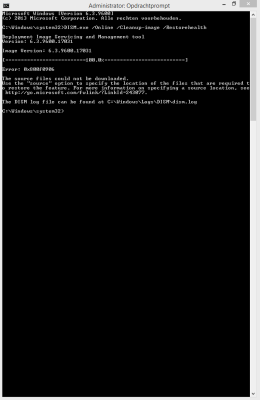
- Windowsmiddlefinger.exe >.<
Godd*mmit
P.S.
Directplay doesn't work

Re: Rayman 3: Widescreen Patch
Posted: Fri Feb 27, 2015 7:35 pm
by Hoozang
Well, I'm no expert in compatibility (maybe) but a 2003 game won't work in such OS as W8.
Re: Rayman 3: Widescreen Patch
Posted: Fri Feb 27, 2015 8:08 pm
by Master
R3 works ok on mine, the only issue is with controllers.
Re: Rayman 3: Widescreen Patch
Posted: Tue Mar 03, 2015 11:42 pm
by Reese Riverson
Well, I've finally gotten around to trying this patch out since I wanted to have Rayman 3 on my 13.3" gaming laptop I recently got. Though I went ahead and got the GOG version so I don't have to use a CD for the game.
Thanks a bunch RibShark!

Re: Rayman 3: Widescreen Patch
Posted: Wed Mar 04, 2015 11:43 pm
by saerleiya
Hoozang wrote:Well, I'm no expert in compatibility (maybe) but a 2003 game won't work in such OS as W8.
R3 works. I'm not sure about R2 though (there is something fishy around here...).
R1 doesn't work on W7 and W8 anyway.
Re: Rayman 3: Widescreen Patch
Posted: Thu Mar 05, 2015 6:50 am
by NyaNyaLily
saerleiya wrote:Hoozang wrote:Well, I'm no expert in compatibility (maybe) but a 2003 game won't work in such OS as W8.
R3 works. I'm not sure about R2 though (there is something fishy around here...).
R1 doesn't work on W7 and W8 anyway.
Exactly the opposite for me
Rayman 3 doesn't work
Rayman 2 works
Rayman works (DOSBox)
Re: Rayman 3: Widescreen Patch
Posted: Thu May 28, 2015 6:25 am
by IIITA
RibShark wrote:Downloads
For 16:9 displays
For 16:10 displays
Cutscene Fix
Installation Instructions
- Download the patched executable and cutscenes using the links above.
- Find your Rayman 3 installation directory (C:\Program Files (x86)\Ubi Soft\Rayman3) or (C:\GOG Games\Rayman 3 - Hoodlum Havoc)
- Replace the Rayman3.exe file with the one you downloaded in step 1.
- Replace all the files in the "videos" folder with those that you downloaded in step one (in videos.zip).
- Go to your start menu (or screen), find Notepad, right click and click "Run as Administrator".
- In Notepad click File > Open, then navigate to C:\Windows\UbiSoft\ and open Ubi.ini
- Change the value of Gli_Mode to be "1 - your screen width x your screen height x 32.
- Run Rayman 3 as normal.
Hopefully this will work well for all of you.
There are two Ubi.ini files in Windows 7 SP1 64bit OS,
C:\Windows\UbiSoft
C:\Users\<unsename>\AppData\Local\VirtualStore\Program Files (x86)\Ubisoft
Maybe both Ubi.ini files should be patched for the value Gli_Mode to be "1 -
your screen width x
your screen height x 32, I guess.
Re: Rayman 3: Widescreen Patch
Posted: Sun Jun 21, 2015 9:27 pm
by Snagglebee
RibShark wrote:I'm actually working on a fully fledged replacement to the stock config tool which would patch the exe and cutscene files for you.
So over a half year has passed since that post, and if you're not looking for completing this, I could take over the work if you like.
Re: Rayman 3: Widescreen Patch
Posted: Sun Jun 21, 2015 9:47 pm
by RibShark
I have big plans for this but it looks like it's not going to happen anytime soon. I'd be happy for you to take over for now though
.
Re: Rayman 3: Widescreen Patch
Posted: Sun Jun 21, 2015 11:46 pm
by Cut
Currently I'm using a No CD Crack for Rayman 3 since I don't own my original CDs anymore (I installed it via ISO files). Will I be able to start the game with this patch if I only mount the ISO?
Re: Rayman 3: Widescreen Patch
Posted: Sun Jun 21, 2015 11:53 pm
by Snagglebee
I'm not entirely sure but this patch will not require you to own any discs or ISO mounted on a virtual CD-Drive, since this is also supposed to work with GOG.com version.
Re: Rayman 3: Widescreen Patch
Posted: Mon Jun 22, 2015 6:15 am
by Harpic fraîcheur
Hoozang wrote:Well, I'm no expert in compatibility (maybe) but a 2003 game won't work in such OS as W8.
It works fine for me.