Page 2 of 3
Re: Rayman 1 sound problems
Posted: Mon Apr 09, 2007 11:27 pm
by Beebop
You are right
Re: Rayman 1 sound problems
Posted: Tue Apr 10, 2007 1:26 am
by Blok2004
Sigh

Re: Rayman 1 sound problems
Posted: Tue Apr 10, 2007 11:08 am
by Beebop
why you sigh?
Re: Rayman 1 sound problems
Posted: Tue Apr 10, 2007 3:31 pm
by Blok2004
I thought that was obvious
Re: Rayman 1 sound problems
Posted: Fri Apr 13, 2007 10:55 pm
by Beebop
I don't know < is confused (again) ):
Re: Rayman 1 sound problems
Posted: Sun Apr 15, 2007 4:25 am
by Feanaro Surion
lol, i think he's sighing, cuz he still really wants rayman 1, but he can't seem to get a hold of it. hopefully you can wrap your head around that.
Re: Rayman 1 sound problems
Posted: Mon Apr 16, 2007 10:16 am
by Beebop
I can just about rap my small brain araound that.
Re: Rayman 1 sound problems
Posted: Mon Apr 16, 2007 6:47 pm
by Feanaro Surion
good to hear.
Re: Rayman 1 sound problems
Posted: Mon Apr 16, 2007 8:27 pm
by Blok2004
"sigh"
Re: Rayman 1 sound problems
Posted: Tue Apr 17, 2007 5:56 pm
by Feanaro Surion
lol. you haven't got over it yet, i take it?
Re: Rayman 1 sound problems
Posted: Thu Apr 19, 2007 1:50 pm
by Cairnie
You know what...

I've had such problems too [and this was long before I got an XP computer]. It says that CD music is available but doesn't play, but still plays the sound effects. Perhaps it's because I have a bad sound card or I got a budget version of Rayman Gold. I suppose it was good for taking screenshots though, because I liked the PSOne version better.
Re: Rayman 1 sound problems
Posted: Thu May 24, 2007 1:16 am
by Lijik
I was having the same problem, and I finally figured it out today.
Open up the Master Volume window from the taskbar, and then click Options>Properties.
In the properties window, there should be an option labeled "CD Player", tick the box next to it and it will appear in the Master Volume window, and will probably be on 'mute' which is where the problem is coming from.
Unmute it, and then the music problem is solved =D
Re: Rayman 1 sound problems
Posted: Thu May 24, 2007 10:01 am
by Beebop
Blok2004 wrote:"sigh"
Just get it off Ebay. They have thousands of copies of Rayman 1, gold, and Forever.
Re: Rayman 1 sound problems
Posted: Thu May 24, 2007 10:04 pm
by Blok2004
PianoMan2007 wrote:Blok2004 wrote:"sigh"
Just get it off Ebay. They have thousands of copies of Rayman 1, gold, and Forever.
Gold and forever don't work either
Oh lijik Good suggestion but it didn't work for me
Re: Rayman 1 sound problems
Posted: Sun May 27, 2007 9:54 pm
by Beebop
You will find it in the end.
Re: Rayman 1 sound problems
Posted: Mon May 28, 2007 6:21 pm
by Feanaro Surion
I highly doubt it. He's tried everything.
Re: Rayman 1 sound problems
Posted: Tue May 29, 2007 10:08 pm
by Beebop
You can have my copy, Blok. It's about 12 years old, though, and it has seen better days. I will sell it to you for 50 Pence or cents.

Re: Rayman 1 sound problems
Posted: Tue May 29, 2007 10:29 pm
by Feanaro Surion
That might fix it. He's tried everything computer-wise, so it must be his copy.
Re: Rayman 1 sound problems
Posted: Sun Jun 24, 2007 8:02 pm
by Beebop
Like I said, I can sell you it, but you would have to tell me where you live...
Re: Rayman 1 sound problems
Posted: Wed Jul 29, 2015 1:55 am
by IIITA
I post this just for information.
I have IBM Thinkpad A20m 2628 running Windows 98SE, oh yes OS IS OBSOLETE but I like use this PC to try running old games especially requiring MS-DOS such as Rayman 1.
I installed Rayman 1 on this PC after long years blank. Now I experienced "sound option" problem not getting Rayman's word "Perfect" which shows sound card selection ,port , irq and dma is correct.
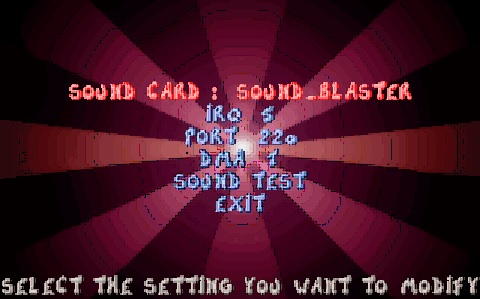
As everyone expected, I got no menu selection sound nor Rayman's action sound pressing X key but getting background music from CD sound track normally.
Oh !!
I ran sound patch supplied from Ubisoft;
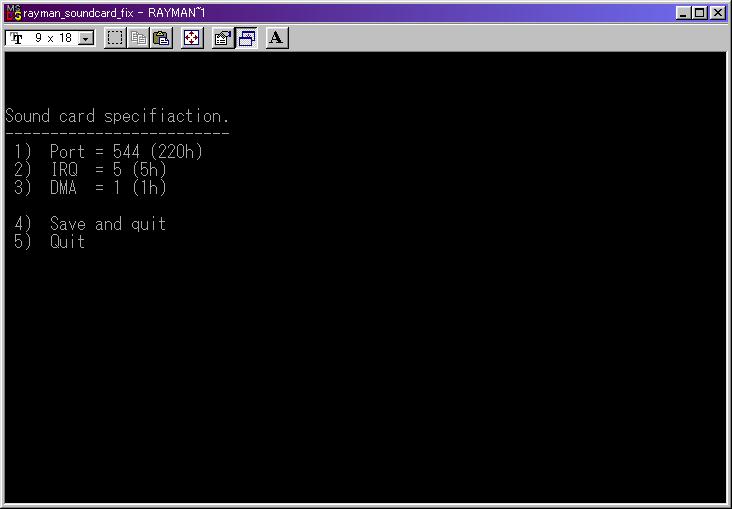
It shown everything normal though I actually got problem.
But after I rebooted PC, everything was normal. Now I got Rayman's action sound as well as menu selection sound "pi" even game quit sound "Hyaa".
I can not figure out this cause of problem clearly, but feel "not stable installation" , the opening video "Hi folks" has no sound why ? in contrast game background sound is normal getting from CD soundtrack !
The sound of Opening video IS ON CD soundtrack, isn't it ?
EDITED; on 26 June 2016 !! Oh it's been a year!
I figured out the cause of my problem, using Alcohol 120% is the problem overloading the CPU power for virtual drive work.
Using the game CD in the drive, I got everything normal.