Page 15 of 34
Re: Rayman 3: Widescreen Patch
Posted: Mon Mar 28, 2016 11:40 pm
by deton24
Dk_XfS wrote:deton24 wrote:Not all videos are needed to be replaced I guess.
No offense, but it doesn't make sense to add videos if the game isn't gonna play them. It's just plain stupid, increasing the game's size and all.
And seriously, just trying to understand. Don't take this the wrong way.

Or do u mean that we should replace only the videos which are present in the rar ?
In that case, I'm pretty sure I read in the instructions on the first post that we should replace the original folder with the one given.
E.g. in Polish version of R3, one cutscene is not dubbed, so original can be left.
That's how it works.
Re: Rayman 3: Widescreen Patch
Posted: Mon Mar 28, 2016 11:53 pm
by RibShark
It's been a while since I've looked in Shadorino's cutscenes but I believe the videos that are not replaced are the "Wanna Kick Rayman" extras.
Re: Rayman 3: Widescreen Patch
Posted: Tue Mar 29, 2016 8:55 am
by Dk_XfS
RibShark wrote:It's been a while since I've looked in Shadorino's cutscenes but I believe the videos that are not replaced are the "Wanna Kick Rayman" extras.
Alright, that must be it. What about the auto-patcher ? I don't seem to find it in the 'Widescreen.zip' provided.
[EDIT]
I've just played the original bink files and like you said, the missing ones are the 'Wanna Kick Rayman' Shorts.
Re: Rayman 3: Widescreen Patch
Posted: Tue Mar 29, 2016 9:00 am
by Dk_XfS
deton24 wrote:Dk_XfS wrote:deton24 wrote:Not all videos are needed to be replaced I guess.
No offense, but it doesn't make sense to add videos if the game isn't gonna play them. It's just plain stupid, increasing the game's size and all.
And seriously, just trying to understand. Don't take this the wrong way.
Or do u mean that we should replace only the videos which are present in the rar ?
In that case, I'm pretty sure I read in the instructions on the first post that we should replace the original folder with the one given.
E.g. in Polish version of R3, one cutscene is not dubbed, so original can be left.
That's how it works.
I play on english. But anyway, leaving the original file doesn't make the game crash or something because it doesn't match the aspect ratio ?
Re: Rayman 3: Widescreen Patch
Posted: Tue Mar 29, 2016 10:45 am
by RibShark
Dk_XfS wrote:Alright, that must be it. What about the auto-patcher ? I don't seem to find it in the 'Widescreen.zip' provided.
Just extract all the files into the Rayman 3 folder. The DLL file will be opened by the game and the patch will work.
Re: Rayman 3: Widescreen Patch
Posted: Tue Mar 29, 2016 10:48 am
by Dk_XfS
RibShark wrote:Dk_XfS wrote:Alright, that must be it. What about the auto-patcher ? I don't seem to find it in the 'Widescreen.zip' provided.
Just extract all the files into the Rayman 3 folder. The DLL file will be opened by the game and the patch will work.
OK. Thx.

It does work indeed. Just to be sure, should I keep TnL=1 or TnL=0 ?
Re: Rayman 3: Widescreen Patch
Posted: Tue Mar 29, 2016 5:28 pm
by Shadorino
Yes the videos that are not present are the bonus videos. The regular cutscenes are supposed to be in 16/9 aspect ratio, so I made my calculations accordingly. However, the "Wanna Kick Rayman" extras are supposed to be displayed in 4/3. That requires a whole new set of try and fail which I didn't want to go into again at the time since the regular cutscenes already kicked my ass for a whole month

I will take care of them eventually.
Re: Rayman 3: Widescreen Patch
Posted: Tue Mar 29, 2016 5:32 pm
by Dk_XfS
Shadorino wrote:Yes the videos that are not present are the bonus videos. The regular cutscenes are supposed to be in 16/9 aspect ratio, so I made my calculations accordingly. However, the "Wanna Kick Rayman" extras are supposed to be displayed in 4/3. That requires a whole new set of try and fail which I didn't want to go into again at the time since the regular cutscenes already kicked my ass for a whole month
I will take care of them eventually.
Cool.
Re: Rayman 3: Widescreen Patch
Posted: Tue May 31, 2016 11:22 pm
by ENunn
Hey, I can't find ubi.ini. There's no C:\Windows\UbiSoft folder. :/
Re: Rayman 3: Widescreen Patch
Posted: Tue May 31, 2016 11:25 pm
by Shadorino
Did you launch the game at least once ?
Re: Rayman 3: Widescreen Patch
Posted: Tue May 31, 2016 11:27 pm
by ENunn
Nevermind I got it.
Now how do I get it to use my dedicated NVIDIA graphics instead of the crappy Intel HD Graphics card? I have a GTX 960m, if you're wondering. When I run the launcher there's no NVIDIA card. :/
Re: Rayman 3: Widescreen Patch
Posted: Tue May 31, 2016 11:32 pm
by Shadorino
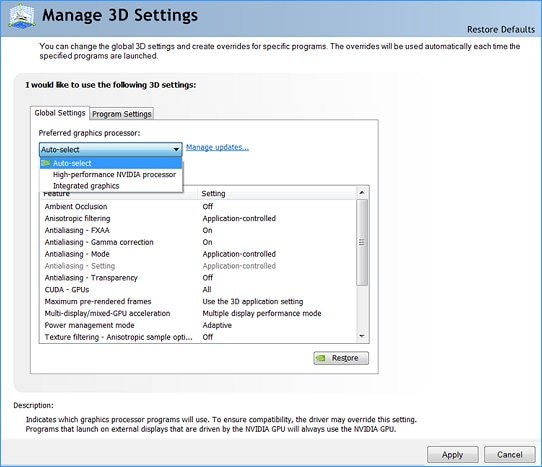
I have an i7-4930K so no integrated graphics so I'm not sure where but in the NVIDIA control panel, in Manage 3D settings, choose the game and maybe somewhere you can set it to your GTX 960
Re: Rayman 3: Widescreen Patch
Posted: Tue May 31, 2016 11:35 pm
by Shadorino
Re: Rayman 3: Widescreen Patch
Posted: Tue May 31, 2016 11:39 pm
by ENunn
Doesn't work sadly. Still used the integrated graphics. :/
Re: Rayman 3: Widescreen Patch
Posted: Tue May 31, 2016 11:43 pm
by Shadorino
What version of Windows are you using ?
Re: Rayman 3: Widescreen Patch
Posted: Tue May 31, 2016 11:43 pm
by ENunn
10
Re: Rayman 3: Widescreen Patch
Posted: Tue May 31, 2016 11:51 pm
by Shadorino
Right click on the Start menu > Programs and features > Turn Windows features on or off > Under "Legacy Components" check DirectPlay
Re: Rayman 3: Widescreen Patch
Posted: Tue May 31, 2016 11:52 pm
by Master
If memory serves, you can force the launcher to run with the GeForce active, try right clicking the launcher .exe file, then go to "run with graphics processor" and select your GeForce.
Re: Rayman 3: Widescreen Patch
Posted: Wed Jun 01, 2016 12:20 am
by Shadorino
If you have set your GTX 960 in the NVIDIA Control panel > Manage 3D settings > Global settings as well as the game exe in Program settings, maybe it is using the NVIDIA card in game after all even though there isn't the option in the Rayman 3 launcher.
The game is old, and not Optimus aware. Use MSI Afterburner (if you are familiar with it) to monitor the GPU clock and usage, that way you'll know for sure if the game is using it.
Re: Rayman 3: Widescreen Patch
Posted: Wed Jun 01, 2016 1:34 am
by RibShark
With Windows 10
Optimus does not work with DirectX 8 games, like Rayman 3. You can try using a wrapper like dgVoodoo but that might slow the game down even further.