Page 19 of 30
Re: IT... Computing....
Posted: Wed Oct 08, 2025 11:05 pm
by PluMGMK
Reese Riverson wrote: Wed Oct 08, 2025 9:26 pm
So, back to this a bit... I decided to download your driver, but primarily for vidmodes.com to see what the output is. Since I cannot resize the MS-DOS prompt windows like you can, I decided to do the next best thing and let it spit out the information into a text file.
Monitor_1_20251008-151511-102.png
Resizing the DOS prompt was done with the command "mode con lines=50", which is only available if you load ANSI.SYS in your CONFIG.SYS file

Reese Riverson wrote: Wed Oct 08, 2025 9:26 pm
Though, since you've got the experience with
your driver, what do you think my next step is? Since this could be applicable to both the virtual and real-world machine with these cards?
I reckon all those old Windows 3.1 drivers were hard-coded to work with non-widescreen modes, since that simplifies the calculations of DPI values and stuff that GDI requires all device drivers to specify. I'm pretty sure the Matrox driver could be patched to run in 1920×1080, but without also patching the geometry tables it could result in some weird stuff (like CLOCK.EXE rendering the clock as an oval instead of a circle

)
Re: IT... Computing....
Posted: Wed Oct 08, 2025 11:39 pm
by EdgyRabbid
Alright. I’m getting the mini computer, today actually! Will USB work to install it on a system? Or do I need another method to set it up on a computer? The computer doesn’t have a os by default btw.
Re: IT... Computing....
Posted: Thu Oct 09, 2025 12:40 am
by Steo
I think it might be time to use a search engine, such as Google.
___
I'd been using soundfonts and listening to old midi tracks I still have stored on an old HDD. Most of the files initially came from my older computer I had around 2007. Pretty nostalgic stuff.
Re: IT... Computing....
Posted: Thu Oct 09, 2025 1:41 am
by Reese Riverson
Oh nice! I'm glad you're feeling nostalgic!
Reese Riverson wrote: Wed Oct 08, 2025 4:29 pm
Yeah, and apparently with the system configuration, my physical disc copy of King's Quest VII is the original version, which normally had ran fine. Though this system reveals it's bugs quite readily, and early on. Version 2.00b that I had to get seems to be fine thus far:
Alright, update on this one... Uh, no, that actually didn't do
anything to help. Turns out the only reason it worked was from a CPU selection difference on the office computer due to the performance limitations of the Ryzen 3600 on it. Of all the stupid...

Re: IT... Computing....
Posted: Thu Oct 09, 2025 6:13 pm
by Steo
Oh yeah you mentioned this to me. Pretty weird issue really, and clearly infuriating given how long you were spending trying to diagnose and solve the issue. Computers can be a nuisance when they feel like it.

Re: IT... Computing....
Posted: Thu Oct 09, 2025 8:52 pm
by Reese Riverson
PluMGMK wrote: Wed Oct 08, 2025 11:05 pm
Resizing the DOS prompt was done with the command "mode con lines=50", which is only available if you load ANSI.SYS in your CONFIG.SYS file
Alright, so this was the easy part, as well as figuring out how to make MS-DOS Prompt open in windowed mode by default.

Now for the hard part:
PluMGMK wrote: Wed Oct 08, 2025 11:05 pm
I reckon all those old Windows 3.1 drivers were hard-coded to work with non-widescreen modes, since that simplifies the calculations of DPI values and stuff that GDI requires all device drivers to specify. I'm pretty sure the Matrox driver could be patched to run in 1920×1080, but without also patching the geometry tables it could result in some weird stuff (like CLOCK.EXE rendering the clock as an oval instead of a circle
)
So how does one go about driver modifications then? This is the one part that I'm having issues finding information on with a mere Google search inquiry. This is a rabbit hole I would need your help on, if you have the spare time.

Now, I've seen other people posting about modifying drivers, such as for the
NVIDIA TNT/TNT2 cards giving them
1920x1080 and beyond capability in Windows 3.x.
I don't know what resolutions are supported in Windows 3.x for the
Matrox G400, since I cannot test this as of this time, but the fact the
Windows 3.x driver actually
supports on-the-fly resolution / color depth switching is pretty amazing in its own right in that OS.
Re: IT... Computing....
Posted: Thu Oct 09, 2025 9:16 pm
by PluMGMK
I think the S3 ViRGE had the same features. Mine has DCI acceleration but I need to figure out how to add on-the-fly switching…

Anyhoo, I have an IDA Home subscription so I can disassemble Windows 3.1 EXEs / DLLs, including graphics drivers. I'll probably download the Matrox driver at some point and see if I can disassemble it and figure out what needs patching!
Re: IT... Computing....
Posted: Thu Oct 09, 2025 10:45 pm
by EdgyRabbid
Alright I'm trying to set up 3.1.. and I did it! All on my own!
BUT! It BROKE? So now I gotta restart everything.. dear god!
But after this, I will probably install some programs, any suggestions?
Re: IT... Computing....
Posted: Thu Oct 09, 2025 10:54 pm
by Steo
EdgyRabbid wrote: Thu Oct 09, 2025 10:45 pm
But after this, I will probably install some programs, any suggestions?
Steo wrote: Thu Oct 09, 2025 12:40 am
I think it might be time to use a search engine, such as Google.
Re: IT... Computing....
Posted: Thu Oct 09, 2025 10:59 pm
by Fifo
Re: IT... Computing....
Posted: Thu Oct 09, 2025 11:04 pm
by Reese Riverson
PluMGMK wrote: Thu Oct 09, 2025 9:16 pm
I think the S3 ViRGE had the same features. Mine has DCI acceleration but I need to figure out how to add on-the-fly switching…
Anyhoo, I have an IDA Home subscription so I can disassemble Windows 3.1 EXEs / DLLs, including graphics drivers. I'll probably download the Matrox driver at some point and see if I can disassemble it and figure out what needs patching!
PluM, you are absolutely
the best, I appreciate it a ton!

Re: IT... Computing....
Posted: Thu Oct 09, 2025 11:06 pm
by EdgyRabbid
Wait you're allowed to just post links with no extra details??? I thought that would be considered "low quality posting"????
Re: IT... Computing....
Posted: Thu Oct 09, 2025 11:08 pm
by Steo
It's the answer you need, search Google for "Windows 3.1 software". Then you will see the first link that shows up will help you.
Re: IT... Computing....
Posted: Thu Oct 09, 2025 11:11 pm
by EdgyRabbid
The reason I asked is because I wanted your opinions. Cuz yours matter a lot to me.
Re: IT... Computing....
Posted: Fri Oct 10, 2025 12:43 am
by The Jonster
Well I'd say it's a matter preference. Search around for Windows 3.1 programs and choose the ones you think you'd like. I don't have Windows 3.1, so I can't help with any suggestions here, in any case....
EdgyRabbid wrote: Thu Oct 09, 2025 11:06 pm
Wait you're allowed to just post links with no extra details??? I thought that would be considered "low quality posting"????
Well he's giving you infomation through that link (which is very similar to this answer Steo posted). Not that low quality if it pertains to the topic on hand
That's why this is also valid, since this answer was already stated to you and Steo is merely redirecting you to it.
Steo wrote: Thu Oct 09, 2025 10:54 pm
EdgyRabbid wrote: Thu Oct 09, 2025 10:45 pm
But after this, I will probably install some programs, any suggestions?
Steo wrote: Thu Oct 09, 2025 12:40 am
I think it might be time to use a search engine, such as Google.
Re: IT... Computing....
Posted: Fri Oct 10, 2025 12:51 am
by Steo
Yeah, I was indeed just trying to direct Edge into searching for the answer. There are a several different software's for different purposes. It's hard to narrow down what one is going to use the OS for, and it depends on one's needs as to what software might suit them. Whether it be old games, music related stuff, old paint programs, etc.
The list is too big to really delve into without knowing what one will specifically want, hence the reason it made sense to look at a guide that lists several different types of software for various purposes. Unless for some reason, we would have to go Google it ourselves, and then paste a comprehensive list in this thread, which would be pretty counter productive when the information is readily available elsewhere.
If there are more specific questions about needing help finding a program for a certain purpose, or needing to fix a certain thing, then that's more of a question that can be answered. It's best to Google when the question is vague and there are likely way too many possible answers, and we can't guess what one may be looking for.
Re: IT... Computing....
Posted: Fri Oct 10, 2025 1:16 am
by Reese Riverson
You can always take a look at whatever was previously posted between Fifo, Plum, and myself to get ideas too, based on the screenshots.
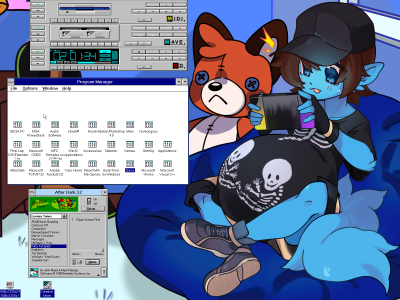
- Reese Win3.x
Re: IT... Computing....
Posted: Fri Oct 10, 2025 1:23 am
by EdgyRabbid
Wait, photoshop existed all the way back then? :0
Re: IT... Computing....
Posted: Fri Oct 10, 2025 1:39 am
by Master
I'm pretty sure Photoshop predates the Rayman series, and consequently, a lot of even the older members of this forum.
Re: IT... Computing....
Posted: Fri Oct 10, 2025 1:41 am
by Steo
Yet another Google, but apparently it was released in February 1990. That's older than I am.