Page 20 of 30
Re: IT... Computing....
Posted: Fri Oct 10, 2025 1:43 am
by EdgyRabbid
Damn! My mom was 5 years old when it came out!
I’m gonna check out the older versions of photoshop at a later date then! It’s gonna be interesting to see if I could make webgraphics on such a primitive version of the program..
Re: IT... Computing....
Posted: Fri Oct 10, 2025 2:00 am
by Reese Riverson
Well, I have
Photoshop 4.0 specifically, which was released in 1996.
Windows 3.11 itself released in 1993.
And to add with Master's point, where
Rayman 1 released in 1995. Then the
After Dark screen saver software I had as a kid, version 3.0 was released in 1994, while this version 3.2 was released in 1995.
The Looney Tunes pack was released in 1995 for After Dark as well.
Notable things that came packed with our first computer, was Viso Home, Read With Me 1 & 2, and Memphis Math. DOS side of things, Epic Pinball Shareware and Descent Shareware.
Things I've had back then? King's Quest VII, Myst, and a couple of other things I cannot recall.
Re: IT... Computing....
Posted: Fri Oct 10, 2025 4:02 pm
by EdgyRabbid
Alright, first of all I'm still trouble shooting with my 3.1. It'll download but when I try to go back to Msdos it doesnt let me. Do I put the MS DOS disk back In, in Virtual box? (I tried googling this, there were no answers, so I'm kinda confused).
second of all, I found this
cool website with a lot of epic programs when looking at the melonking website! Thought y'all would enjoy it!
Re: IT... Computing....
Posted: Fri Oct 10, 2025 4:38 pm
by Reese Riverson
By "When you try to go back to MS-DOS, and it doesn't let you", how are you trying to get back to MS-DOS? This is one of those things you will need to be more descriptive of, in order for someone to help troubleshoot the issue. Please list out all the steps you take.
Re: IT... Computing....
Posted: Fri Oct 10, 2025 4:43 pm
by EdgyRabbid
Alright!
First, I installed 3.1. it all went by easily for me, but my installation disk I downloaded came with 6 disks when I only needed 5 so IDK that's about.
Then, after the installation, it sent me back to what I assume to be some sort of command prompt for the whole PC? It says "loading up msdos" but then never loads It up. I can retry and send a screenshot, but I do take the 5th 3.1 disk out of the virtual box.
Then I wondered if I had to put the MS DOS disk back in, but when I did and typed "win" into the command prompt, it just gives me "incorrert prompt" or something amoung those lines. So I probably did do something wrong.
L'll also link [url=
https://i12bretro.github.io/tutorials/0068.html] the guide I was following, maybe its outdated or something.
Re: IT... Computing....
Posted: Fri Oct 10, 2025 4:48 pm
by Fifo
Remove the MS-DOS install disk and boot from the hard drive that you installed MS-DOS onto. See step 31 in the guide.
Re: IT... Computing....
Posted: Fri Oct 10, 2025 4:50 pm
by EdgyRabbid
MS DOS is installed properly. Its just that it doesn't wanna boot until I put the disk in when I open the Virtual Machine without me putting the disk in.
Re: IT... Computing....
Posted: Fri Oct 10, 2025 4:52 pm
by Fifo
What’s it saying when you boot without the floppy inserted?
Re: IT... Computing....
Posted: Fri Oct 10, 2025 4:58 pm
by EdgyRabbid
“Starting MS-DOS, HIMEM is testing extended memory, done.”
Then it says “C:\>C:\DOS\SMARTDRV.EXE /X”
I assume this means it’s not installed properly? Because like I mentioned before, when I type “win” it tells me bad command or file name.
Re: IT... Computing....
Posted: Fri Oct 10, 2025 4:59 pm
by Reese Riverson
Sounds like windows wasn't set as a path.
Can you:
cd windows
win
Re: IT... Computing....
Posted: Fri Oct 10, 2025 5:01 pm
by EdgyRabbid
Nope. It still gives me “bad command or file name” when I type in the prompt. I do remember when I installed 3.1 it gave me a weird warning, I’m not sure what it is but if I try the re-installation process, should I send the warning?
Re: IT... Computing....
Posted: Fri Oct 10, 2025 5:05 pm
by Reese Riverson
That would probably be for the best, yeah. That way someone can actually see what the warning even says.
Re: IT... Computing....
Posted: Fri Oct 10, 2025 5:10 pm
by EdgyRabbid
Weird, when I put the floppy in for 3.1 it gave me this warning, saying there is already a path. So idk why it’s not opening…
Re: IT... Computing....
Posted: Fri Oct 10, 2025 5:31 pm
by Steo
It's making it out that it's already installed though. I just type "win" at that point (when it's showing "C:\"), and Windows starts.
Re: IT... Computing....
Posted: Fri Oct 10, 2025 5:36 pm
by EdgyRabbid
Yeah but my problem is that when I type win it says “bad command” for some reason.

so I’m kinda confused at this point.
Re: IT... Computing....
Posted: Fri Oct 10, 2025 6:06 pm
by Reese Riverson
Reese Riverson wrote: Fri Oct 10, 2025 4:59 pm
Sounds like windows wasn't set as a path.
Can you:
cd windows
win
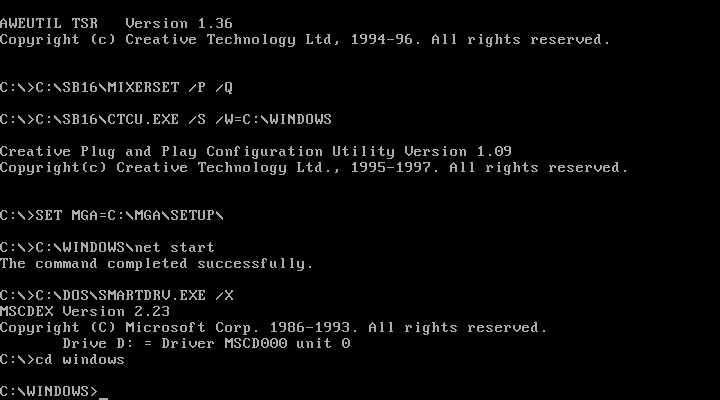
- Monitor_1_20251010-120614-349.png (8.4 KiB) Viewed 128 times
-Edit-
I updated my reese.com for my DOS systems just a little bit
(Best viewed as a full sized image):

- REESE.COM Menu Screen for MS-DOS
Re: IT... Computing....
Posted: Sun Oct 12, 2025 2:07 pm
by PluMGMK
Oh my God, that is so cool!

What did you use to make it? Is it written in C?
Re: IT... Computing....
Posted: Sun Oct 12, 2025 5:56 pm
by Reese Riverson
PluMGMK wrote: Sun Oct 12, 2025 2:07 pm
Oh my God, that is so cool!
What did you use to make it? Is it written in C?
Ha, you give mee too much credit.

I used an application for MS-DOS called The Draw version 4.63, which lets you do some really cool things. Which that's all it is, is a screen thingy. Once that part's done, I have done this with my
reese.bat file:
Code: Select all
@echo off
:start
cls
C:\REESE\REESE.COM
choice /n /c:123456789abcdefghijklmnopqrstuvwxy?z

if errorlevel==36 goto end
if errorlevel==35 goto start
if errorlevel==34 goto start
if errorlevel==33 goto start
if errorlevel==32 goto windows
if errorlevel==31 goto start
if errorlevel==30 goto start
if errorlevel==29 goto start
if errorlevel==28 goto start
if errorlevel==27 goto start
if errorlevel==26 goto games
if errorlevel==25 goto start
if errorlevel==24 goto start
if errorlevel==23 goto start
if errorlevel==22 goto sbmix
if errorlevel==21 goto start
if errorlevel==20 goto start
if errorlevel==19 goto start
if errorlevel==18 goto start
if errorlevel==17 goto start
if errorlevel==16 goto games
if errorlevel==15 goto start
if errorlevel==14 goto start
if errorlevel==13 goto end
if errorlevel==12 goto start
if errorlevel==11 goto start
if errorlevel==10 goto start
if errorlevel==9 goto start
if errorlevel==8 goto start
if errorlevel==7 goto start
if errorlevel==6 goto start
if errorlevel==5 goto start
if errorlevel==4 goto start
if errorlevel==3 goto start
if errorlevel==2 goto start
if errorlevel==1 goto start

:sbmix
cd C:\SB16
MIXERSET.EXE
goto start

:games
cd C:\LBXDOS20
LAUNCHR.BAT

:windows
win
goto start

:end
cd C:\
cls
My next plan is to attempt to go a step further with more
advanced start-up features, thanks to Philscomputerlab!
Re: IT... Computing....
Posted: Sun Oct 12, 2025 5:59 pm
by Master
I'm not a software developer by any stretch, but damn that's a lot of IFs. Guess .bat files don't do case statements?
Re: IT... Computing....
Posted: Sun Oct 12, 2025 6:06 pm
by Steo
I always try to use switch statements where possible, but I'm not really familiar with writing batch. I'm more used to C#, but I've had to work a little with C++ as well. Python was one of the first languages I started out trying to mess with, but I feel I've been working more with C# than anything else for the past few years.
EDIT: To me, when you're writing something with several possible outcomes, I prefer the switch statement by far where applicable, to if else if else if else if. It just seems much tidier when it comes to reading the code, though in a way it will still do the same thing. A lot of if statements with no else though, that's like finding your keys, and then continuing to look for them.

EDIT 2: Not in Reese's case though, since the goto keyword is used. It will always branch away when the condition is true. Just generally in other languages and when not using the goto keyword. It would just keep executing the rest of the checks after it already found the condition that was true.