Neat, I've been looking for an excuse to play Rayman 3 again, I'll try it out tonight if I get the chance.RibShark wrote:I have updated the patch. It now contains an installer, and a completely rebuilt configuration program, that will allow you to change more settings than the one built into the game did! Additionally, I have decided to rename the project to "Better Rayman 3"! I've kept the old patch available in case the new one doesn't work for anyone.
Better Rayman 3
Moderator: Modding and utilities team
Forum rules
Please keep the forum rules and guidelines in mind when creating or replying to a topic.
Please keep the forum rules and guidelines in mind when creating or replying to a topic.
-
Master

- Posts: 53542
- Joined: Sun Aug 21, 2011 10:14 am
- Location: Somewhere specific, I'd assume.
- Tings: 468310
Re: Better Rayman 3 (previously: Rayman 3 Widescreen Patch)
-
Adsolution

- Posts: 22233
- Joined: Sat Aug 22, 2009 4:55 pm
- Contact:
- Tings: 110541
Re: Better Rayman 3 (previously: Rayman 3 Widescreen Patch)
You dirty lying corporate-swindler faggot

Re: Better Rayman 3 (previously: Rayman 3 Widescreen Patch)
You caught meAdsolution wrote:You dirty lying corporate-swindler faggot

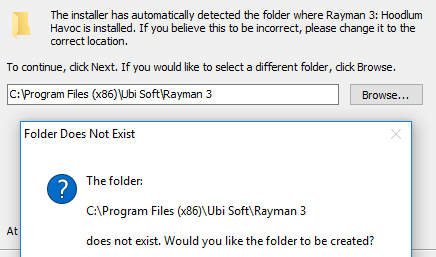
Basically, the installer checks a registry key which should contain the path for Rayman 3. If it's not there for some reason, then it will default to that folder in Program Files, which is the default location when Rayman 3 is installed via a disc.
Re: Better Rayman 3 (previously: Rayman 3 Widescreen Patch)
Yeah, it was. I'll attach it to this post so you can redownload it and see if running that command fixes it.Carrot-master wrote:I just get this: "Error: couldn't open SDB 'C:\GOG Games\Rayman 3\Rayman3.sdb'."
If Rayman3.sdb was some file which came with your installer it's removed now as I tried reinstalling the game to see if that helped.

Re: Better Rayman 3 (previously: Rayman 3 Widescreen Patch)
Ok, I tried it and got this: "File C:\WINDOWS\AppPatch\Custom\{91063491-4d76-4107-b7f4-f481ae365a78}.sdb is not installed. Uninstalling halted."RibShark wrote:Yeah, it was. I'll attach it to this post so you can redownload it and see if running that command fixes it.Carrot-master wrote:I just get this: "Error: couldn't open SDB 'C:\GOG Games\Rayman 3\Rayman3.sdb'."
If Rayman3.sdb was some file which came with your installer it's removed now as I tried reinstalling the game to see if that helped.
What exactly is this even supposed to be doing though?
Re: Better Rayman 3 (previously: Rayman 3 Widescreen Patch)
Wait, it wasn't even installed? That's strange, oh well. What that file is meant to do is to redirect the C:\Windows\UbiSoft\Ubi.ini file to AppData.Carrot-master wrote:Ok, I tried it and got this: "File C:\WINDOWS\AppPatch\Custom\{91063491-4d76-4107-b7f4-f481ae365a78}.sdb is not installed. Uninstalling halted."RibShark wrote:Yeah, it was. I'll attach it to this post so you can redownload it and see if running that command fixes it.Carrot-master wrote:I just get this: "Error: couldn't open SDB 'C:\GOG Games\Rayman 3\Rayman3.sdb'."
If Rayman3.sdb was some file which came with your installer it's removed now as I tried reinstalling the game to see if that helped.
What exactly is this even supposed to be doing though?
Re: Better Rayman 3 (previously: Rayman 3 Widescreen Patch)
What isn't installed...?
Oh, but I believe there is a ubi.ini file in AppData which the game uses when I run it as admin (or if it's the other way around). I don't see how that'd change the fps of the game though as the config isn't anything the game constantly checks as far as I'm aware.
Oh, but I believe there is a ubi.ini file in AppData which the game uses when I run it as admin (or if it's the other way around). I don't see how that'd change the fps of the game though as the config isn't anything the game constantly checks as far as I'm aware.
-
PluMGMK

- Posts: 40517
- Joined: Fri Jul 31, 2009 9:00 pm
- Location: https://www.youtube.com/watch?v=cErgMJSgpv0
- Contact:
- Tings: 136651
Re: Better Rayman 3 (previously: Rayman 3 Widescreen Patch)
Against my better judgement I decided to try this in my Vista Virtual Machine, with a fresh R3 install, and the Configurator gave me this:
I'm not sure if this is something queer about my Vista installation itself, or something that should be listed as a "system requirement".
Re: Better Rayman 3 (previously: Rayman 3 Widescreen Patch)
Install this: https://www.microsoft.com/en-gb/downloa ... x?id=48145PluMGMK wrote:Against my better judgement I decided to try this in my Vista Virtual Machine, with a fresh R3 install, and the Configurator gave me this: I'm not sure if this is something queer about my Vista installation itself, or something that should be listed as a "system requirement".
I'll add the required DLL to the installer at a later date.

Re: Better Rayman 3 (previously: Rayman 3 Widescreen Patch)
Rayman Arena (Not M) Wide-Screen .exe Fix (No-CD) (16:9)
https://www.dropbox.com/s/r8zdzp77q99yt ... x.zip?dl=0
Now if only the Videos could be fixed then that would be great.
EDIT: Well, never mind this patch. These guys made a better one.
viewtopic.php?t=25010
https://www.dropbox.com/s/r8zdzp77q99yt ... x.zip?dl=0
Now if only the Videos could be fixed then that would be great.
EDIT: Well, never mind this patch. These guys made a better one.
viewtopic.php?t=25010
Last edited by ICUP321 on Sat Oct 01, 2016 2:57 am, edited 2 times in total.
-
PluMGMK
- Posts: 40517
- Joined: Fri Jul 31, 2009 9:00 pm
- Location: https://www.youtube.com/watch?v=cErgMJSgpv0
- Contact:
- Tings: 136651
Re: Better Rayman 3 (previously: Rayman 3 Widescreen Patch)
Hmm, I actually had that runtime installed, but it was apparently screwed up. Probably something to do with the fact that the installation is "non-genuine", and I never managed to get it to SP2. Anyway, I uninstalled the patch.
I was gonna try it under Wine (which is what I normally use to play the game), but I'm guessing that wouldn't work out very well either!
I was gonna try it under Wine (which is what I normally use to play the game), but I'm guessing that wouldn't work out very well either!
Re: Better Rayman 3 (previously: Rayman 3 Widescreen Patch)
I have found a way to fix cutscenes without replacing every video! Additionally, I have been able to enable skipping every video cutscene by pressing Esc or Space. These plus some general fixes to Better Rayman 3 should be arriving in the next update.
Re: Better Rayman 3 (previously: Rayman 3 Widescreen Patch)
Wait, so you mean we can now skip all in-game cutscenes as well?RibShark wrote:I have found a way to fix cutscenes without replacing every video! Additionally, I have been able to enable skipping every video cutscene by pressing Esc or Space. These plus some general fixes to Better Rayman 3 should be arriving in the next update.
-
Master
- Posts: 53542
- Joined: Sun Aug 21, 2011 10:14 am
- Location: Somewhere specific, I'd assume.
- Tings: 468310
Re: Better Rayman 3 (previously: Rayman 3 Widescreen Patch)
I'd imagine video cutscene would refer to the cinematics, but I'd be happy to be proven wrong, I'd love for the opportunity to skip the accursed Murfy cutscene.
Re: Better Rayman 3 (previously: Rayman 3 Widescreen Patch)
I thought you already could skip the FMV cutscenes by pressing esc or space. Maybe it only applied to some?
Re: Better Rayman 3 (previously: Rayman 3 Widescreen Patch)
Yeah, I meant the cinematics. Previously, the UbiSoft logo, plus any of the in game cutscenes that followed levels could not be skipped.Master wrote:I'd imagine video cutscene would refer to the cinematics, but I'd be happy to be proven wrong, I'd love for the opportunity to skip the accursed Murfy cutscene.

Re: Better Rayman 3 (previously: Rayman 3 Widescreen Patch)
FMV videos can be skipped by typing esc letters end pressing enter. UBI logo can be permanently disabled by replacing video file by blank one from here
http://pcgamingwiki.com/wiki/Rayman_3:_Hoodlum_Havoc
http://pcgamingwiki.com/wiki/Rayman_3:_Hoodlum_Havoc
Re: Better Rayman 3 (previously: Rayman 3 Widescreen Patch)
Yeah I know, I found that "E" "S" "C" workarounddeton24 wrote:FMV videos can be skipped by typing esc letters end pressing enter. UBI logo can be permanently disabled by replacing video file by blank one from here
http://pcgamingwiki.com/wiki/Rayman_3:_Hoodlum_Havoc
 . But now none of this will be needed when I update the patch.
Re: Better Rayman 3 (previously: Rayman 3 Widescreen Patch)
Has anybody said already that you are a genius?
So I'll say.
U R a genius
Thank you!
So I'll say.
U R a genius
Thank you!
Re: Better Rayman 3 (previously: Rayman 3 Widescreen Patch)
I've updated the patch to include the new improvements to video cutscene handling! Now the original video files should work in widescreen resolutions, so downloading a 2GB folder of replacement videos is no longer necessary. All video cutscenes can also be skipped now.