Page 20 of 34
Re: Better Rayman 3 (previously: Rayman 3 Widescreen Patch)
Posted: Thu Sep 29, 2016 2:03 pm
by Master
RibShark wrote:I have updated the patch. It now contains an installer, and a completely rebuilt configuration program, that will allow you to change more settings than the one built into the game did! Additionally, I have decided to rename the project to "Better Rayman 3"! I've kept the old patch available in case the new one doesn't work for anyone.
Neat, I've been looking for an excuse to play Rayman 3 again, I'll try it out tonight if I get the chance.
Re: Better Rayman 3 (previously: Rayman 3 Widescreen Patch)
Posted: Thu Sep 29, 2016 2:05 pm
by Adsolution
You dirty lying corporate-swindler faggot
Re: Better Rayman 3 (previously: Rayman 3 Widescreen Patch)
Posted: Thu Sep 29, 2016 3:49 pm
by RibShark
Adsolution wrote:You dirty lying corporate-swindler faggot
You caught me

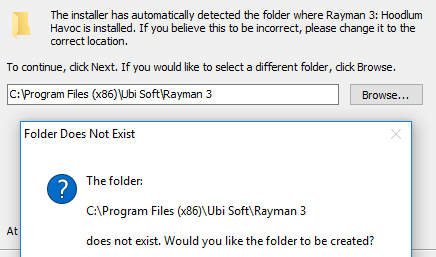
Basically, the installer checks a registry key which should contain the path for Rayman 3. If it's not there for some reason, then it will default to that folder in Program Files, which is the default location when Rayman 3 is installed via a disc.
Re: Better Rayman 3 (previously: Rayman 3 Widescreen Patch)
Posted: Thu Sep 29, 2016 4:32 pm
by RibShark
Carrot-master wrote:I just get this: "Error: couldn't open SDB 'C:\GOG Games\Rayman 3\Rayman3.sdb'."
If Rayman3.sdb was some file which came with your installer it's removed now as I tried reinstalling the game to see if that helped.
Yeah, it was. I'll attach it to this post so you can redownload it and see if running that command fixes it.
Re: Better Rayman 3 (previously: Rayman 3 Widescreen Patch)
Posted: Thu Sep 29, 2016 5:45 pm
by RayCarrot
RibShark wrote:Carrot-master wrote:I just get this: "Error: couldn't open SDB 'C:\GOG Games\Rayman 3\Rayman3.sdb'."
If Rayman3.sdb was some file which came with your installer it's removed now as I tried reinstalling the game to see if that helped.
Yeah, it was. I'll attach it to this post so you can redownload it and see if running that command fixes it.
Rayman3.sdb.zip
Ok, I tried it and got this: "File C:\WINDOWS\AppPatch\Custom\{91063491-4d76-4107-b7f4-f481ae365a78}.sdb is not installed. Uninstalling halted."
What exactly is this even supposed to be doing though?
Re: Better Rayman 3 (previously: Rayman 3 Widescreen Patch)
Posted: Thu Sep 29, 2016 5:55 pm
by RibShark
Carrot-master wrote:RibShark wrote:Carrot-master wrote:I just get this: "Error: couldn't open SDB 'C:\GOG Games\Rayman 3\Rayman3.sdb'."
If Rayman3.sdb was some file which came with your installer it's removed now as I tried reinstalling the game to see if that helped.
Yeah, it was. I'll attach it to this post so you can redownload it and see if running that command fixes it.
Rayman3.sdb.zip
Ok, I tried it and got this: "File C:\WINDOWS\AppPatch\Custom\{91063491-4d76-4107-b7f4-f481ae365a78}.sdb is not installed. Uninstalling halted."
What exactly is this even supposed to be doing though?
Wait, it wasn't even installed? That's strange, oh well. What that file is meant to do is to redirect the C:\Windows\UbiSoft\Ubi.ini file to AppData.
Re: Better Rayman 3 (previously: Rayman 3 Widescreen Patch)
Posted: Thu Sep 29, 2016 5:59 pm
by RayCarrot
What isn't installed...?
Oh, but I believe there is a ubi.ini file in AppData which the game uses when I run it as admin (or if it's the other way around). I don't see how that'd change the fps of the game though as the config isn't anything the game constantly checks as far as I'm aware.
Re: Better Rayman 3 (previously: Rayman 3 Widescreen Patch)
Posted: Thu Sep 29, 2016 7:00 pm
by PluMGMK
Against my better judgement I decided to try this in my Vista Virtual Machine, with a fresh R3 install, and the Configurator gave me this:
I'm not sure if this is something queer about my Vista installation itself, or something that should be listed as a "system requirement".
Re: Better Rayman 3 (previously: Rayman 3 Widescreen Patch)
Posted: Thu Sep 29, 2016 7:27 pm
by RibShark
PluMGMK wrote:Against my better judgement I decided to try this in my Vista Virtual Machine, with a fresh R3 install, and the Configurator gave me this:
ConfiguratorProb.jpg
I'm not sure if this is something queer about my Vista installation itself, or something that should be listed as a "system requirement".
Install this:
https://www.microsoft.com/en-gb/downloa ... x?id=48145
I'll add the required DLL to the installer at a later date.
Re: Better Rayman 3 (previously: Rayman 3 Widescreen Patch)
Posted: Thu Sep 29, 2016 8:55 pm
by ICUP321
Rayman Arena (Not M) Wide-Screen .exe Fix (No-CD) (16:9)
https://www.dropbox.com/s/r8zdzp77q99yt ... x.zip?dl=0
Now if only the Videos could be fixed then that would be great.
EDIT: Well, never mind this patch. These guys made a better one.
viewtopic.php?t=25010
Re: Better Rayman 3 (previously: Rayman 3 Widescreen Patch)
Posted: Thu Sep 29, 2016 8:58 pm
by PluMGMK
Hmm, I actually had that runtime installed, but it was apparently screwed up. Probably something to do with the fact that the installation is "non-genuine", and I never managed to get it to SP2. Anyway, I uninstalled the patch.
I was gonna try it under Wine (which is what I normally use to play the game), but I'm guessing that wouldn't work out very well either!
Re: Better Rayman 3 (previously: Rayman 3 Widescreen Patch)
Posted: Sat Oct 08, 2016 6:47 pm
by RibShark
I have found a way to fix cutscenes without replacing every video! Additionally, I have been able to enable skipping every video cutscene by pressing Esc or Space. These plus some general fixes to Better Rayman 3 should be arriving in the next update.
Re: Better Rayman 3 (previously: Rayman 3 Widescreen Patch)
Posted: Sat Oct 08, 2016 10:18 pm
by RayCarrot
RibShark wrote:I have found a way to fix cutscenes without replacing every video! Additionally, I have been able to enable skipping every video cutscene by pressing Esc or Space. These plus some general fixes to Better Rayman 3 should be arriving in the next update.
Wait, so you mean we can now skip all in-game cutscenes as well?
Re: Better Rayman 3 (previously: Rayman 3 Widescreen Patch)
Posted: Sat Oct 08, 2016 10:41 pm
by Master
I'd imagine video cutscene would refer to the cinematics, but I'd be happy to be proven wrong, I'd love for the opportunity to skip the accursed Murfy cutscene.
Re: Better Rayman 3 (previously: Rayman 3 Widescreen Patch)
Posted: Sun Oct 09, 2016 8:25 am
by RayCarrot
I thought you already could skip the FMV cutscenes by pressing esc or space. Maybe it only applied to some?
Re: Better Rayman 3 (previously: Rayman 3 Widescreen Patch)
Posted: Sun Oct 09, 2016 9:33 am
by RibShark
Master wrote:I'd imagine video cutscene would refer to the cinematics, but I'd be happy to be proven wrong, I'd love for the opportunity to skip the accursed Murfy cutscene.
Yeah, I meant the cinematics. Previously, the UbiSoft logo, plus any of the in game cutscenes that followed levels could not be skipped.
Re: Better Rayman 3 (previously: Rayman 3 Widescreen Patch)
Posted: Sun Oct 09, 2016 12:13 pm
by deton24
FMV videos can be skipped by typing esc letters end pressing enter. UBI logo can be permanently disabled by replacing video file by blank one from here
http://pcgamingwiki.com/wiki/Rayman_3:_Hoodlum_Havoc
Re: Better Rayman 3 (previously: Rayman 3 Widescreen Patch)
Posted: Sun Oct 09, 2016 12:15 pm
by RibShark
Yeah I know, I found that "E" "S" "C" workaround

. But now none of this will be needed when I update the patch.
Re: Better Rayman 3 (previously: Rayman 3 Widescreen Patch)
Posted: Sun Oct 09, 2016 12:21 pm
by deton24
Has anybody said already that you are a genius?
So I'll say.
U R a genius

Thank you!
Re: Better Rayman 3 (previously: Rayman 3 Widescreen Patch)
Posted: Sun Oct 09, 2016 2:05 pm
by RibShark
I've updated the patch to include the new improvements to video cutscene handling! Now the original video files should work in widescreen resolutions, so downloading a 2GB folder of replacement videos is no longer necessary. All video cutscenes can also be skipped now.