Better Rayman 3
Moderator: Modding and utilities team
Forum rules
Please keep the forum rules and guidelines in mind when creating or replying to a topic.
Please keep the forum rules and guidelines in mind when creating or replying to a topic.

Re: Rayman 3: Widescreen Patch
Disabling vsync is recommended in that menu too for fixing framerate.

Re: Rayman 3: Widescreen Patch
I had already tried that...but it didn't find Rayman 3.
Maybe because I had already patched it...or I should restart computer again.
Gotta go sleep. See ya tomorrow.
Maybe because I had already patched it...or I should restart computer again.
Gotta go sleep. See ya tomorrow.

Re: Rayman 3: Widescreen Patch
I have uploaded the fixed cutscene files and put a link to them in the first post.
-
Snagglebee

- Posts: 11795
- Joined: Tue Jan 08, 2013 6:22 pm
- Location: Yes
- Tings: 2770
Re: Rayman 3: Widescreen Patch
Awsome! 
Gonna check them out now. Rib if you are ok with that, I would like to create an one click patcher if that's ok for you?
EDIT: They're working just fine for 16:9 and 16:10 resolution. Awsome work RibShark!
Gonna check them out now. Rib if you are ok with that, I would like to create an one click patcher if that's ok for you?
EDIT: They're working just fine for 16:9 and 16:10 resolution. Awsome work RibShark!
-
Master

- Posts: 53544
- Joined: Sun Aug 21, 2011 10:14 am
- Location: Somewhere specific, I'd assume.
- Tings: 468320
Re: Rayman 3: Widescreen Patch
Thanks very much for your hard work, Ribshark. I think it's only fair you get some tings for your efforts.
Re: Rayman 3: Widescreen Patch
I'm actually working on a fully fledged replacement to the stock config tool which would patch the exe and cutscene files for you. You're welcome to create a patcher in the mean time though.emshomar wrote:I would like to create an one click patcher if that's ok for you?
-
Snagglebee
- Posts: 11795
- Joined: Tue Jan 08, 2013 6:22 pm
- Location: Yes
- Tings: 2770
Re: Rayman 3: Widescreen Patch
Ah in that sense, I'll wait up for that and how about releasing a kind update?
Re: Rayman 3: Widescreen Patch
I don't understand what you mean, sorry.emshomar wrote:how about releasing a kind update?
-
Snagglebee
- Posts: 11795
- Joined: Tue Jan 08, 2013 6:22 pm
- Location: Yes
- Tings: 2770
Re: Rayman 3: Widescreen Patch
Sorry I have it bad worded. I was thinking of an one click updater that installs the new configurator you're working and the patched files and etc..
Re: Rayman 3: Widescreen Patch
Sure when I've done with everything I'll release an installer for it.emshomar wrote:Sorry I have it bad worded. I was thinking of an one click updater that installs the new configurator you're working and the patched files and etc..

Re: Rayman 3: Widescreen Patch
Hmm...I am downloading R3 right now, the GOG version. I am not sure if I am going to find Ubi.ini, but whatever. I'll download it if needed.
By the way, how can I know if my screen is 16:9 or 16:10? It's 1360x768. I googled it, but I couldn't understand :p
By the way, how can I know if my screen is 16:9 or 16:10? It's 1360x768. I googled it, but I couldn't understand :p
-
Snagglebee
- Posts: 11795
- Joined: Tue Jan 08, 2013 6:22 pm
- Location: Yes
- Tings: 2770
Re: Rayman 3: Widescreen Patch
1360x768 is neither 16:9 nor 16:10. If your monitor supports, 1280x720 (that's 16:9) enter that in Ubi.ini. If you monitor does support 1280x800 (that's 16:10) use that resolution instead 
Re: Rayman 3: Widescreen Patch
Thanks Omar, I am going to use 16:10. And damn, the cutsene fix is too god damn big.
Re: Rayman 3: Widescreen Patch
Once I have released the full patcher non 16:9 or 16:10 resolutions will also be supported.
Re: Rayman 3: Widescreen Patch
Hmm, is it normal for the UI to get broken? The Health Bar and the Score Marker are fine in-game.
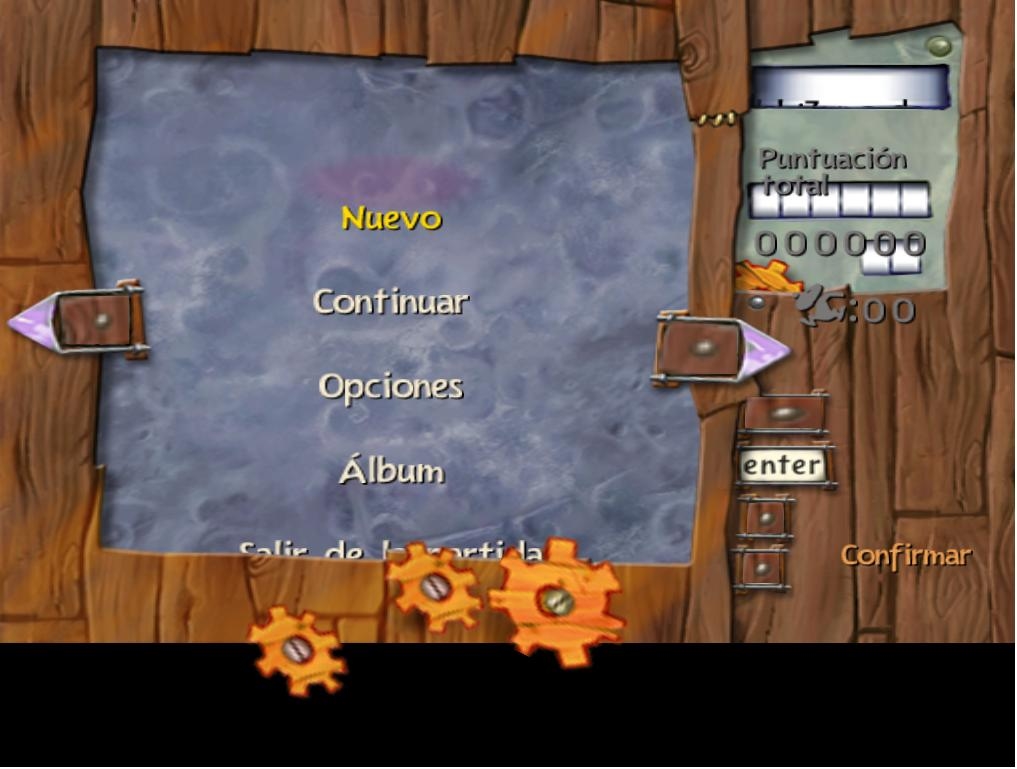
Re: Rayman 3: Widescreen Patch
This means you didn't change resolution in ubi.ini file. Same thing happened to me before I changed it.
Re: Rayman 3: Widescreen Patch
No, I did, I placed the R3.exe and I changed the ubi.ini.
Here's mine:
Here's mine:
Code: Select all
[SYSTEM]
3DFX=0
Memory=4061
MMX=1
Windows colors=34
CPU=12

[OSD]
Valid=TRUE
[Rayman3]
Gli_Mode=1 - 1360 x 768 x 32
Adapter=0
TnL=1
TriLinear=1
Identifier=D7B78E66-6902-11CF-9E7A-6838A7C2C535
DynamicShadows=0
StaticShadows=0
Video_BPP=32
Video_WantedQuality=2
Video_AutoAdjustQuality=1
Camera_VerticalAxis=4
Camera_HorizontalAxis=3
VignettesFile=Vignette.cnt
TexturesQuality=32
TexturesCompressed=0
Language=Español
[Rayman Arena]
Video_WantedQuality=0
Video_RealQuality=0
Video_BPP=32
Video_AutoAdjustQuality=1Re: Rayman 3: Widescreen Patch
1360x768 is neither 16:9 nor 16:10 so thats why the patch is not working for you. You need to put resolution in ubi.ini file that is 16:9 or 16:10
Re: Rayman 3: Widescreen Patch
So, I change 1360x768 for a 16:10 or 16:9 one?
Re: Rayman 3: Widescreen Patch
Yes. Depending what works best for your monitor.Sugar wrote:So, I change 1360x768 for a 16:10 or 16:9 one?