Page 3 of 34
Re: Rayman 3: Widescreen Patch
Posted: Sun Nov 02, 2014 1:11 am
by OCG
Disabling vsync is recommended in that menu too for fixing framerate.
Re: Rayman 3: Widescreen Patch
Posted: Sun Nov 02, 2014 1:17 am
by saerleiya
I had already tried that...but it didn't find Rayman 3.
Maybe because I had already patched it...or I should restart computer again.
Gotta go sleep. See ya tomorrow.
Re: Rayman 3: Widescreen Patch
Posted: Sun Nov 02, 2014 7:57 pm
by RibShark
I have uploaded the fixed cutscene files and put a link to them in the first post.
Re: Rayman 3: Widescreen Patch
Posted: Sun Nov 02, 2014 7:58 pm
by Snagglebee
Awsome!

Gonna check them out now. Rib if you are ok with that, I would like to create an one click patcher if that's ok for you?
EDIT: They're working just fine for 16:9 and 16:10 resolution. Awsome work RibShark!
Re: Rayman 3: Widescreen Patch
Posted: Sun Nov 02, 2014 8:13 pm
by Master
Thanks very much for your hard work, Ribshark. I think it's only fair you get some tings for your efforts.
Re: Rayman 3: Widescreen Patch
Posted: Sun Nov 02, 2014 8:18 pm
by RibShark
emshomar wrote:I would like to create an one click patcher if that's ok for you?
I'm actually working on a fully fledged replacement to the stock config tool which would patch the exe and cutscene files for you. You're welcome to create a patcher in the mean time though.
Re: Rayman 3: Widescreen Patch
Posted: Sun Nov 02, 2014 8:21 pm
by Snagglebee
Ah in that sense, I'll wait up for that and how about releasing a kind update?
Re: Rayman 3: Widescreen Patch
Posted: Sun Nov 02, 2014 8:25 pm
by RibShark
emshomar wrote:how about releasing a kind update?
I don't understand what you mean, sorry.
Re: Rayman 3: Widescreen Patch
Posted: Sun Nov 02, 2014 8:33 pm
by Snagglebee
Sorry I have it bad worded. I was thinking of an one click updater that installs the new configurator you're working and the patched files and etc..
Re: Rayman 3: Widescreen Patch
Posted: Sun Nov 02, 2014 8:40 pm
by RibShark
emshomar wrote:Sorry I have it bad worded. I was thinking of an one click updater that installs the new configurator you're working and the patched files and etc..
Sure when I've done with everything I'll release an installer for it.
Re: Rayman 3: Widescreen Patch
Posted: Mon Nov 03, 2014 4:48 pm
by Hoozang
Hmm...I am downloading R3 right now, the GOG version. I am not sure if I am going to find Ubi.ini, but whatever. I'll download it if needed.
By the way, how can I know if my screen is 16:9 or 16:10? It's 1360x768. I googled it, but I couldn't understand :p
Re: Rayman 3: Widescreen Patch
Posted: Mon Nov 03, 2014 5:03 pm
by Snagglebee
1360x768 is neither 16:9 nor 16:10. If your monitor supports, 1280x720 (that's 16:9) enter that in Ubi.ini. If you monitor does support 1280x800 (that's 16:10) use that resolution instead

Re: Rayman 3: Widescreen Patch
Posted: Mon Nov 03, 2014 5:09 pm
by Hoozang
Thanks Omar, I am going to use 16:10. And damn, the cutsene fix is too god damn big.
Re: Rayman 3: Widescreen Patch
Posted: Mon Nov 03, 2014 5:39 pm
by RibShark
Once I have released the full patcher non 16:9 or 16:10 resolutions will also be supported.
Re: Rayman 3: Widescreen Patch
Posted: Mon Nov 03, 2014 5:55 pm
by Hoozang
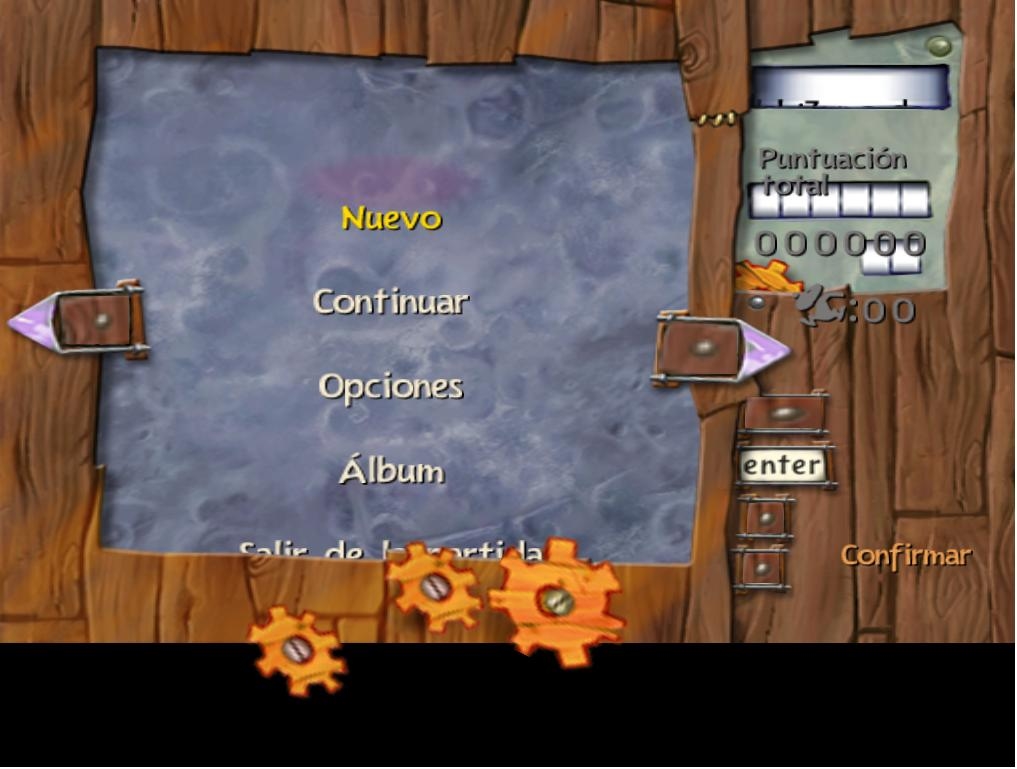
Hmm, is it normal for the UI to get broken? The Health Bar and the Score Marker are fine in-game.
Re: Rayman 3: Widescreen Patch
Posted: Mon Nov 03, 2014 6:01 pm
by OCG
This means you didn't change resolution in ubi.ini file. Same thing happened to me before I changed it.
Re: Rayman 3: Widescreen Patch
Posted: Mon Nov 03, 2014 6:07 pm
by Hoozang
No, I did, I placed the R3.exe and I changed the ubi.ini.
Here's mine:
Code: Select all
[SYSTEM]
3DFX=0
Memory=4061
MMX=1
Windows colors=34
CPU=12

[OSD]
Valid=TRUE
[Rayman3]
Gli_Mode=1 - 1360 x 768 x 32
Adapter=0
TnL=1
TriLinear=1
Identifier=D7B78E66-6902-11CF-9E7A-6838A7C2C535
DynamicShadows=0
StaticShadows=0
Video_BPP=32
Video_WantedQuality=2
Video_AutoAdjustQuality=1
Camera_VerticalAxis=4
Camera_HorizontalAxis=3
VignettesFile=Vignette.cnt
TexturesQuality=32
TexturesCompressed=0
Language=Español
[Rayman Arena]
Video_WantedQuality=0
Video_RealQuality=0
Video_BPP=32
Video_AutoAdjustQuality=1
Re: Rayman 3: Widescreen Patch
Posted: Mon Nov 03, 2014 6:12 pm
by OCG
1360x768 is neither 16:9 nor 16:10 so thats why the patch is not working for you. You need to put resolution in ubi.ini file that is 16:9 or 16:10
Re: Rayman 3: Widescreen Patch
Posted: Mon Nov 03, 2014 6:17 pm
by Hoozang
So, I change 1360x768 for a 16:10 or 16:9 one?
Re: Rayman 3: Widescreen Patch
Posted: Mon Nov 03, 2014 6:25 pm
by OCG
Sugar wrote:So, I change 1360x768 for a 16:10 or 16:9 one?
Yes. Depending what works best for your monitor.