Page 22 of 30
Re: IT... Computing....
Posted: Wed Oct 15, 2025 10:18 pm
by dr_st
Why would anyone edit SmartDrv.exe? What exactly did you do?
Re: IT... Computing....
Posted: Wed Oct 15, 2025 10:22 pm
by EdgyRabbid
All I did was add "WIN" to the end of it, that's what Fifo told me to do!
Re: IT... Computing....
Posted: Wed Oct 15, 2025 10:32 pm
by The Jonster
So in other words, your file now reads, "SmartDrv.exeWIN"? Or....?
Re: IT... Computing....
Posted: Wed Oct 15, 2025 10:46 pm
by EdgyRabbid
So I edited the document manual.. and Fifo told me to add WIN as the last command.
Re: IT... Computing....
Posted: Wed Oct 15, 2025 10:47 pm
by Steo
I don't think Fifo intended for you to rename this file. It sounds like he wanted you to run a command.
Re: IT... Computing....
Posted: Wed Oct 15, 2025 10:53 pm
by EdgyRabbid
I didn't rename the file! I went INTO the file and added "WIN" at the end! Fifo gave me instructions on how to do so!
Re: IT... Computing....
Posted: Wed Oct 15, 2025 10:54 pm
by The Jonster
Perhaps it would help if you shared images/pictures of what happened.
Re: IT... Computing....
Posted: Wed Oct 15, 2025 10:57 pm
by Steo
Yeah, I don't think that's what he meant. I assume he meant run it from DOS with the argument "WIN", not edit the exe file with a text editor.
Re: IT... Computing....
Posted: Wed Oct 15, 2025 10:59 pm
by EdgyRabbid
no. He told me to open up the file itself and add WIN at the end of it. He even told me how to open it up!
Re: IT... Computing....
Posted: Wed Oct 15, 2025 11:05 pm
by Steo
If you are talking about actually opening the file with a text editor and appending "WIN" to it, you just broke the exe. I'm very sure this is not what Fifo meant.
Re: IT... Computing....
Posted: Wed Oct 15, 2025 11:11 pm
by EdgyRabbid
Wait… I ment he told me to edit the AutoEXEc.Bat file. I’m stupid, yeah I did edit that. But it broke on me, how do I fix it?
Re: IT... Computing....
Posted: Wed Oct 15, 2025 11:16 pm
by Steo
You append "win" to the very end of that batch file and that makes Windows load automatically rather than needing to type "win" every time. Where exactly did you put the word win? It should have been on a new line at the very end of the file. I'm assuming there was a typo or something to break it.
Type "edit autoexec.bat". Make very sure that the word "win" is on its own line at the very end, not just mashed in with another command. Then press ALT, then ENTER, then go to "Exit". Make sure to hit "Yes" when it asks you to save.
Re: IT... Computing....
Posted: Wed Oct 15, 2025 11:24 pm
by EdgyRabbid
Hmm,,, I did edit it. This is the BAT command. Idk what’s going on

Re: IT... Computing....
Posted: Wed Oct 15, 2025 11:28 pm
by Steo
Weird. Try retyping "WIN" in uppercase. Everything else in the file seems to be written this way, and mine is working.
Re: IT... Computing....
Posted: Wed Oct 15, 2025 11:30 pm
by EdgyRabbid
Still nothing. It still shows that “SmartDRV.EXE” is a bad command or file name. I’m quite confused honestly, as i did everything right! Does anyone want the files of my VM to see what’s wrong because… yeah im genuinely perplexed. I’m not as smart as all of you!
Re: IT... Computing....
Posted: Wed Oct 15, 2025 11:35 pm
by Steo
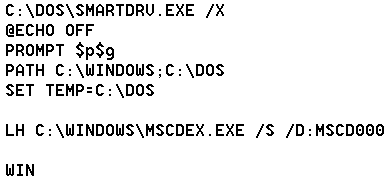
Mine is different when it comes to the path, as it also includes "WINDOWS":
- autoexec.png (3.58 KiB) Viewed 81 times
EDIT: You can ignore the LH line, that's just for my CD-ROM.
Re: IT... Computing....
Posted: Wed Oct 15, 2025 11:40 pm
by EdgyRabbid
Alright, I did that.. now it’s just saying that smartdrv.exe cannot be found… what is wrong with my machine…
Re: IT... Computing....
Posted: Wed Oct 15, 2025 11:53 pm
by Steo
If you manually type (assuming you are at drive C:) "dos\smartdrv.exe", do you get an error? I'm wondering what else must have happened, because I don't think this autoexec file is even the problem.
Re: IT... Computing....
Posted: Wed Oct 15, 2025 11:57 pm
by EdgyRabbid
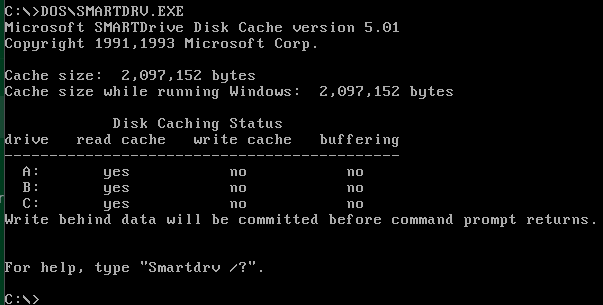
Nope. It just says the Cache amount.. like, I'm wondering what the hell I did. Why is it doing this?? I did everything correctly..
Re: IT... Computing....
Posted: Thu Oct 16, 2025 12:04 am
by Steo
If it's doing something like this, that's normal and it means the file is still there:
- smartdrvcache.png (9.02 KiB) Viewed 70 times