Page 24 of 30
Re: IT... Computing....
Posted: Fri Oct 17, 2025 8:29 pm
by PluMGMK
Reese Riverson wrote: Wed Oct 15, 2025 1:32 pm
PluMGMK wrote: Wed Oct 15, 2025 9:27 am
Well Reese, that's even more screwed up than what happens on my system!

I have a suspicion that DOS 7 may be interfering here, which I will check out tonight...
I suppose one option is to boot DOS 6.22 via a floppy disk and run the program under that to see if anything changes on the laptop?
Forgot to post this last night, but here's an updated version, which prints some output before the FPU exception hits (or is supposed to hit anyway!)
Re: IT... Computing....
Posted: Sat Oct 18, 2025 1:20 am
by Reese Riverson
PluMGMK wrote: Fri Oct 17, 2025 8:29 pm
Forgot to post this last night, but here's an updated version, which prints some output before the FPU exception hits (or is supposed to hit anyway!)
Well, unfortunately no dice, and no output:
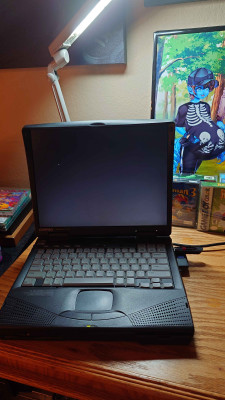
- ReeseRiverson Compaq
-Edit-
Well this is odd, this is the second time I had to unplug the thing with no battery in it, in order for it to actually boot... it came up with a flashing cursor both times now... I wonder if that's the result of attempting to run this, and forcing it off after...?

Re: IT... Computing....
Posted: Sat Oct 18, 2025 1:58 am
by The Jonster
My gosh! I wonder how old is this laptop Reese? I only ask cuz Compaq is a name I haven't heard of in a long time now. I remember the first desktop computer that I used was a Compaq that ran an older Windows edition that I can't remember at the moment.
Re: IT... Computing....
Posted: Sat Oct 18, 2025 2:17 am
by Reese Riverson
The Jonster wrote: Sat Oct 18, 2025 1:58 am
My gosh! I wonder how old is this laptop Reese? I only ask cuz Compaq is a name I haven't heard of in a long time now. I remember the first desktop computer that I used was a Compaq that ran an older Windows edition that I can't remember at the moment.
Here's where I posted the information at, I don't have the year in mind but maybe the documentation can help.

Anyway, so I decided to try to try this on my 486DX4 system that does have a PCI board, buuuuuuuut...

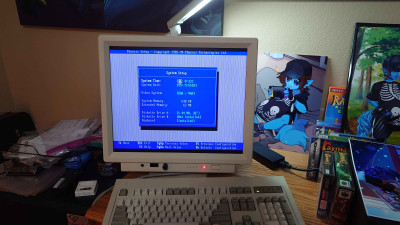
- ReeseRiverson's 486DX4 - CMOS DALLAS Chip Battery Dead
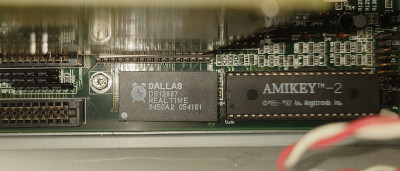
- The DALLAS chip...
So the battery in the chip is finally dead, and until I can get all that taken care of, this system is useless. Since the settings cannot be retained, since these not only handle the clock, but the CMOS settings.
You should really check the screen closely, the date displayed is
wild.
 -Edit-
I've decided to go ahead and order one of those drop in replacements for it, so I can hopefully get this system back on its feet. Meanwhile, I'll probably pull and check one of the other machines for PluM's test.
-Edit 2-
Alright, so I grabbed my
Pentium build (Specs Listed on the bottom), which also has a dead CMOS battery, but it's not one that uses the DALLAS chips and it still boots up regardless. I did have to modify my config.sys to remove EMM386, since it didn't want to run there.
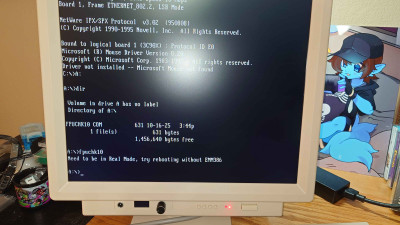
- Uh oh, EMM386!
So once I did that, here it is:
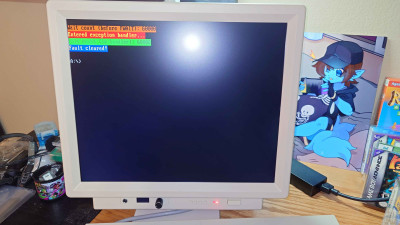
- PluM's Test!
Re: IT... Computing....
Posted: Sat Oct 18, 2025 10:55 am
by PluMGMK
OK so at least the Pentium machine likes it! How long did it take to count up to 60000?
That's very strange about the laptop though, there's nothing in here that should cause such a bad outcome. All the program does is turn on native exception handling for the FPU and do a division by zero to test it...
Re: IT... Computing....
Posted: Sat Oct 18, 2025 11:51 am
by dr_st
The Jonster wrote: Sat Oct 18, 2025 1:58 am
My gosh! I wonder how old is this laptop Reese? I only ask cuz Compaq is a name I haven't heard of in a long time now. I remember the first desktop computer that I used was a Compaq that ran an older Windows edition that I can't remember at the moment.
Compaq was acquired by HP in 2001 and for some time the brands ran in parallel.
Some of HP's business notebook lines ran as HP Compaq, until it was discontinued (at least in North America) in 2003.
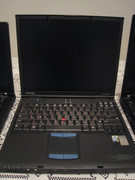
This one is my Compaq Evo N610c - a Mobile P4-M based business laptop from 2002. It has no HP labels anywhere that I remember, but already during its warranty period, the service was provided by HP labs. The laptop hasn't really been used in the past decade, but I guarantee that it still works (a few hard drives later, with a dead battery, dead speakers and broken trackpoint buttons, which I transplanted with the touchpad buttons, since I never use the touchpad).
Reese's laptop is even older, though.

Re: IT... Computing....
Posted: Sat Oct 18, 2025 11:59 am
by Steo
It makes me feel a little annoyed that I started throwing away old laptops, they would have been useful for stuff like this.

EDIT: Well that little Eeepc might be still some use for it if I can find a charger.
Re: IT... Computing....
Posted: Sat Oct 18, 2025 12:05 pm
by EdgyRabbid
My tip for chargers, keep them in one drawer. Its easier to track!
Re: IT... Computing....
Posted: Sat Oct 18, 2025 12:18 pm
by Steo
Oh yeah I just mean I don't think I ever had a charger for this one. It's one that my dad found somewhere he was working and brought it home. It takes 9v and most of mine are around 19v, so clearly I don't want to blow it up.
Re: IT... Computing....
Posted: Sat Oct 18, 2025 12:22 pm
by EdgyRabbid
Ah! Well i dont know much about the more techical side of computers.. but i am excited to learn!
Re: IT... Computing....
Posted: Sat Oct 18, 2025 12:26 pm
by dr_st
EdgyRabbid wrote: Sat Oct 18, 2025 12:05 pm
My tip for chargers, keep them in one drawer. Its easier to track!
Oh, yes, I have a box full of chargers for various generations of Thinkpads. Can always find what I need!
Re: IT... Computing....
Posted: Sat Oct 18, 2025 12:36 pm
by Steo
Moving to Sweden and back and then having half of the stuff I used to have in my old room where my brother is now doesn't help with knowing where things are.
Re: IT... Computing....
Posted: Sat Oct 18, 2025 1:00 pm
by Master
Keeping all your chargers in one place isn't always helpful if you've got old hardware with a whole bunch of proprietary connections and charging standards. It becomes a rats nest to detangle and dig through.
If you're fortunate enough to only have hardware that uses common standards like USB C, it's probably not quite as much of a headache.
Re: IT... Computing....
Posted: Sat Oct 18, 2025 1:31 pm
by dr_st
Master wrote: Sat Oct 18, 2025 1:00 pm
If you're fortunate enough to only have hardware that uses common standards like USB C, it's probably not quite as much of a headache.
Oh, yes. In the last 25 years there have been just 4 different charger standards for most Thinkpads - the 16V slim barrel tip, the 20V gray barrel, the 20V rectangular slim tip and USB-C. With adapters you can use the second type charger with the third type laptops. And some transitional generation devices support both the rectangular slim-tip and USB-C.
Re: IT... Computing....
Posted: Sat Oct 18, 2025 2:04 pm
by Reese Riverson
PluMGMK wrote: Sat Oct 18, 2025 10:55 am
OK so at least the Pentium machine likes it! How long did it take to count up to 60000?
Instant. Literally instantly. I'm not sure if that was supposed to happen like that or not?
Re: IT... Computing....
Posted: Sat Oct 18, 2025 3:39 pm
by PluMGMK
Interesting! I would have thought that it would be slow on older hardware! Could you try running the program with the /s switch? This will make it sweep the wait time from 0 to 2000 and retrigger the exception each time, and usually takes quite a bit longer (and is fun to watch! :3)
Re: IT... Computing....
Posted: Sat Oct 18, 2025 3:57 pm
by Reese Riverson
PluMGMK wrote: Sat Oct 18, 2025 3:39 pm
Interesting! I would have thought that it would be slow on older hardware! Could you try running the program with the /s switch? This will make it sweep the wait time from 0 to 2000 and retrigger the exception each time, and usually takes quite a bit longer (and is fun to watch! :3)
Certainly, do you want me to record this from the machine itself? I can do that quite easily enough if you wanted me to.
Re: IT... Computing....
Posted: Sat Oct 18, 2025 7:24 pm
by PluMGMK
Well, it'd look cool, but it's up to you.

The important thing is that it doesn't hang!
BTW, not sure if you've been looking at the GitHub conversation I linked before, but I discovered this morning (thanks to stsp's suggestion) that it can work on my system if I disable legacy USB support in the firmware (problem is my keyboard obviously doesn't work in that case

)
Re: IT... Computing....
Posted: Sun Oct 19, 2025 8:41 pm
by Reese Riverson
PluMGMK wrote: Sat Oct 18, 2025 3:39 pm
Interesting! I would have thought that it would be slow on older hardware! Could you try running the program with the /s switch? This will make it sweep the wait time from 0 to 2000 and retrigger the exception each time, and usually takes quite a bit longer (and is fun to watch! :3)
Well, I didn't get around to getting thing moved around to do a capture setup, but I did go ahead and run this with the /s switch for ya!
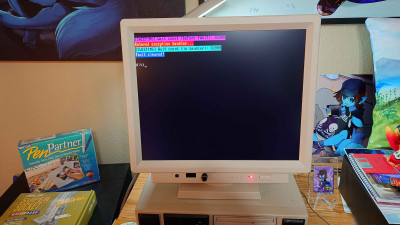
- ReeseRiverson's Pentium again
Re: IT... Computing....
Posted: Mon Oct 20, 2025 4:39 pm
by EdgyRabbid
ive been watching an ice berg about computer viruses and realized 2 things:
1. jesus email is a fantastastic way of spreading this shit
2. why did people click on them to the point where they caused millions in damages?? There wasnt a campaign to tell people not to click random exe files from this email?