Page 4 of 77
Re: Rayman Mega Patch
Posted: Thu Jan 17, 2013 11:29 pm
by Decidetto
I tried several full-screen resolutions, Emshomar,(including the smallest one) but they all ran at the same, horrible speed. My PC's specs aren't bad though: i7 @ 2.5GHz, 8GB RAM and an NVidia GT650M.
Don't you have a near-perfect version of the original game, Adsolution? I have seen it in one of your old videos.
Also, that parallax example makes me think of Super Mario World.
Re: Rayman Mega Patch
Posted: Thu Jan 17, 2013 11:32 pm
by Adsolution
How come the resolutions are all 4:3 resolutions, even though the game runs in 16:10?
Decidetto wrote:Don't you have a near-perfect version of the original game, Adsolution? I have seen it in one of your old videos.
I do... somewhere. I'm actually really distressed over the fact that I don't know where it is.
EDIT:
What is the advantage of this patch actually? To be honest, it seems to play the exact same as running it with the standard DosBox, or the Bonusweb patch.
Re: Rayman Mega Patch
Posted: Thu Jan 17, 2013 11:43 pm
by Decidetto
Adsolution wrote:How come the resolutions are all 4:3 resolutions, even though the game runs in 16:10?
I am getting 16:10 resolutions, like 640x400, as well.

Asolution wrote:Decidetto wrote:Don't you have a near-perfect version of the original game, Adsolution? I have seen it in one of your old videos.
I do... somewhere. I'm actually really distressed over the fact that I don't know where it is.
Uh-oh!
If she finds it, Emsho, do you think you might be able to put that version in the installer?
Re: Rayman Mega Patch
Posted: Thu Jan 17, 2013 11:45 pm
by Snagglebee
Decidetto wrote:I tried several full-screen resolutions, Emshomar,(including the smallest one) but they all ran at the same, horrible speed. My PC's specs aren't bad though: i7 @ 2.5GHz, 8GB RAM and an NVidia GT650M.
Don't you have a near-perfect version of the original game, Adsolution? I have seen it in one of your old videos.
Also, that parallax example makes me think of Super Mario World.
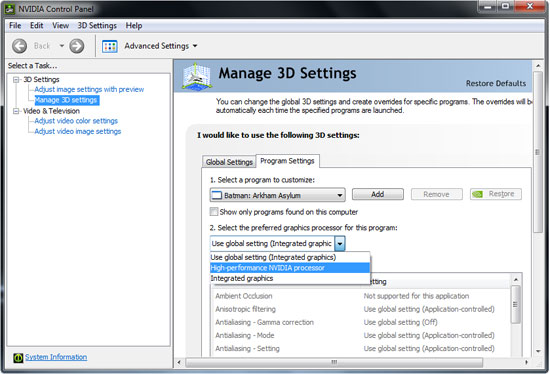
I got it! It's your Graphics Card. You have nVidia Optimus! Rayman doesn't start with your decent Graphics Card (GT650) but with your intergrated (Intel HD4000). Right-click on Application and start with nVidia GPU.
Re: Rayman Mega Patch
Posted: Thu Jan 17, 2013 11:47 pm
by Adsolution
Rayman By His Fans also runs at hyperspeed, the CPU cycles seem way off.
Though, like I said before, this seems to run the exact same as running it in DosBox, literally. The only thing you had to modify in DosBox to make it run like this patch here is to set your soundcard options in the Rayman setup to Ultrasound, instead of Soundblaster.
Re: Rayman Mega Patch
Posted: Thu Jan 17, 2013 11:53 pm
by Haruka
If this is of any help, my graphic card is an ASUS EAH5770 Series (ATi).
Re: Rayman Mega Patch
Posted: Thu Jan 17, 2013 11:54 pm
by Decidetto
emshomar wrote:Decidetto wrote:I tried several full-screen resolutions, Emshomar,(including the smallest one) but they all ran at the same, horrible speed. My PC's specs aren't bad though: i7 @ 2.5GHz, 8GB RAM and an NVidia GT650M.
Don't you have a near-perfect version of the original game, Adsolution? I have seen it in one of your old videos.
Also, that parallax example makes me think of Super Mario World.
I got it! It's your Graphics Card. You have nVidia Optimus! Rayman doesn't start with your decent Graphics Card (GT650) but with your intergrated (Intel HD4000). Right-click on Application and start with nVidia GPU.
Hey, that's the way it worked on my other laptop! (It had a GTX660M, but the hard drive broke down within 3 weeks...) While I do have the NVidia Control Panel, I don't have the option to run the game with the NVidia card. And even though I manually added the .exe for the original game to the NVidia Control panel, it still goes slowly in full-screen.
By the way, how do you like this little icon I made? It's based on the icon of the original game, but way updated. Maybe it's something you can use as the icon for a launcher via which you can start any of the 4 games, if you ever make one.
 https://www.dropbox.com/s/c1xkqzvtn3da3rn/RayIco.zip
EDIT: I have tested Rayman By His Fans and I, too, get the hyperspeed. Interestingly enough, the menu, credits and map screen all run at the correct speed. It's just the gameplay that is way too fast.
One more thing: In the original Rayman, the video part of the intro video is too fast as well. Thusly, the audio starts to lag behind after about 10 seconds.
Re: Rayman Mega Patch
Posted: Fri Jan 18, 2013 4:00 pm
by Danone
Hey, what's the Registration Code?
Re: Rayman Mega Patch
Posted: Fri Jan 18, 2013 4:54 pm
by Shrooblord
Danone:
emshomar wrote:You'll need a registration number to install. Contact me per PM or at
[email protected]
Don't forget the prove that you own Rayman 1, Rayman Designer, Rayman by his Fans and Rayman 60 Levels. Otherwise I can't generate you a number.
Re: Rayman Mega Patch
Posted: Fri Jan 18, 2013 8:36 pm
by Snagglebee
I updated the Configurator with more Options and more better stability. Heres the new link:
https://www.dropbox.com/s/kxcmfkj7uz7np ... ration.exe
Decidetto wrote:emshomar wrote:Decidetto wrote:I tried several full-screen resolutions, Emshomar,(including the smallest one) but they all ran at the same, horrible speed. My PC's specs aren't bad though: i7 @ 2.5GHz, 8GB RAM and an NVidia GT650M.
Don't you have a near-perfect version of the original game, Adsolution? I have seen it in one of your old videos.
Also, that parallax example makes me think of Super Mario World.
I got it! It's your Graphics Card. You have nVidia Optimus! Rayman doesn't start with your decent Graphics Card (GT650) but with your intergrated (Intel HD4000). Right-click on Application and start with nVidia GPU.
Hey, that's the way it worked on my other laptop! (It had a GTX660M, but the hard drive broke down within 3 weeks...) While I do have the NVidia Control Panel, I don't have the option to run the game with the NVidia card. And even though I manually added the .exe for the original game to the NVidia Control panel, it still goes slowly in full-screen.
By the way, how do you like this little icon I made? It's based on the icon of the original game, but way updated. Maybe it's something you can use as the icon for a launcher via which you can start any of the 4 games, if you ever make one.
https://www.dropbox.com/s/c1xkqzvtn3da3rn/RayIco.zip
EDIT: I have tested Rayman By His Fans and I, too, get the hyperspeed. Interestingly enough, the menu, credits and map screen all run at the correct speed. It's just the gameplay that is way too fast.
One more thing: In the original Rayman, the video part of the intro video is too fast as well. Thusly, the audio starts to lag behind after about 10 seconds.
I borought me a leptop with GT540M Optimus. This files are playable on nVidia GPU. Please download the lastest driver here :
http://www.nvidia.de/Download/index.aspx?lang=de
If you still can't get into the High Performance GPU just download the new Configurator and deselect the Filter. To those people who gets hyperspead also download my new Configurator and deselect the native Game Spead.
To your icon. It's very good! I like it

! The .ico file was just corruct. Maybee incorrect compression. I reconverted from the .png into .ico file so they can be included in exe. You really don't have something against the usage as icon for these launchers?
Re: Rayman Mega Patch
Posted: Fri Jan 18, 2013 9:51 pm
by Decidetto
I don't know where you're getting the "Optimus" thing from. Mine doesn't say it anywhere. It doesn't seem my laptop includes "Intel HD Graphics" either, but I guess that's a good thing!
I'll download the new configurator and see if disabling the filter solves anything. (Funny, I was about to ask you to make the filter an option. Not just for people who get bad performance, but for people who like the pixelated look as well
)
And about the icon: you can use it, no problem at all! After all, I made it with the intention of it being used, so use away!
EDIT: Okay, I disabled the filter (didn't change any other settings) and all the games now run at the correct speed for me. Hurray! Have you updated the installation with the English 60 Levels files already? I'm asking because in your version, it is English in all the menus and the world map (and the speech is English as well, but I don't know if that changes with the language), but the level selection (after selecting a world) is still in German. So I was wondering if the files I sent you didn't work, or if you simply didn't update the installer yet.
ANOTHER EDIT: The amount of available resolutions has suddenly decreased by a whole lot. Now it doesn't have 640x400 anymore and it doesn't go higher than 800x600. Also, little language error in the configurator. The check boxes say "<gameName> native Spead". "Spead" is spelled incorrectly here. It should simply be "speed", even without the capital letter. (This ain't German!

)
Re: Rayman Mega Patch
Posted: Fri Jan 18, 2013 11:00 pm
by Snagglebee
Decidetto wrote:EDIT: Okay, I disabled the filter (didn't change any other settings) and all the games now run at the correct speed for me. Hurray! Have you updated the installation with the English 60 Levels files already? I'm asking because in your version, it is English in all the menus and the world map (and the speech is English as well, but I don't know if that changes with the language), but the level selection (after selecting a world) is still in German. So I was wondering if the files I sent you didn't work, or if you simply didn't update the installer yet.
No, still not updated. I am changing all icons to your brilliant one and I'm still waiting for the cdrom from france.
Decidetto wrote:ANOTHER EDIT: The amount of available resolutions has suddenly decreased by a whole lot. Now it doesn't have 640x400 anymore and it doesn't go higher than 800x600. Also, little language error in the configurator. The check boxes say "<gameName> native Spead". "Spead" is spelled incorrectly here. It should simply be "speed", even without the capital letter. (This ain't German!
)
Haha

my fault! I will change on the installer release
EDIT:
Original is 640x400
EDIT2:
IMPORTANT UPDATE
Check first post!
Re: Rayman Mega Patch
Posted: Sat Jan 19, 2013 4:35 pm
by Haruka
I should continue the tests with the new versions.
Glad to know you are missing only the English files!
Re: Rayman Mega Patch
Posted: Sat Jan 19, 2013 4:40 pm
by Snagglebee
Haruka wrote:Glad to know you are missing only the English files!
In the updated version English and French language are finally updated. Today my Rayman Collector from france had been delivered. It's exact the same as in Germany the
Rayman Platin Collection here just only French. Decidetto gave me the english files. I got everything I needed.
EDIT:


Re: Rayman Mega Patch
Posted: Sat Jan 19, 2013 5:23 pm
by Haruka
Oh my, your Rayman Collector is EXACTLY equal to mine. 8'3
This time I tested the new version of your patch in my laptop instead of desktop computer.
Rayman Designer: No issues
Mapper: Ubi.ini error
Rayman 60 Levels: No issues
Rayman By His Fans: The menus were ok but the gameplay was too much quick. I unchecked the game in the configuration, and while the gameplay was ok, the menu got a little slower.
Rayman 1: The menus were ok but the gameplay was too much quick. I unchecked the game in the configuration and nothing changed.
Rayman 2 Making-Of: Is it normal being showed with "stripes"? The background music of the flash-thing keeps playing when you are watching the interviews.
(I had no idea the Making-Of got translated to english at a point, and owns some extra footage and better resolution of image)
Re: Rayman Mega Patch
Posted: Sat Jan 19, 2013 5:31 pm
by Master
If this was fixed, would you be capable of sharing the English version? Not to be a bratty wanting so and so, but it'd be quite nice to be able to see it.
Re: Rayman Mega Patch
Posted: Sat Jan 19, 2013 6:06 pm
by Snagglebee
Haruka wrote:Oh my, your Rayman Collector is EXACTLY equal to mine. 8'3
This time I tested the new version of your patch in my laptop instead of desktop computer.
Rayman Designer: No issues
Mapper: Ubi.ini error
Rayman 60 Levels: No issues
Rayman By His Fans: The menus were ok but the gameplay was too much quick. I unchecked the game in the configuration, and while the gameplay was ok, the menu got a little slower.
Rayman 1: The menus were ok but the gameplay was too much quick. I unchecked the game in the configuration and nothing changed.
Rayman 2 Making-Of: Is it normal being showed with "stripes"? The background music of the flash-thing keeps playing when you are watching the interviews.
(I had no idea the Making-Of got translated to english at a point, and owns some extra footage and better resolution of image)
Rayman Designer: Perfect
Mapper: Must be a problem by installer. I'll fix that shortly. In meantime install on a other Language and then back to English that would fix first the problem.
Rayman 60 Levels: Perfect
Rayman by his Fans: It's from Computer to Computer different. On my computer the native spead works on all 4 Games. I'm very sorry if the native spead doesn't work!
Rayman 1: A build a new one here :
https://www.dropbox.com/s/kxcmfkj7uz7np ... ration.exe
Rayman 2 Making-of: That's normal!
Re: Rayman Mega Patch
Posted: Sat Jan 19, 2013 6:33 pm
by Snagglebee
Great News! I managed to get a very fluent intro by emulating a pentium processor.
Re: Rayman Mega Patch
Posted: Sat Jan 19, 2013 7:46 pm
by Decidetto
Ooh, I can't wait to see the fluent intro! Does it fix the out-of-syncness too?
Anyway, I installed the new version with the installer (my icons look great!
) and one thing I noticed, is that it still says "Patch only" in the title bar of the installer. That is something to fix!
Another very strange thing, is that the option to turn on the parallax backgrounds in the original Rayman is gone now. Are you using a different version of the game now?
Re: Rayman Mega Patch
Posted: Sat Jan 19, 2013 8:07 pm
by Snagglebee
Decidetto wrote:Ooh, I can't wait to see the fluent intro! Does it fix the out-of-syncness too?
Unfortunetly no. There is still that lag.