Page 4 of 7
Re: Rayman M x64 Installer
Posted: Fri Jul 10, 2015 11:35 pm
by Abze95
Sorry, but that seemed to have no effect - I just changed the value and saved the file but it didn't seem to make any difference (the textures are stilled bugged/missing). Of the downloads that Emshomar listed I used RM_Installer.exe, if that helps. The contents of ubi.ini for me are:
[SYSTEM]
Memory=1023
[RAYMANM]
Language=English
Gli_Mode=1 - 1024 x 768 x 16
Adapter=0
TnL=0
TriLinear=0
Identifier=D7B78E66-4226-11CF-A97D-3538B4C2C735
Video_BPP=32
Video_WantedQuality=0
Video_AutoAdjustQuality=1
VignettesFile=Vignette.cnt
TexturesFile=Tex32.cnt
TexturesCompressed=0
Video_RealQuality=0
just in case that's relevant.
Re: Rayman M x64 Installer
Posted: Fri Jul 10, 2015 11:36 pm
by incognito
Mmmh, interesting. Mine is completely different.
Re: Rayman M x64 Installer
Posted: Thu Jul 16, 2015 2:47 pm
by Kevinrayman15
The links are broken :/ does someone have another solution to install Rayman M on Windows 7?
Re: Rayman M x64 Installer
Posted: Thu Jul 16, 2015 3:00 pm
by Snagglebee
Just contact me via PM and I'll provide the links

Re: Rayman M x64 Installer
Posted: Sat Aug 29, 2015 8:30 pm
by HaruAritaRAM [DR99]
Guys I've downloaded the installer (not the Remake.iso cause the link is broken

) and used my original discs. The game works, but it doesn't set in full screen: you can see in attachment Windows' bar of applications and the game in a window... I'm using Windows 10 but I had the same issue with Windows 8.1
Edit: I've just found a nice solution

ALT+TAB, then ALT+TAB again, but make sure you don't get on the desktop or you'll get borders again xD
Re: Rayman M x64 Installer
Posted: Tue Sep 01, 2015 5:04 pm
by maddy razor
Hello! The links are not working, can we get a new one please?
Re: Rayman M x64 Installer
Posted: Mon Sep 07, 2015 12:01 am
by maddy razor
Up^^
Re: Rayman M x64 Installer
Posted: Sun Sep 20, 2015 1:33 pm
by IIITA
RaylyStupid wrote:
Wait
You gave me a keylogger! Now my steam account got stolen.
Is this true that gamecopyworld IS SUPPLYING THE KEYLOGGER as Rayman M NO-CD patcher ?
Re: Rayman M x64 Installer
Posted: Sun Sep 20, 2015 1:59 pm
by OCG
I never had issue with gamecopyworld.
Re: Rayman M x64 Installer
Posted: Sun Sep 20, 2015 2:10 pm
by incognito
OCG wrote:I never had issue with gamecopyworld.
Like me, I often, use their No-cds for my notebook.
Re: Rayman M x64 Installer
Posted: Wed Sep 23, 2015 12:10 am
by Haruka
I use GCW's R3 no-CD executable and it works like a charm.
Re: Rayman M x64 Installer
Posted: Mon Sep 28, 2015 3:40 am
by IIITA
OCG wrote:I never had issue with gamecopyworld.
incognito wrote:OCG wrote:I never had issue with gamecopyworld.
Like me, I often, use their No-cds for my notebook.
Haruka wrote:I use GCW's R3 no-CD executable and it works like a charm.
Thank you , guys.
I was relieved to hear it somhow, but still wonder why RaylyStupid got keylogger from the patcher ?
RaylyStupid wrote:
Wait
You gave me a keylogger! Now my steam account got stolen.
Re: Rayman M x64 Installer
Posted: Mon Sep 28, 2015 5:19 am
by IIITA
Re: Rayman M x64 Installer
Postby HaruAritaRAM [DR99] » Sat Aug 29, 2015 8:30 pm
HaruAritaRAM [DR99] wrote:Guys I've downloaded the installer (not the Remake.iso cause the link is broken
) and used my original discs. The game works, but it doesn't set in full screen: you can see in attachment Windows' bar of applications and the game in a window... I'm using Windows 10 but I had the same issue with Windows 8.1
Edit: I've just found a nice solution
ALT+TAB, then ALT+TAB again, but make sure you don't get on the desktop or you'll get borders again xD
I have a question.
looking into your picture posted , you got the aspect ratio 4:3 for Rayman M in Windows10.
Oh, as my notebook pc running Windows 7 64bit has 16:9 display, I would like to know how do you set PC to get screen ratio 4:3 to Rayman M game play.
Re: Rayman M x64 Installer
Posted: Sat Nov 07, 2015 11:44 pm
by Shadorino
IIITA wrote:Re: Rayman M x64 Installer
Postby HaruAritaRAM [DR99] » Sat Aug 29, 2015 8:30 pm
HaruAritaRAM [DR99] wrote:Guys I've downloaded the installer (not the Remake.iso cause the link is broken
) and used my original discs. The game works, but it doesn't set in full screen: you can see in attachment Windows' bar of applications and the game in a window... I'm using Windows 10 but I had the same issue with Windows 8.1
Edit: I've just found a nice solution
ALT+TAB, then ALT+TAB again, but make sure you don't get on the desktop or you'll get borders again xD
I have a question.
looking into your picture posted , you got the aspect ratio 4:3 for Rayman M in Windows10.
Oh, as my notebook pc running Windows 7 64bit has 16:9 display, I would like to know how do you set PC to get screen ratio 4:3 to Rayman M game play.
You have to edit the ubi.ini file located here : C:\Windows\Ubisoft
Change the “Gli_Mode” value under Rayman Arena or Rayman M to “1440 x 1080 x 32” for example for a 1080p display.
Re: Rayman M x64 Installer
Posted: Sun Nov 08, 2015 1:32 am
by Shadorino
Ignore that, I just posted a widescreen fix here :
viewtopic.php?p=1124784#p1124784
Edit the ubi.ini file with your native resolution and replace the exe by this one. Don’t run the RM_Setup_DX8 again or it will reset the resolution set in the ubi.ini.
Re: Rayman M x64 Installer
Posted: Tue Nov 24, 2015 10:15 am
by IIITA
Shadorino wrote:Ignore that, I just posted a widescreen fix here :
viewtopic.php?p=1124784#p1124784
Edit the ubi.ini file with your native resolution and replace the exe by this one. Don’t run the RM_Setup_DX8 again or it will reset the resolution set in the ubi.ini.
Thank you for your reply.
I am now using Windows 10 Pro 64bit and tried your wide screen patch of Rayman M with 1600x900 PC screen.
I am happy now to play the game in 1600x900 PC screen without feeling horizontal distortion.
And could get full screen of game with ALT+TAB solution !!
Here's the screenshot of 1600x900 aspect ratio , note that it is not 4:3.
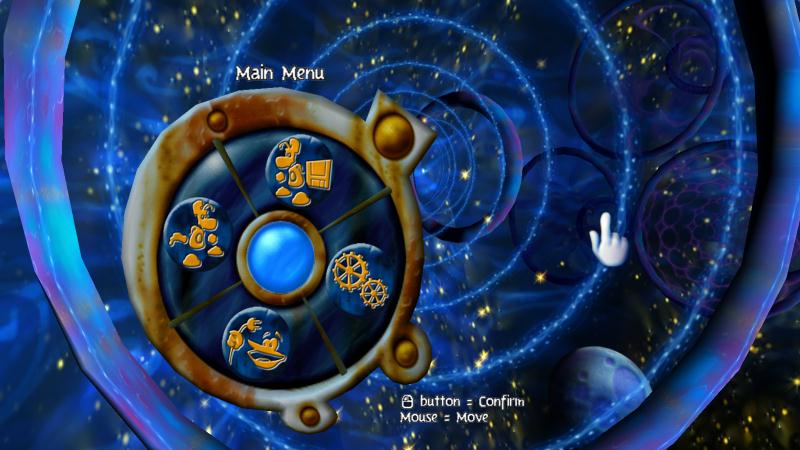
May I ask you one more favour ?
I would like to get *bik files (Intro.bik Outro.bik Ubi.bik )patched for wide screen in
C:\Program Files (x86)\UbiSoft\RaymanM\Videos
Could you post them , i.e. widescreen cutscenes ?
Re: Rayman M x64 Installer
Posted: Tue Nov 24, 2015 7:19 pm
by Shadorino
That’s the first thing I tried after making the widescreen EXE. But for a reason I don’t understand, RAD Video Tools crash now when I enter the values I used when making the widescreen Rayman 3 cutscenes.
Besides, it will require some try and fail because the Bink videos are this time already in 512x512 resolution, and Rayman M displays the same weird aspect ratio when read by the game.
I already acquired the PS2 cutscenes for better quality. I’ll see what I can do
Re: Rayman M x64 Installer
Posted: Wed Nov 25, 2015 12:24 pm
by IIITA
Shadorino wrote:That’s the first thing I tried after making the widescreen EXE. But for a reason I don’t understand, RAD Video Tools crash now when I enter the values I used when making the widescreen Rayman 3 cutscenes.
Besides, it will require some try and fail because the Bink videos are this time already in 512x512 resolution, and Rayman M displays the same weird aspect ratio when read by the game.
I already acquired the PS2 cutscenes for better quality. I’ll see what I can do
Oh ! what a bolt out of the blue !
Rayman M widescreen cutscene is slightly different from those of Rayman 3 . I never noticed that.
BTW I downloaded Ribshark's cutscene videos for widescreen fix of Rayman 3;
viewtopic.php?p=992390#p992390
I hope you will solve "Rayman M widescreen fix" in the near future.
Re: Rayman M x64 Installer
Posted: Mon Feb 29, 2016 5:16 am
by Shadorino
Re: Rayman M x64 Installer
Posted: Mon Feb 29, 2016 7:19 am
by Harpic fraîcheur
Awesome ! I'll try this when I'll be back from school.
