Page 347 of 467
Re: Rayman 3
Posted: Thu Feb 16, 2017 9:56 pm
by bunnieblaster
It's a cd by one of the composers of the Rayman 3 soundtrack

Re: Rayman 3
Posted: Mon Feb 20, 2017 9:07 pm
by raymanrules77
Ok so I just got a laptop and I wanted to play Rayman 3 but many textures are missing and I have tried different settings and switched between the 2 graphics cards on my laptop. I have also tried RibSharks Better Rayman 3 mod but it did not help.
I hope there is a fix to this, here are my 2 GPU's: Nvidia Geforce GT 650M 2GB and Intel HD Graphics 4000
Re: Rayman 3
Posted: Mon Feb 20, 2017 9:14 pm
by PluMGMK
A lot of people seem to be having such issues lately. I hear upgrading the graphics drivers sometimes seems to solve it, though if you've tried two GPUs that doesn't sound very plausible.

Can't hurt to try though, since if it's a new laptop it probably didn't come with all the latest updates installed anyway.
Re: Rayman 3
Posted: Mon Feb 20, 2017 9:29 pm
by raymanrules77
Well this is a used computer and it does not have any software for updating drivers to my knowledge.
Re: Rayman 3
Posted: Mon Feb 20, 2017 9:34 pm
by PluMGMK
You should be able to get the latest NVIDIA driver directly from their website.
Re: Rayman 3
Posted: Mon Feb 20, 2017 10:17 pm
by raymanrules77
Ok i both installed Better Rayman 3 again and updated the drivers and there are more textures but still some are missing. Are there any special settings i should try? Also, i'm not sure what resolution my computer screen is but i just picked 1920 x 1080 32bit.
Re: Rayman 3
Posted: Mon Feb 20, 2017 11:10 pm
by raymanHUN
https://www.youtube.com/watch?v=i_6gshbVFxE
do you mean this kind of missing textures, like the one in the video? (fast forward to 5:13) if so, changing the value of TnL to 0 in the ubi configuration file (looks like a normal txt file, but it has a gear icon next to it) should fix it for you. If there are other texture errors than that, sorry, but I can't help with those.
Re: Rayman 3
Posted: Mon Feb 20, 2017 11:21 pm
by raymanrules77
It's not as bad as that shown in the video but still similair. Where is the ubi config file? I can't find it
Re: Rayman 3
Posted: Mon Feb 20, 2017 11:25 pm
by PluMGMK
I'm not sure, but I think you should be able to change it from Better Rayman 3's configurator. If not, it should be somewhere underneath %APPDATA% (I guess C:/Users/<YOUR NAME>/Application Data).
Re: Rayman 3
Posted: Mon Feb 20, 2017 11:27 pm
by raymanrules77
TnL is set to 0...
rip
Re: Rayman 3
Posted: Mon Feb 20, 2017 11:29 pm
by Master
Throwing out random suggestions at this point, are you playing the CD or GoG version of R3? Is it possible you might be missing some items or for there to be some corrupted files?
Re: Rayman 3
Posted: Tue Feb 21, 2017 10:28 am
by raymanrules77
GoG version, maybe i should try to reinstall?
Re: Rayman 3
Posted: Tue Feb 21, 2017 10:32 am
by raymanHUN
Well, if it doesn't work now, than reinstalling can't cause more problems, so I guess you should go for it
edit, just so I don't double-post:
If you hadn't deleted it yet, you should check if TriLinear is set to 0 as well in your ubi.ini file. It should be under c:\programs\windows\ubisoft... Actually it's the same file, so I just write the path, to be sure. If this doesn't help either/it is set to 0 too, then go ahead, and reinstall it.
another edit, sry for the storm, but I've found a possible solution:
So I've read that, there are programs with integrated Intel graphic cards. So what you should try (If you hadn't already) is to change Vertex Processing Mode to Software in your intel settings. You should be able to do this by:
-right-clicking on your desktop
-choose Graphic Properties
-it should bring up the intel control settings
-go to the 3D menu on the left
-click Custom Settings
-find Vertex Processing, and change it from default to software setting
-click apply, close the window
And that should be it. It's not my solution, I've found it on a forum, but wiki also says that, it works. (Haven't tried it personally, so don't know if it still works)
Re: Rayman 3
Posted: Tue Feb 21, 2017 5:17 pm
by raymanrules77
My computer is in Swedish so it was hard to find the settings but i managed to get to the 3D settings but there is no vertex processing option.
I wish i had the DVD version with me so i could try that.
Re: Rayman 3
Posted: Tue Feb 21, 2017 6:17 pm
by NyaNyaLily
raymanrules77 wrote:My computer is in Swedish so it was hard to find the settings but i managed to get to the 3D settings but there is no vertex processing option.
I wish i had the DVD version with me so i could try that.
I'm pretty sure that the ubi.ini file is located in "C:\Windows\Ubisoft\"
Re: Rayman 3
Posted: Tue Feb 21, 2017 6:20 pm
by raymanrules77
I already disabled TnL on that.
Re: Rayman 3
Posted: Tue Feb 21, 2017 6:55 pm
by raymanHUN
Yep, but have you checked if TriLinear is disabled as well? And if you can send a screenshot to me of the 3D settings menu as well, maybe I can help you find Vertex Processing.
Re: Rayman 3
Posted: Tue Feb 21, 2017 7:35 pm
by PluMGMK
CHRdutch wrote:raymanrules77 wrote:My computer is in Swedish so it was hard to find the settings but i managed to get to the 3D settings but there is no vertex processing option.
I wish i had the DVD version with me so i could try that.
I'm pretty sure that the ubi.ini file is located in "C:\Windows\Ubisoft\"
RibShark's patch reconfigures the OS to look in %APPDATA% instead of C:\Windows.
Re: Rayman 3
Posted: Tue Feb 21, 2017 8:01 pm
by raymanrules77
Ok both TriLinear and TnL is disabled.
Here is 3D menu:
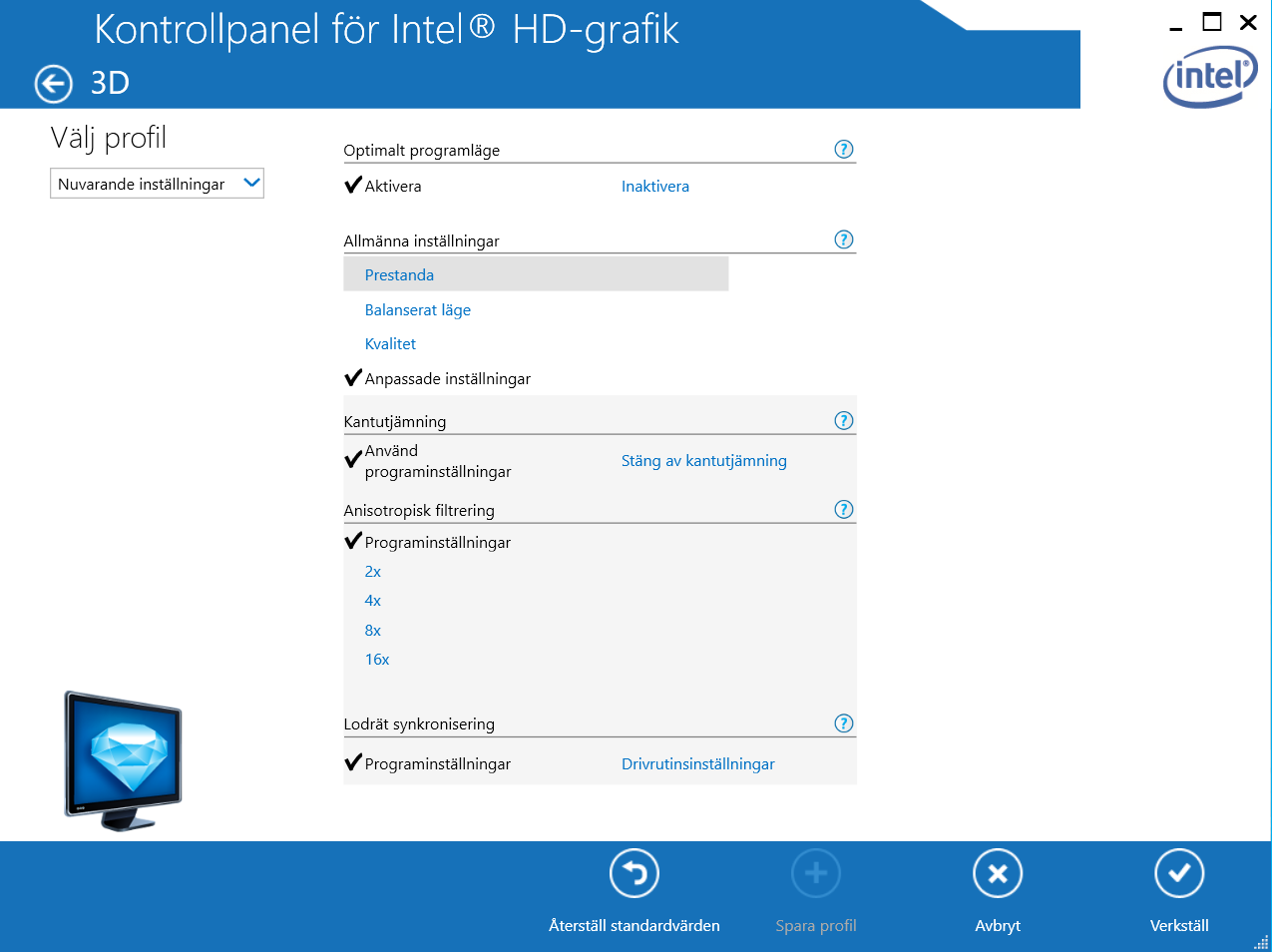
Edit: fixed image
Re: Rayman 3
Posted: Tue Feb 21, 2017 8:15 pm
by raymanHUN
Umm sry, but I guess you forgot to upload the image
At least it doesn't show image for me
