Page 1 of 4
Tonic Trouble Launcher (Retail)
Posted: Wed Jul 24, 2019 8:58 am
by Hipnosis183
TTLauncher (
TonicTroubleLauncher) is a collection of patches and utilities for Tonic Trouble,
Retail Version, developed with simplicity and ease of use in mind, as an
all-in-one program that will manage everything needed for the game to work on both old and modern systems, plus a number of enhancements.
TTLauncher is an
open-source tool, and it can be found on
GitHub.
Download - Last update: 06/06/20 - Version 1.0
Features
- Compatibility: Included an unpacked executable that let the game to run on modern systems.
- Portable Mode: A series of patches to eliminate external dependencies (installation and CD-ROM presence), working only inside the game folder.
- Widescreen: A dynamic patch that adjusts the FOV for a proper, wide aspect ratio display.
- Video Wrapper Integration: Using dgVoodoo at the minimal settings needed, and optional High Resolution and Anti-Aliasing modes.
- Version Check: To know which one you have, and determine if is compatible with the launcher.
- Savegame Managing: To import, export and delete the save data in an easy way.
The only residual file left is the launcher configuration, everything else gets cleaned at exit.
This, besides the files created by the game (configuration, options and savegames).
Requirements
- Operating System: Windows XP or higher.
- Software: .NET Framework 3.5 or higher.
- Graphics: Direct3D11 support (only for dgVoodoo).
- Game: A clean copy of the files.
Extras
Additionally, if you're interested, i wrote an article of the whole development, which can be read on my page
Hipnosis' Stuff
Also remade the different logos of the game, which can be found on my
DeviantArt page:
Supported Versions
The game had a lot of different releases, but some of them had exactly the same executable, and after extensive investigation it came down to these on the list. Mind that the ones marked as (un)protected (all versions except for the french release) reffers to the game executable's protection. The included executable in the launcher deals with this protection when present, so it doesn't make a real difference from the user perspective.
Supported
- REVIEW ENGLISH : TT221099-PC - SPANISH -
PROTECTED
- SHA-256= 17457C330D11621474A50B2852618D7DF53468C24899176CB2AFC951B51518FB
- REVIEW ENGLISH : TT221099-PC - ITALIAN -
PROTECTED
- SHA-256= C379FFADD35C738C0041CEB9916CCA31C35C6EC096B1B3F257F2C66000F0BBFA
- RETAIL MASTER V5 : TT181099-PC - FRENCH -
UNPROTECTED
- SHA-256= 6AD8506714FC86856369FFE834BB22792AEBCD0FF4FAB780E03AA0ADB47643B3
- RETAIL MASTER GERMAN V3: TT221099-PC - GERMAN -
PROTECTED
- SHA-256= EA4BE88CEB9BB7C438BEE7F97767CF12C0F9439707A2CDAEE362FFA01C88FDA6
- RETAIL MASTER V3 : TT131099-PC - BRAZILIAN | CHINESE | EUROPE | USA -
PROTECTED
- SHA-256= 37631F2FE37C07DD4CCDE32C0981685E152AC016920BEB01CCC0E8FC0E53DC57
Unsupported
- RETAIL MASTER GERMAN V3: TT221099-PC - GERMAN -
UNPROTECTED
- SHA-256= A9F88F6117D39B3AB28B0B96E873BFA6146640480877C7F864DE832DAAE3A314
Usage
Put the launcher on the game folder. Regardless of the version, a clean game folder (plus the launcher) should look like this:
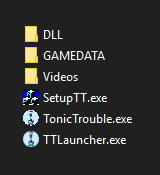
- 01.png (3.63 KiB) Viewed 9642 times
While you can install the game normally, it's recommended to copy the files straight from the disc. Keep in mind that doing it this way means that the game won't work if you disable Portable Mode, so have that in consideration. There's an error while trying to copy the file "tt4.cnt" normally; for the moment the only way to overcome this is by extracting the file directly from the disc image. A simpler solution might be added later on.
Then execute the launcher. Be sure to check the settings first, and adjust them to your liking. Still, the defaults are set to fullfill most user's needs.
Well,
finally, i'm done with this game. I think now i should finally play it.
Re: Tonic Trouble Tools (Retail)
Posted: Fri Jul 26, 2019 7:23 pm
by RayCarrot
Great job! It's nice to have the available TT mods put together like this

I might consider adding some of these to my Rayman Control Panel if you don't mind.
One thing I'd like to point out though is that redirecting the ubi.ini file to the Windows directory is not something I'd recommend. That directory is for the Windows system and thus has heavy protection and might get removed. Then again I guess it's Ubisoft's fault to begin with by putting it in a sub-directory there.... I don't know how you patched the location, but would it be possible changing it completely? You mentioned the game folder didn't work (which would be ideal), but other locations like AppData or ProgramFiles would work too imo.
Re: Tonic Trouble Tools (Retail)
Posted: Fri Jul 26, 2019 8:15 pm
by PluMGMK
RayCarrot wrote: Fri Jul 26, 2019 7:23 pmThen again I guess it's Ubisoft's fault to begin with by putting it in a sub-directory there....
Ah, the 90s, when nobody cared about silly things like security or access controls.

Re: Tonic Trouble Tools (Retail)
Posted: Sat Jul 27, 2019 2:10 am
by Hipnosis183
RayCarrot wrote: Fri Jul 26, 2019 7:23 pm
Great job! It's nice to have the available TT mods put together like this
I might consider adding some of these to my Rayman Control Panel if you don't mind.
Yeah sure, go ahead. I might release the source once the patcher gets more complete (if you want to integrate the functionality into your UI natively); this means adding more that just widescreen support (or at least that would be the idea).
RayCarrot wrote: Fri Jul 26, 2019 7:23 pm
One thing I'd like to point out though is that redirecting the ubi.ini file to the Windows directory is not something I'd recommend. That directory is for the Windows system and thus has heavy protection and might get removed. Then again I guess it's Ubisoft's fault to begin with by putting it in a sub-directory there.... I don't know how you patched the location, but would it be possible changing it completely? You mentioned the game folder didn't work (which would be ideal), but other locations like AppData or ProgramFiles would work too imo.
The game stores the "\ubi.ini" ("\Ubisoft\ubi.ini") location as a string in the executable, and takes the "C:\Windows" direction from the system function GetWindowsDiretoryA, so isn't possible to change the file direction to anything over that location. I tried to change the function to GetCurrentDirectoryA, which should return the game directory, but there's an error at execution time, so didin't tried further. It might be possible to do though, maybe if someone knows how could give a hand on it, but may need something more than just hex edit.
About the protection of the windows folder, it should be fine, i wouldn't fear any problems with permissions. We could discuss other options for this, but i would preffer to wait until we found a way to work just with the game folder, the cleaner way.
PluMGMK wrote: Fri Jul 26, 2019 8:15 pm
Ah, the 90s, when nobody cared about silly things like security or access controls.
90's software loved to put stuff in "C:" and "Windows" folder.
Re: Tonic Trouble Tools (Retail)
Posted: Sat Jul 27, 2019 8:46 am
by RayCarrot
Hipnosis183 wrote: Sat Jul 27, 2019 2:10 am
RayCarrot wrote: Fri Jul 26, 2019 7:23 pm
Great job! It's nice to have the available TT mods put together like this
I might consider adding some of these to my Rayman Control Panel if you don't mind.
Yeah sure, go ahead. I might release the source once the patcher gets more complete (if you want to integrate the functionality into your UI natively); this means adding more that just widescreen support (or at least that would be the idea).
That'd be great! I made a similar widescreen patch for Rayman 2 based on existing ones where I allow the value to be changed to any aspect ratio rather than limit it to 16/9. Assuming that should be possible here too since you're just editing a value in the executable.
Hipnosis183 wrote: Sat Jul 27, 2019 2:10 am
RayCarrot wrote: Fri Jul 26, 2019 7:23 pm
One thing I'd like to point out though is that redirecting the ubi.ini file to the Windows directory is not something I'd recommend. That directory is for the Windows system and thus has heavy protection and might get removed. Then again I guess it's Ubisoft's fault to begin with by putting it in a sub-directory there.... I don't know how you patched the location, but would it be possible changing it completely? You mentioned the game folder didn't work (which would be ideal), but other locations like AppData or ProgramFiles would work too imo.
The game stores the "\ubi.ini" ("\Ubisoft\ubi.ini") location as a string in the executable, and takes the "C:\Windows" direction from the system function GetWindowsDiretoryA, so isn't possible to change the file direction to anything over that location. I tried to change the function to GetCurrentDirectoryA, which should return the game directory, but there's an error at execution time, so didin't tried further. It might be possible to do though, maybe if someone knows how could give a hand on it, but may need something more than just hex edit.
About the protection of the windows folder, it should be fine, i wouldn't fear any problems with permissions. We could discuss other options for this, but i would preffer to wait until we found a way to work just with the game folder, the cleaner way.
Oh, that's more troublesome. I thought the location was hardcoded. Ideally you should be able to remove the native function call completely and make the path relative, which will always make it relative to the current directory. I think something similar was done with the GOG version of Rayman 2.
Regarding permissions there are some minor issues in some old Ubisoft games. Rayman 3 specifically has the tendency on Windows Vista and above to redirect the ubi.ini file to the VirtualStore location depending on the user privileges (running as admin or not). Though for TT I suppose it's fine. As long as the game has read permissions it doesn't really matter since the config program needs to run as admin anyways.
Re: Tonic Trouble Tools (Retail)
Posted: Sat Sep 07, 2019 5:35 pm
by closer1000
Everything works great except for the widescreen patcher. My issue is, patched or not, selecting any resolution other than 640x480 crashes to desktop. Obviously, dgVoodoo is doing it's thing so it's rendering at a much higher resolution, but I can't select 800x600 to get widescreen working with the patch. Any suggestions?
Re: Tonic Trouble Tools (Retail)
Posted: Sun Sep 08, 2019 12:37 am
by deton24
@up Try to set manually 1680x1050 (16:10) or 1600x900 (16:9) in ubi.ini (C:\Windows).
Alternatively use Wine libraries instead
https://yadi.sk/d/0nP1H9bJ8aZ-KA.
Is there any possibility to make widescreen patch also for Special Edition? (This one with red spades instead of thermometer like in retail version.)
It has MaiD3Dvr.exe instead of TonicTrouble.exe as main game executable (Tonic Trouble Special Edition 8.7.4 - Guillemot release).
It doesn't run without Wine. With yours dgVoodoo it has graphic glitches.
Generally, when resolution is higher than 1680x1050 (16:10) or 1600x900 (16:9) it will cause crash. Setting these resolutions, and running the game from desktop will force your native desktop resolution (at least that's what my monitor OSD keeps telling me).
Wine libraries for SE
https://yadi.sk/d/0nP1H9bJ8aZ-KA They fix textures.
Most importantly, SE doesn't have to be patched to run on newer systems (so Ribshark patch is not required).
Your patched binaries don't work with Special Edition. Widescreen patch also fails.
(tried to run as admin, copying gli* libraries from Rayman 2 - it causes the game to launch the patched setup, but it gives an infinite setup show up, and sadly it causes the game to crash permanently till the uninstallation).
Re: Tonic Trouble Tools (Retail)
Posted: Mon Sep 09, 2019 6:14 am
by Hipnosis183
Ok, here's a quick update on how's everything going.
I've been mesing around with disassembly, while learning on the march. I've gone pretty far in regard to redirecting the "ubi.ini" file location, but when I thought it was almost done I hit a wall, so haven't progressed from then. It's been like a month since that, I haven't had the time to continue messing with it, but hopefully this november will be a month with more spare time, so I will come back to it then.
deton24 wrote: Sun Sep 08, 2019 12:37 am
Is there any possibility to make widescreen patch also for Special Edition?
Yes, but at the moment the main focus is to get everything done for the retail version. Plus, there are a lot of different versions of the SE (and retail too), so it'd be nice to do something like a complete and detailed list of them all; it will be easier to work from there, ensuring that we cover every version.
deton24 wrote: Sun Sep 08, 2019 12:37 am
Most importantly, SE doesn't have to be patched to run on newer systems (so Ribshark patch is not required).
As already said, the english retail version seems to be the only one with the problem, so it's not necessary for any other.
deton24 wrote: Sun Sep 08, 2019 12:37 am
Your patched binaries don't work with Special Edition. Widescreen patch also fails.
Those are exclusively for the specified english retail version, so it's expected not to work with anything else. Also, I doubt that other versions will get any extra treatment besides widescreen patching, furthermore considering the amount of time that the game's debbuging is taking, having to do the same with every version is not worth it, nor viable. Will see in the future what does make it to the program and what not.
Also, I've seen that you're modifying the PCGamingWiki page. While it's WIP for sure, I'd recommend to do two separated pages, one for retail and other for SE, so it'd be easier to read and won't confuse many people. All of this if it's possible, of course. Other than that, it's shaping pretty good, keep with it.
I'll update again when (hopefully) get somewhere.
Re: Tonic Trouble Tools (Retail)
Posted: Tue Sep 10, 2019 2:31 am
by deton24
It wasn't necessary to make a new page for the game, just a note about SE in availability section.
There is separate info about widescreen for retail and SE, so I think it is enough for now.
There are many SE versions, indeed. Lot of dumps flies over the archive.org. I saw them with versions listed so it easy to find most of SE versions:
- Special Edition
- 8.1.0 (Jan 30 1998!) (Beta) (Glide Version)
- (DX6):
8.5.1
8.5.2
8.6.1 (Green or Gold DVD, multi language, HQ OST included, the same ISOs)
8.6.2
8.7.0
8.7.4
Retail (DX6):
Master V3 (re-release)
Master V5
To check current version, press F12, and type: version. F1 for Glide version.
In case of SE, I think it would be good enough to make widescreen for 8.7.4 (MaiD3Dvr).
With widescreen resolution SE has cropped interface.
Though Glide version supports also Reshade (DXGI.dll) (unlike SE with Wine; dgvoodoo has texture problem for me) but I wasn't able to fix the widescreen-only bug in Glide version (doesn't seem to have cropped interface bug). You can only drag your window to the middle of the screen with navtive resolution in dgvoodoo set.
I wasn't able to run beta glide version yetIt justs exits to desktop with attached glide2x from dgvooodoo.
I needed to update dgvoodoo and copy conf file too, and make some custom settings (windowed, force v-sync). WIndowed trick with SE doesn't work, it runs on full screen with disappearing textures on the bottom.
Thanks for your reply and dedicated time!
Re: Tonic Trouble Tools (Retail)
Posted: Wed Jan 29, 2020 4:09 pm
by aale09
Hi! It all works fine for me in windows 10 but when I try to launch it the game just crashes after showing a glitched title screen. Then I tried to run it in a virtual box machine with windows xp but when i launch the game the set up window just loops forever. Anyone knows how to solve one of this problems? I've tried everything
Re: Tonic Trouble Tools (Retail)
Posted: Wed Jan 29, 2020 8:41 pm
by deton24
If there is any wrapper around while using XP (ddraw.dll) delete it.
Try to record or give some screens what exactly happens, and what is the content of your game folder.
Re: Tonic Trouble Tools (Retail)
Posted: Thu Jan 30, 2020 1:57 am
by aale09
Re: Tonic Trouble Tools (Retail)
Posted: Thu Jan 30, 2020 10:02 am
by ElZboub
Have you tried following that tutorial? With this, the game should start :
https://www.youtube.com/watch?v=tJss50OWXb8
Re: Tonic Trouble Tools (Retail)
Posted: Fri Jan 31, 2020 1:29 am
by aale09
I had already seen the tutorial but this time i've tried downloading the same version of dgvoodoo 2 he downloads and not the newer one, and it works! Thank you all for everything! I always wanted this game working!
Re: Tonic Trouble Tools (Retail)
Posted: Mon May 11, 2020 5:10 pm
by RayBlue
Hi there! I'm having some trouble with the Launcher file, I'm not sure what I should do with it. I've tried putting it in the game folder alongside the patched TonicTrouble.exe and SetUpTT.exe, but launching it leads to nothing. I've also tried deleting the first one and renaming the Launcher, same result. Am I missing something?
Re: Tonic Trouble Tools (Retail)
Posted: Mon May 11, 2020 9:19 pm
by deton24
You can try to edit manually shortcut and to its path:
"...TonicTrouble.exe" cdrom:
and e.g. see whether it start intro movie when you copy the folder from CD to the game folder (if it will launch the game at all). You can also try to provide full game path after ":"
Let us know if it works. You can also make sure that all files from CD are present in installed game folder.
Actually PCGamingWiki (probably ICUP) says that Retail version cannot be run without CD, but I hope that launcher wasn't made for no reason and it should be possible.
Re: Tonic Trouble Tools (Retail)
Posted: Tue May 12, 2020 7:12 am
by RayBlue
Nope, nothing works. Hope the OP checks the thread and give us a hint.

Re: Tonic Trouble Tools (Retail)
Posted: Tue May 12, 2020 11:12 am
by deton24
But the game with CD works?
Re: Tonic Trouble Tools (Retail)
Posted: Tue May 12, 2020 12:46 pm
by Hipnosis183
RayBlue wrote: Tue May 12, 2020 7:12 am
Nope, nothing works. Hope the OP checks the thread and give us a hint.
Hey. So the launcher checks for 2 bytes in the executable i think, but it shouldn't be a problem if you didn't touch anything. If nothing happens when you execute the launcher, i guess it could be a problem with the game, in this case with the config file (ubi.ini), as i stated in the main post:
Note: if you use this version, be sure to have the file "ubi.ini" in "C:\Windows", or run the setup first to create one; if not, the game would be looping searching for it without starting.
Check that, it should work. You can confirm this is the problem if the process is still running in the background.
By the way, i'll take the oportunity to say that i still plan to develop a better and more complete launcher; i just have been very busy with study, work and other projects, and reverse enginering takes a lot of time, also considering i'm a begginer in x86 decompilation and debugging.
Re: Tonic Trouble Tools (Retail)
Posted: Tue May 12, 2020 6:24 pm
by RayBlue
Hipnosis183 wrote: Tue May 12, 2020 12:46 pm
Note: if you use this version, be sure to have the file "ubi.ini" in "C:\Windows", or run the setup first to create one; if not, the game would be looping searching for it without starting.
Check that, it should work. You can confirm this is the problem if the process is still running in the background.
Hey there, thanks for replying! So I tried this out, the ubi.ini file was already in the right directory and, just to be sure, I replaced it by running your patched SetUpTT.exe again... Sadly, it goes exactly like you said anyway: infinite loop, Tonic Trouble.exe running in the background but not launching.
Hipnosis183 wrote: Tue May 12, 2020 12:46 pm
Hey. So the launcher checks for 2 bytes in the executable i think, but it shouldn't be a problem if you didn't touch anything.
Well, I
touched the game by applying all of your patches (replacing exes + pasting dgvoodoo + patching TonicTrouble.exe for widescreen purposes), before trying to use the patched Launcher. Maybe this should be it? Should I try applying the patches in a different order?
deton24 wrote: Tue May 12, 2020 11:12 am
But the game with CD works?
Ish. The game launches and works fine, but I experience some weird glitches (e.g. I can't see the timer in the slide segment right at the start of the game, because there's a fixed purple box right at the bottom portion of the screen).