Page 1 of 1
Got a problem with Rayman 1!
Posted: Fri Mar 05, 2010 7:49 pm
by IllarKallas
I got Rayman 1 for the pc,used the WinXP patch for it,okay straight to the point!
The graphics quality its baaaaad!,it looks pixelated!!! How i can make the resolution bigger or the quality of graphics better?
Re: Got a problem with Rayman 1!
Posted: Fri Mar 05, 2010 8:05 pm
by Cairnie
Rayman 1 on the PC is an MS-DOS game so there's not much you can do about the "pixelated" graphics. If you really want the game to look smooth you're better off playing it on a PS1/2.
Re: Got a problem with Rayman 1!
Posted: Fri Mar 05, 2010 8:39 pm
by IllarKallas

Dammit i gotta get the PS1 ISO now,know where i can get it? Without errors you know (One ISO that doenst freezes at the Ubisoft screen.).
Re: Got a problem with Rayman 1!
Posted: Fri Mar 05, 2010 8:43 pm
by Droolie
Or you could always play the playstation on emulator with graphics enhancers ( HQ4X, etc. ) enabled in the graphics options.
Also, here's the US version of Rayman 1 for PS1. US, because that version has a smoother framerate.

Code: Select all
http://rapidshare.com/files/303544103/PS__R4YMAN.part1.rar
http://rapidshare.com/files/303558004/PS__R4YMAN.part2.rar
http://rapidshare.com/files/303558832/PS__R4YMAN.part3.rar
Re: Got a problem with Rayman 1!
Posted: Fri Mar 05, 2010 8:45 pm
by PluMGMK
SuperlolPwnz wrote:I got Rayman 1 for the pc,used the WinXP patch for it,okay straight to the point!
The graphics quality its baaaaad!,it looks pixelated!!! How i can make the resolution bigger or the quality of graphics better?
You could try playing in windowed mode, I guess. It's easier than emulation anyway.
Re: Got a problem with Rayman 1!
Posted: Fri Mar 05, 2010 9:04 pm
by IllarKallas
Rayman 1 works great on my pc,if i put on MAX speed its almost impossible to play,so i suppose it will work on ePSXe or Emurayden.
Also,its possible to record the ISO on a CD and play it on a PS2? or i need a special chip like Matrix? My PS2 its modded to work with backup (or better i say ''pirate'')PS2 games, but i havent tried using a pirate PS1 game.
Re: Got a problem with Rayman 1!
Posted: Fri Mar 05, 2010 10:59 pm
by syntheticgerbil
You do know the pixel sizes for all of the sprites are the same no matter what version right?
Besides the Playstation or Saturn version having a bigger map size and more colors, the only difference you would see is if the edges were blurred by the lack of fidelity on a CRT television. If you use an S-Video hookup on an LCD television, the pixels are still going to exist. If you are looking for an inexpensive way to play a burned PSX game on a PS2, you are going to need the Swap Magic key and possible a bootdisc.
I usually play burned games PS1 games on my PS2 by inserting a legal PS1 game while inside the menu, then using the key to replace it with the burned and load.
If you are planning to use an ISO to play on the PC on a PSX emulator, you're going to still see the same pixels.
Drolpiraat wrote:Also, here's the US version of Rayman 1 for PS1. US, because that version has a smoother framerate.
The frame rate is only smoother during the FMV sequences. In the actual game, they are the same, following NTSC or PAL standards depending on your region. Running the MS-DOS version with the smoothest framerate is to make sure you set the game up at the same Hz as your monitor (In the options menu, or you alternatively have to adjust your monitor's settings) and to make sure your cycles are set correctly when emulating.
Re: Got a problem with Rayman 1!
Posted: Fri Mar 05, 2010 11:02 pm
by Droolie
syntheticgerbil wrote:If you are planning to use an ISO to play on the PC on a PSX emulator, you're going to still see the same pixels.
Wrong. You won't if you use graphics enhancers.
Re: Got a problem with Rayman 1!
Posted: Fri Mar 05, 2010 11:07 pm
by IllarKallas

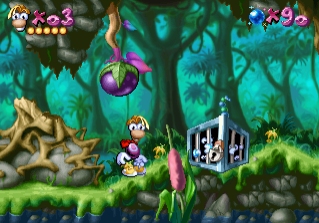
I see a big difference of them.
Re: Got a problem with Rayman 1!
Posted: Fri Mar 05, 2010 11:07 pm
by syntheticgerbil
How is that wrong? The pixels are still originally the same even if you have the Supereagle filter going over it. Besides, if the dude doesn't like the original graphics of the game, that's his problem.
SuperlolPwnz wrote:I see a big difference of them.
Oh yeah? What's the difference? Map size? Count the amount of pixels making Rayman from head to toe in both and tell me those numbers don't match.
We've already established in another thread the only difference is the Playstation and Saturn versions are using a thousands of colors, while the PC version uses 256. There is no resolution difference in the actual sprites or art outside of that and even then it seems to mostly impact the backgrounds more than the character sprites, since they probably can only use so many colors at once. The map size is larger in the PSX or Saturn versions to properly fit to a 4:3 TV display.
Re: Got a problem with Rayman 1!
Posted: Fri Mar 05, 2010 11:13 pm
by Droolie
syntheticgerbil wrote:How is that wrong? The pixels are still originally the same even if you have the Supereagle filter going over it. Besides, if the dude doesn't like the original graphics of the game, that's his problem.
You're partially right - the pixels are still the same. But he won't see a pixelated image anymore if he uses that.
And SuperlolPwnz, try resizing the bottom picture to the same size as the top picture. You won't see much difference then.

You could always try playing the game in windowed mode, with the resolution set to 320x240 or something. You'll get the same result as the bottom picture.
Re: Got a problem with Rayman 1!
Posted: Fri Mar 05, 2010 11:19 pm
by PluMGMK
Isn't that what I said before?
Re: Got a problem with Rayman 1!
Posted: Fri Mar 05, 2010 11:34 pm
by Droolie
Yep. And as you can see, I completely agree with you.
Re: Got a problem with Rayman 1!
Posted: Sat Mar 06, 2010 3:22 pm
by IllarKallas
syntheticgerbil wrote:How is that wrong? The pixels are still originally the same even if you have the Supereagle filter going over it. Besides, if the dude doesn't like the original graphics of the game, that's his problem.
Hey,i like the original graphics,but i played Rayman 1 on the PS1,so i want to feel im playing on a PS1 on a Joystick okay? I remember that when i played Rayman 1 in my PS1 (Its broken now) it was 0% pixelated
You re sounding a little agressive syntheticgerbil,i just wanted some help.
Re: Got a problem with Rayman 1!
Posted: Sun Mar 07, 2010 6:38 am
by Adsolution
The PC/PS1 resolution are the same, just the PS1 is a little taller.

On the PC version, use the hq3x or the opengl shader (I like the hq3x shader) in your dosbox.conf and use the DosBox.exe in your Rayman folder and NOT the normal application or it will revert.
Re: Got a problem with Rayman 1!
Posted: Sun Mar 07, 2010 2:55 pm
by spiraldoor
Drolpiraat wrote:Also, here's the US version of Rayman 1 for PS1. US, because that version has a smoother framerate.
It also lacks
the Magician's REAL voice.
Also, is anyone here familiar with the EPX3 filter? I have used it on Super Metroid, and it is glorious.
Re: Got a problem with Rayman 1!
Posted: Sun Mar 07, 2010 3:03 pm
by Cairnie
I really don't get why they have to have like two different voices for the Magician in the intro, they're both North American accents anyway whaaat
Re: Got a problem with Rayman 1!
Posted: Mon Mar 08, 2010 1:11 am
by IllarKallas
RayFan9876 wrote:The PC/PS1 resolution are the same, just the PS1 is a little taller.
On the PC version, use the hq3x or the opengl shader (I like the hq3x shader) in your dosbox.conf and use the DosBox.exe in your Rayman folder and NOT the normal application or it will revert.
I got that DOSbox based patch on the game,could you give me more info,or a link to that ''Hq3x Shader?''.
Re: Got a problem with Rayman 1!
Posted: Mon Mar 08, 2010 7:58 pm
by syntheticgerbil
SuperlolPwnz wrote:syntheticgerbil wrote:How is that wrong? The pixels are still originally the same even if you have the Supereagle filter going over it. Besides, if the dude doesn't like the original graphics of the game, that's his problem.
Hey,i like the original graphics,but i played Rayman 1 on the PS1,so i want to feel im playing on a PS1 on a Joystick okay? I remember that when i played Rayman 1 in my PS1 (Its broken now) it was 0% pixelated
You re sounding a little agressive syntheticgerbil,i just wanted some help.
I guess I am aggressive because I don't understand why the technology of games is so hard for people to grasp. And because I do this stuff all day at my job of doing art for small games.
It's impossible, for instance, for you to truthfully say when you originally played Rayman 1 it was 0% pixelated, because it's not like there's some 1028x768 version of Rayman 1 out there. All of the character sprites use the same pixel art and animation, and the only reason the original Rayman would have appeared smooth to you is if you were sitting far from a small CRT TV with bad clarity, hooked up with an R/F cable.
Playing classic games on a good modern monitor is going to show how the games really looked no matter what, basically.
Anyways, I do agree the Playstation or Saturn versions are the best you can get if you aren't looking for extra levels.
I would personally recommend playing it through an HDMI cable on a PS3 if possible (with the default screen stretching settings turned off). I guess I'm no fan of graphic filters because sometimes they can look funky and they weren't how the games looked originally in the first place.
Re: Got a problem with Rayman 1!
Posted: Tue Mar 09, 2010 1:00 am
by Adsolution
SuperlolPwnz wrote:RayFan9876 wrote:The PC/PS1 resolution are the same, just the PS1 is a little taller.
On the PC version, use the hq3x or the opengl shader (I like the hq3x shader) in your dosbox.conf and use the DosBox.exe in your Rayman folder and NOT the normal application or it will revert.
I got that DOSbox based patch on the game,could you give me more info,or a link to that ''Hq3x Shader?''.
Go to wherever you installed the patch, and in that Rayman folder there should be a file called "dosbox.conf". Open it with Notepad. In there you should see a column of settings. Change the "scaler=surface" to "scaler=hq3x". Then save and in that same folder DON'T run the Rayman exe with the icon or it will revert. Instead, run the DosBox.exe application in the same Rayman folder. The game should start up with some anti-aliasing. Or if you just want the pixels blurred instead of anti-aliased, set the scaler to "scaler=opengl".