Tonic Trouble Windows 10
Forum rules
Please keep the forum rules and guidelines in mind when creating or replying to a topic.
Please keep the forum rules and guidelines in mind when creating or replying to a topic.

Tonic Trouble Windows 10
I've wanted to buy Tonic Trouble for a while now though I'm wondering if it works on modern computers. I have windows 10 (though I have 7 on a hard drive I can use). I've heard there have been some graphical glitches on some computers, is that connected to the OS or the graphic card? I have Intel in case that helps

Re: Tonic Trouble Windows 10
Tonic Trouble game has two versions. Regular and Special Edition. Regular (common one) does not work on anything beyond Windows XP (not even Windows 7 32bit). Special Edition is rare for purchasing and that one works on every OS but latest GPU drivers cause horrible glitches. I do recall once owning some driver versions that were older and did not cause graphical glitches and the Special Edition then ran fine on Win 7.
Re: Tonic Trouble Windows 10
Ah, bummer. Guess I won't be purchasing it thenOCG wrote:Tonic Trouble game has two versions. Regular and Special Edition. Regular (common one) does not work on anything beyond Windows XP (not even Windows 7 32bit). Special Edition is rare for purchasing and that one works on every OS but latest GPU drivers cause horrible glitches. I do recall once owning some driver versions that were older and did not cause graphical glitches and the Special Edition then ran fine on Win 7.
 Cause there's no patch or anything that fixes it?
Re: Tonic Trouble Windows 10
I don't think there is a patch but I am not 100% sure. I didn't hear about one existing however.
-
anaphasiia

- Posts: 219
- Joined: Thu Jul 09, 2015 11:50 am
- Location: Manhattan
- Tings: 3495
Re: Tonic Trouble Windows 10
If they are the same glitches as Rayman 2 on the GTX 900 series, then nGlide should fix it.OCG wrote:Tonic Trouble game has two versions. Regular and Special Edition. Regular (common one) does not work on anything beyond Windows XP (not even Windows 7 32bit). Special Edition is rare for purchasing and that one works on every OS but latest GPU drivers cause horrible glitches. I do recall once owning some driver versions that were older and did not cause graphical glitches and the Special Edition then ran fine on Win 7.
Re: Tonic Trouble Windows 10
Tonic Trouble is not detected by nGlide because game does not use 3DFX in settings. At least Special Edition does not. Regular one might use it but that one does not want to run at all on anything above Win XP. So no, nGlide cannot fix anything about Tonic Trouble.
-
anaphasiia
- Posts: 219
- Joined: Thu Jul 09, 2015 11:50 am
- Location: Manhattan
- Tings: 3495
Re: Tonic Trouble Windows 10
Ah okay, that sucks.  I was looking forward to try Tonic Trouble soon too...
But, I have an older computer for that. I guess I just won't be playing at 4k.
But, I have an older computer for that. I guess I just won't be playing at 4k.
Re: Tonic Trouble Windows 10
I managed to get the Special Edition to work by using dgVoodoo. If you extract the setup program, and the required ddraw dll's into the same directory, there should be no graphical errors.
As for the normal version, I haven't found a way to even start the EXE (when I try, nothing happens). Looking at the exe in a debugger suggests it is either compressed or self modifying (or both), in a way that is not compatible with newer versions of Windows.
As for the normal version, I haven't found a way to even start the EXE (when I try, nothing happens). Looking at the exe in a debugger suggests it is either compressed or self modifying (or both), in a way that is not compatible with newer versions of Windows.
Re: Tonic Trouble Windows 10
I extracted files from archive into Tonic Trouble directory and I still have issues. Am I not doing it correct?
Re: Tonic Trouble Windows 10
I believe you need to copy the DLL files into the same directory as tonic trouble (they should be in the DDraw folder IIRC).OCG wrote:I extracted files from archive into Tonic Trouble directory and I still have issues. Am I not doing it correct?
Re: Tonic Trouble Windows 10
DDraw folder does not exist. Can you make a bit more detailed tutorial please.
Re: Tonic Trouble Windows 10
I actually got the special edition working without graphic problems when playing around with the setup. Here's how I had it:
[TONICT]
DDDriver=0
D3DDevice=1
Buffering=2
ScreenSize=1024x768
ParticuleRate=High
TexturesMem=Agp4
I am however having some other issues, mainly the camera being very weird and changing while I'm moving. It's also playing in like x2 speed in the menu at least, the maybe in the gameplay as well though it's hard to tell.
[TONICT]
DDDriver=0
D3DDevice=1
Buffering=2
ScreenSize=1024x768
ParticuleRate=High
TexturesMem=Agp4
I am however having some other issues, mainly the camera being very weird and changing while I'm moving. It's also playing in like x2 speed in the menu at least, the maybe in the gameplay as well though it's hard to tell.
Re: Tonic Trouble Windows 10
With your settings, I confirm that graphical glitches are gone but game works too slow for me and its unplayable
Re: Tonic Trouble Windows 10
Kind of the same problem I had, though it was fixed when I minimized the view-area in the settings. Though the menu screen is still x2 speed and the camera isn't working so it's unplayable for me as well
Edit: Tried a bit more and it seems the camera is supposed to be like that, which is weird.
Edit: Tried a bit more and it seems the camera is supposed to be like that, which is weird.
Re: Tonic Trouble Windows 10
Where is view-area in the settings? I don't see such option. Screenshot please.
Re: Tonic Trouble Windows 10
It's under Options > Video and Sound > Screen Size
You could possible also lower the resolution instead if you still want it fullscreen. Not sure if it will work though.
You could possible also lower the resolution instead if you still want it fullscreen. Not sure if it will work though.

Re: Tonic Trouble Windows 10
I can get Tonic Trouble (probably the Special Edition?) to run in Windows 10 (well, up to that one level that crashes if you don't have a patch) but it kind of looks like this.
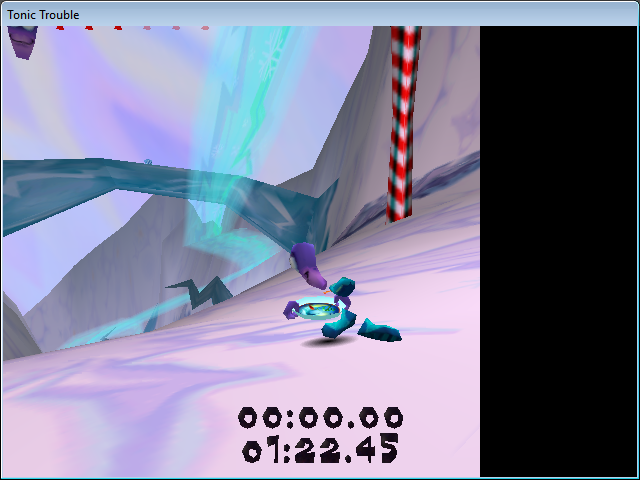
Also, it seems any resolution over 800x600 will crash the game.
PS: If anyone knows where I could find that patch for the OEM/Special Edition/Beta, that would be very helpful. The only place I knew where I could get it before was the official website, but that's been gone for a while now.
Also, it seems any resolution over 800x600 will crash the game.
PS: If anyone knows where I could find that patch for the OEM/Special Edition/Beta, that would be very helpful. The only place I knew where I could get it before was the official website, but that's been gone for a while now.
Re: Tonic Trouble Windows 10
Sorry, but I've no idea. Tonic Trouble seems to just not want to work on modern systems, which is too bad. I never really got my version to work either, so yeah.Mr. Nutt wrote:I can get Tonic Trouble (probably the Special Edition?) to run in Windows 10 (well, up to that one level that crashes if you don't have a patch) but it kind of looks like this.
Also, it seems any resolution over 800x600 will crash the game.
PS: If anyone knows where I could find that patch for the OEM/Special Edition/Beta, that would be very helpful. The only place I knew where I could get it before was the official website, but that's been gone for a while now.

Re: Tonic Trouble Windows 10
They should put it on gog, will make our lives easier
Re: Tonic Trouble Windows 10
Speaking of GOG, Tonic Trouble is in the community wishlist, though it doesn't have that many votes. I guess it might help its chances of getting added to the store if it got more votes.