Rayman M Pc controller doesn't work
Forum rules
Please keep the forum rules and guidelines in mind when creating or replying to a topic.
Please keep the forum rules and guidelines in mind when creating or replying to a topic.
-
Bessymate4eva

- Posts: 1
- Joined: Sun Aug 09, 2015 2:06 pm
- Tings: 5
Rayman M Pc controller doesn't work
Hi just got Rayman M for pc and seems to work fine on my windows 10 but I can't get my xbox 360 usb controller to work on the multiplayer mode. I tried x padder and that doesn't seem to work. Would I need to get a different controller? I don't know what kind of controllers will work for rayman M. Has anyone else had this problem?

Re: Rayman M Pc controller doesn't work
Howdy and welcome to the forum!
The solution is right here:
viewtopic.php?p=1045409#p1045409
I can guarantee it will work because I own the exact same controller as you .
.
The solution is right here:
viewtopic.php?p=1045409#p1045409
I can guarantee it will work because I own the exact same controller as you
.
Re: Rayman M Pc controller doesn't work
Such old game like Rayman M normally works with "DirectInput" controller.Bessymate4eva wrote:Hi just got Rayman M for pc and seems to work fine on my windows 10 but I can't get my xbox 360 usb controller to work on the multiplayer mode. I tried x padder and that doesn't seem to work. Would I need to get a different controller? I don't know what kind of controllers will work for rayman M. Has anyone else had this problem?
So first solution is "Use the DirectInput controller" for the game.
Secondly for ones having Xbox 360 controller and using it for Rayman M, Ribshark the genius devised dinput8.dll;
viewtopic.php?p=1011042#p1011042
It will convert Xinput signal to DirectInput to work in Raymam M.
Maybe need the Xbox 360 diver from Microsoft;
https://www.microsoft.com/hardware/en-u ... or-windows
Link has only for Windows 7 64bit or 32bit as the latest OS, but maybe good for Windows 10. Check it in Control Panel for your Xbox 360 controller.
Note that Xpadder will work for assigning the game controller button as keyboard signal for the game that does not recognize the game controller" but only keyboard. Yes Rayman M recognize the "DirectInput game controller" and keyboard, so using Xpadder the game get both signal, Xpadder output that shows keyboard signal and Xinput signal not like expected from DirectInput, Oh my !! poor Rayman M may got confused having both signals?
Am I in the right point on Xpadder with Xbox 360 controoler for Rayman M ?
If I am wrong, please correct lines above.
Last edited by IIITA on Mon Jul 11, 2016 11:13 pm, edited 1 time in total.
Re: Rayman M Pc controller doesn't work
Ahhmmm, I re-installed Rayman M into Windows 10 Pro 64bit today, and ran it to set the gamepad control which is DirectInput one.
Oh, no it did not recognize this controller although it worked in March 2016.
Maybe Windows10 got much update since this March and made this happen.
In previous installation and trial, in the option-controller setting menu, when I pointed the key and pressed ENTER key I would like to set "..." mark turned white and in the bottom of the screen "Please, press the new control key ....." was shown until I pushed the certain button on the controller to set it as the action. But today the line "Please, press the new control key ....." was shown in just a moment and disappeared right after I released the ENTER key, furthermore pushing the button of the game controller had nothing to change!!
Oh boy, what update Microsoft did !
So, now that DirectInput game controller did not work in Rayman M running in Windows 10 Pro 64bit, the best way to play the game with some controller IS THE ONE THAT RIBSHARK'S RECOMMENDED, I mean Xinput game controller with his dinput8.dll.
Oh, no it did not recognize this controller although it worked in March 2016.
Maybe Windows10 got much update since this March and made this happen.
In previous installation and trial, in the option-controller setting menu, when I pointed the key and pressed ENTER key I would like to set "..." mark turned white and in the bottom of the screen "Please, press the new control key ....." was shown until I pushed the certain button on the controller to set it as the action. But today the line "Please, press the new control key ....." was shown in just a moment and disappeared right after I released the ENTER key, furthermore pushing the button of the game controller had nothing to change!!
Oh boy, what update Microsoft did !
So, now that DirectInput game controller did not work in Rayman M running in Windows 10 Pro 64bit, the best way to play the game with some controller IS THE ONE THAT RIBSHARK'S RECOMMENDED, I mean Xinput game controller with his dinput8.dll.
Re: Rayman M Pc controller doesn't work
And now I need help from forum guys.
As all I have is "DirectInput game pad", is there any dll to make this gamepad work in Rayman M running in "current Windows 10 Pro 64bit" ?
This gamepad used to work in W10 64bit in this March for Rayman M but now by many update to W10 Rayman M does not recognize it anymore !!
That is sad, I would like to get the gamepad back to work.
Need help !!
EDIT : Of cause, this gamepad is rocognized by OS, looking into "USB Joystick" in "Device and Printer" and opening the "Game Controller Setting" for every button and stick setting. Even I got vivration of it. But with Rayman M, the pad did nothing !.
As all I have is "DirectInput game pad", is there any dll to make this gamepad work in Rayman M running in "current Windows 10 Pro 64bit" ?
This gamepad used to work in W10 64bit in this March for Rayman M but now by many update to W10 Rayman M does not recognize it anymore !!
That is sad, I would like to get the gamepad back to work.
Need help !!
EDIT : Of cause, this gamepad is rocognized by OS, looking into "USB Joystick" in "Device and Printer" and opening the "Game Controller Setting" for every button and stick setting. Even I got vivration of it. But with Rayman M, the pad did nothing !.
Last edited by IIITA on Tue Aug 09, 2016 6:02 am, edited 2 times in total.

Re: Rayman M Pc controller doesn't work
As stated by IIITA, the dinput8.dll doesn't work anymore on the latest version of Windows 10 (Threshold 2 and Redstone) for a lot of controllers.
See here : viewtopic.php?t=9727&start=80
See here : viewtopic.php?t=9727&start=80
Re: Rayman M Pc controller doesn't work
Oh what W10 IS !Shadorino wrote:As stated by IIITA, the dinput8.dll doesn't work anymore on the latest version of Windows 10 (Threshold 2 and Redstone) for a lot of controllers.
See here : viewtopic.php?t=9727&start=80
Not only my DirectInput controller but also Xinput controller is not recognized in Rayman M even with dinput8.dll !
I guess converted DirectInput signal from Xinput gamepad by dinput8.dll is not sensed anylonger in W10 becuase DirectInput gamepad is not recognized in Raman M running in W10 ?
If DirectInput gamepad works directly in Rayman M, Xinput gamepad with dinput8.dll will back to work ?
Re: Rayman M Pc controller doesn't work
I think so yes.If DirectInput gamepad works directly in Rayman M, Xinput gamepad with dinput8.dll will back to work ?
Now as why the gamepad support for Rayman M suddenly stopped, I have no clue...
Re: Rayman M Pc controller doesn't work
Amm, I happened to think I will update Windows 10 Pro 64bit to REDSTONE that is currently TH2.
It took almost 3 and half hour to complete the update, OMG.
After that, I checked my DirectInput gamepad ELECOM JC-U2812F, it's OK in "Device and Printer" section, I got even Vibration from it, so W10 recognized the gamepad. So far so good.
Now I uninstalled Rayman M and reinstalled it, then applied Shadorino's widescreen exe and cutscenes.
Setting "NO compatibility" to RaymanM.exe is now needed, if not I got "CD not found" problem even no DVD is in the drive and "Run as Admin" for eliminating "superstretched gamescreen in 4:3 window" problem.
Curiously, in TH2 I needed "Windows XP SP2" compatibility for the game, if not the gamescreen got superstretched horizontally in 4:3 aspect ratio window for eliminating both problems.
Note that the game started in "Full widescreen" without any help of dgVoodoo that I did not apply this time, actually forgot it.
So I was happy to see this in W10 REDSTONE.
Anyway starting the game, I tried to set the game control with the gamepad and ended up with NO control !
In W10 REDSTONE as well as TH2, my DirectInput gamepad did not work in Rayman M.
I spent pretty bucks for Logitech F310 gamepad this time for trying whether it will work or not in Rayman M running in W10 REDSTONE. I installed their "Logitech gaming software" as its driver along with Xbox 360 controller Software & Drivers from
For "Windows 7 64 bit" is the latest as choice of Xbox 360 controller Software & Drivers , I downloaded that and installed.
Now setting F310 switch to X (Xinput mode), I started Rayman M and tried to set the controller for play.
Oh F310 worked without dinput8.dll , but partially !!
All buttons could be set for each action, but right stick could not change "LOOK", in place of which Right trigger and Left trigger button on the pad worked changing "LOOK" vertically . Combining Camera right and left button with trigger button almost the same "LOOK" change could be simulated though it was slightly heavy to me.
Anyway F310 in XInput mode worked "partially" in Rayman M running in W10 Pro 64bit REDSTONE in my case.
I got confused why Rayman M recognizes the Xinput signal form F310 without dinput8.dll ?
And why the DirectInput gamepad stopped working in Rayman M ?
How are others ?
EDIT:
I tried Logitech's "Gaming Software" with F310 set in "D mode", then launched Rayman M from the tool.
In this case I could set all actions including "Right stick" for "LOOK".
I think F310 is working in "DirectInput mode" along with their "Logitech Gaming Software", now Rayman M recognized its DirectInput signal !! ??? although ELECOM JC-U2812F the DirectInput gamepad not worked ??? Why ??????
Wondering "Logitech Gaming Software" does some GOOD things to their F310 gamepad in DirectInput mode for working in Rayman M, if so, why not to other DirectInput gamepad with the similar method ?
There might be the "Version" that DirectInput signal has ? or simply the driver for ELECOM JC-U2812F got obsolete in REDSTONE as well as in TH2 though it worked till this March ?
EDIT1:
Note that ELECOM JC-U2812F IS STILL RECOGNIZED to W10 REDSTONE in "Device and Printer" section and I got even "vibration" in its property, I could not think the driver is obsolete as far as it works in Final Fantasy VII for PC in W10 REDSTONE.
It took almost 3 and half hour to complete the update, OMG.
After that, I checked my DirectInput gamepad ELECOM JC-U2812F, it's OK in "Device and Printer" section, I got even Vibration from it, so W10 recognized the gamepad. So far so good.
Now I uninstalled Rayman M and reinstalled it, then applied Shadorino's widescreen exe and cutscenes.
Setting "NO compatibility" to RaymanM.exe is now needed, if not I got "CD not found" problem even no DVD is in the drive and "Run as Admin" for eliminating "superstretched gamescreen in 4:3 window" problem.
Curiously, in TH2 I needed "Windows XP SP2" compatibility for the game, if not the gamescreen got superstretched horizontally in 4:3 aspect ratio window for eliminating both problems.
Note that the game started in "Full widescreen" without any help of dgVoodoo that I did not apply this time, actually forgot it.
So I was happy to see this in W10 REDSTONE.
Anyway starting the game, I tried to set the game control with the gamepad and ended up with NO control !
In W10 REDSTONE as well as TH2, my DirectInput gamepad did not work in Rayman M.
I spent pretty bucks for Logitech F310 gamepad this time for trying whether it will work or not in Rayman M running in W10 REDSTONE. I installed their "Logitech gaming software" as its driver along with Xbox 360 controller Software & Drivers from
Code: Select all
http://support.logitech.com/en_us/product/gamepad-f310Code: Select all
https://www.microsoft.com/accessories/en-us/products/gaming/xbox-360-controller-for-windows/52a-00006#techspecs-connectNow setting F310 switch to X (Xinput mode), I started Rayman M and tried to set the controller for play.
Oh F310 worked without dinput8.dll , but partially !!
All buttons could be set for each action, but right stick could not change "LOOK", in place of which Right trigger and Left trigger button on the pad worked changing "LOOK" vertically . Combining Camera right and left button with trigger button almost the same "LOOK" change could be simulated though it was slightly heavy to me.
Anyway F310 in XInput mode worked "partially" in Rayman M running in W10 Pro 64bit REDSTONE in my case.
I got confused why Rayman M recognizes the Xinput signal form F310 without dinput8.dll ?
And why the DirectInput gamepad stopped working in Rayman M ?
How are others ?
EDIT:
I tried Logitech's "Gaming Software" with F310 set in "D mode", then launched Rayman M from the tool.
In this case I could set all actions including "Right stick" for "LOOK".
I think F310 is working in "DirectInput mode" along with their "Logitech Gaming Software", now Rayman M recognized its DirectInput signal !! ??? although ELECOM JC-U2812F the DirectInput gamepad not worked ??? Why ??????
Wondering "Logitech Gaming Software" does some GOOD things to their F310 gamepad in DirectInput mode for working in Rayman M, if so, why not to other DirectInput gamepad with the similar method ?
There might be the "Version" that DirectInput signal has ? or simply the driver for ELECOM JC-U2812F got obsolete in REDSTONE as well as in TH2 though it worked till this March ?
EDIT1:
Note that ELECOM JC-U2812F IS STILL RECOGNIZED to W10 REDSTONE in "Device and Printer" section and I got even "vibration" in its property, I could not think the driver is obsolete as far as it works in Final Fantasy VII for PC in W10 REDSTONE.
Re: Rayman M Pc controller doesn't work
Well to summarize, it's a f*cking mess 
Re: Rayman M Pc controller doesn't work
Ya, it's a f*cking mess I agree.Shadorino wrote:Well to summarize, it's a f*cking mess
For now, I am satisfied with new controller Logitech F310 though it has no vibration capability.
Anyway I spent some bucks already on F310, I have no choice other than "satisfied".
Maybe the driver of ELECOM JC-U2812 will not work enough to transfer its signal to Rayman M in W10 Redstone I wonder.
Re: Rayman M Pc controller doesn't work
Some interesting info I stumbled upon that might be related to this sh*t fest :
http://arstechnica.com/gaming/2016/08/x ... right-now/
I ordered the new Xbox One S controller, I hope there won't be bigger issues than with the current one.
http://arstechnica.com/gaming/2016/08/x ... right-now/
I ordered the new Xbox One S controller, I hope there won't be bigger issues than with the current one.
Re: Rayman M Pc controller doesn't work
Did your F310 switched to "D" mode worked in Rayman M as in my case applying two files to W10 Redstone newly ?Shadorino wrote:Some interesting info I stumbled upon that might be related to this sh*t fest :
http://arstechnica.com/gaming/2016/08/x ... right-now/
I ordered the new Xbox One S controller, I hope there won't be bigger issues than with the current one.
Re: Rayman M Pc controller doesn't work:
In Windows 10 64bit Redstone
Deleted----
I was wrong.
EDIT:
I could not figure out what happened in my PC, but suddenly Rayman M got back the control of my gamepad ELECOM JC-U2812F, the DirectInput one.
Maybe somewhere I was testing many files related with DirectX, some components of DirectX 8.1 might be installed into \Windows\SysWow64, I wonder.......
Tested items were;
1. Original Rayman M retail 2 CD version usage. (Not Snagglebee's RaymanM_Remake.iso)
2. DirectX9.0c installation with directx_Jun2010_redist.exe
3. webinstaller of DirectX with dxwebsetup.exe
4. DirectX 8.1 installation with unarchived DX80eng.exe(I ran "dxsetup.exe" of its! )
If someone can figure out what's going on during the process above, it would be very appreciated.
Deleted----
I was wrong.
EDIT:
I could not figure out what happened in my PC, but suddenly Rayman M got back the control of my gamepad ELECOM JC-U2812F, the DirectInput one.
Maybe somewhere I was testing many files related with DirectX, some components of DirectX 8.1 might be installed into \Windows\SysWow64, I wonder.......
Tested items were;
1. Original Rayman M retail 2 CD version usage. (Not Snagglebee's RaymanM_Remake.iso)
2. DirectX9.0c installation with directx_Jun2010_redist.exe
3. webinstaller of DirectX with dxwebsetup.exe
4. DirectX 8.1 installation with unarchived DX80eng.exe(I ran "dxsetup.exe" of its! )
If someone can figure out what's going on during the process above, it would be very appreciated.
Re: Rayman M Pc controller doesn't work
On further test:
I deleted ELECOM JC-U2812F the gamepad driver manually, and re-installed it, found that THE CONTROLLER WAS NOT RECOGNIZED in Rayman M anymore !
Hey, the controller WAS RECOGNIZED, I am sure, but after simple uninstall-install process this happened.
And more weird, after few days in C:\Users\<username>\AppData\Local\Temp I found many DirectX related files there , maybe Windows 10 did download automatically I believe.
Now the gamepad GOT RECOGNIZED in Rayman M again !!! Like as fairly tales. I can't believe this.
Temporally I used RibShark's dinput8.dll during these hard time,
viewtopic.php?p=1011042#p1011042
but after I found DirectX related files in that folder my gamepad now works in Rayman M without dinput8.dll.
This means that gamepad unrecognition mostly depends upon OS side, not on the game Rayman M. Even the gamepad recognized in OS and in the control panel the pad can have the property to adjust itself, there still have missing DirectX files I guess.
EDIT;
Of course, I checked "Legacy components"-"DirectPlay" for on-demand direct play installation enabled;
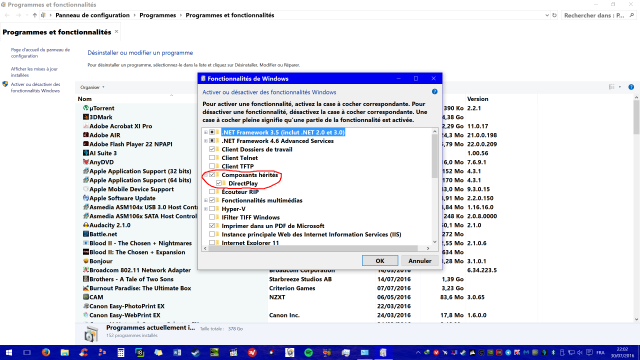
And after setting above, I rebooted PC, then ran DirectX web installer to check the insufficient components of DirectX.
As wise forum guys know, the components of Direct X8.1 or 9.0c are not included in DirectX12 of Windows 10.
And DirectX web installer did its work, I rebooted PC again for dll cache.
And maybe after this is the right turn to install gamepad driver ?
I deleted ELECOM JC-U2812F the gamepad driver manually, and re-installed it, found that THE CONTROLLER WAS NOT RECOGNIZED in Rayman M anymore !
Hey, the controller WAS RECOGNIZED, I am sure, but after simple uninstall-install process this happened.
And more weird, after few days in C:\Users\<username>\AppData\Local\Temp I found many DirectX related files there , maybe Windows 10 did download automatically I believe.
Now the gamepad GOT RECOGNIZED in Rayman M again !!! Like as fairly tales. I can't believe this.
Temporally I used RibShark's dinput8.dll during these hard time,
viewtopic.php?p=1011042#p1011042
but after I found DirectX related files in that folder my gamepad now works in Rayman M without dinput8.dll.
This means that gamepad unrecognition mostly depends upon OS side, not on the game Rayman M. Even the gamepad recognized in OS and in the control panel the pad can have the property to adjust itself, there still have missing DirectX files I guess.
EDIT;
Of course, I checked "Legacy components"-"DirectPlay" for on-demand direct play installation enabled;
And after setting above, I rebooted PC, then ran DirectX web installer to check the insufficient components of DirectX.
Code: Select all
https://www.microsoft.com/en-us/download/details.aspx?id=35And DirectX web installer did its work, I rebooted PC again for dll cache.
And maybe after this is the right turn to install gamepad driver ?