Help with Rayman 2 GOG Graphics Issue?
Forum rules
Please keep the forum rules and guidelines in mind when creating or replying to a topic.
Please keep the forum rules and guidelines in mind when creating or replying to a topic.

Help with Rayman 2 GOG Graphics Issue?
I have an Nvidia GTX 970 graphics card, and have followed all of the steps to try to fix the really low quality texture glitch, including changing the wrapper to nglide and moving those three .dll files into the .dll folder, and nothing has fixed it. I have no idea what is wrong and I really want to play this game again.

Re: Help with Rayman 2 GOG Graphics Issue?
Have you installed nGlide then ran the nGlide configuration and set it to your monitors resolution? Also set the games resolution using GXsetup (which is also how you select the dll files) and if that's not working for you, you can manually set the resolution in ubi.ini.screechy wrote:I have an Nvidia GTX 970 graphics card, and have followed all of the steps to try to fix the really low quality texture glitch, including changing the wrapper to nglide and moving those three .dll files into the .dll folder, and nothing has fixed it. I have no idea what is wrong and I really want to play this game again.
Just make sure to leave the number at the end on 16 for 16bit as 32bit doesn't work.
Make absolutely sure if you're using nGlide to set the resolution with the configurator in your start menu, that makes a huge difference.
If you need more help I also have a GTX970 and would be happy to do some testing

Re: Help with Rayman 2 GOG Graphics Issue?
for some reason I cannot edit ubi.ini because I don't have permission for some reason? I am the admin of my pc, however. I don't know why it's doing this.
-
PluMGMK

- Posts: 40581
- Joined: Fri Jul 31, 2009 9:00 pm
- Location: https://www.youtube.com/watch?v=cErgMJSgpv0
- Contact:
- Tings: 137021
Re: Help with Rayman 2 GOG Graphics Issue?
Well, to edit ubi.ini you need to run Notepad (or whatever) as admin. I guess you also need to make sure you run GXSetup as admin. Can you post a screenshot of GXSetup actually?
Also… Also congratulations on being our 5000th member!
Also… Also congratulations on being our 5000th member!
Re: Help with Rayman 2 GOG Graphics Issue?
Oh, are you referring to when you hit save and get access denied? What I usually just do is save the modified file to my Desktop, do that then drag it over and replace the one in the Rayman 2 folder, then it asks for permission and you allow it. There's another way where you add take ownership to your shortcut menu for when you right click and you can take ownership of the Rayman 2 folder.screechy wrote:for some reason I cannot edit ubi.ini because I don't have permission for some reason? I am the admin of my pc, however. I don't know why it's doing this.
The desktop way is easier in your case though it that's what you're referring to
Oh yeah and Hi, welcome to RPC.

Where are my manners

Re: Help with Rayman 2 GOG Graphics Issue?
Wow, I'm the 5000th member? Also thank you for welcoming me, I can already tell this is a very friendly well-knit community, and I'm glad to be a part of it! 
So, I've edited ubi.ini and changed the resolution to 1920x1080, and it hasn't changed the resolution.
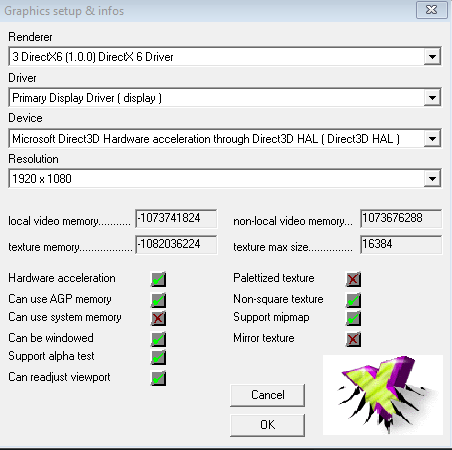 Here is my GXSetup, ran as admin, and I have also set the resolution to 1920x1080 (I am also on Windows 10, not Windows 7 by the way). I have set the renderer to the voodoo one (or whatever it was called), but that still didn't make a difference. Also, for some reason when I move GliVd1vf.dll from the Glide folder to the DLL folder, GXSetup does some weird thing where it flashes and makes the screen really low resolution, then goes back to my native resolution, and does that over and over again, and doesn't appear to stop, and I have only gotten it to actually work and have GXSetup pop up once, and even changing the renderer didn't work. Any ideas?
Also thank you guys for all of your help.
So, I've edited ubi.ini and changed the resolution to 1920x1080, and it hasn't changed the resolution.
Also thank you guys for all of your help.

Re: Help with Rayman 2 GOG Graphics Issue?
Welcome to the RPC screechy, you can introduce yourself here if you want : viewtopic.php?t=1616
I didn’t know much to fix your problem so i can’t help you about that. But maybe some members know more about your problem.
Btw, congratulation to be the 5000th members of the RPC.
I didn’t know much to fix your problem so i can’t help you about that. But maybe some members know more about your problem.
Btw, congratulation to be the 5000th members of the RPC.
Last edited by Birds858 on Sat Jul 28, 2018 5:46 pm, edited 1 time in total.
Re: Help with Rayman 2 GOG Graphics Issue?
OK, so if you haven't already, try this:
Download nglide from here http://www.zeus-software.com/downloads/nglide
Install that and then go to your Windows start menu and look for the nglide configuration program.
Run that and set that to your desired resolution.
Then you can use GliVd1vf.dll again and you should be all set
Download nglide from here http://www.zeus-software.com/downloads/nglide
Install that and then go to your Windows start menu and look for the nglide configuration program.
Run that and set that to your desired resolution.
Then you can use GliVd1vf.dll again and you should be all set
-
The Jonster

- Posts: 40835
- Joined: Sat Mar 24, 2018 6:15 am
- Location: The realm of Mario Karting
- Tings: 51265
Re: Help with Rayman 2 GOG Graphics Issue?
Welcome screechy and congrats on being #5000! For best usage I'd stick with nGLide. Though I can't really do much either. I have a Win10 laptop with Rayman 2 installed but I don't have the same problems aside from the flickering which is normal. Last time I checked last week anyway, but I'll test mine myself too to see.
Re: Help with Rayman 2 GOG Graphics Issue?
In nGlide, I already have my resolution set to 1920x1080, and it still has a very low resolution in game, along with the usual texture issues.
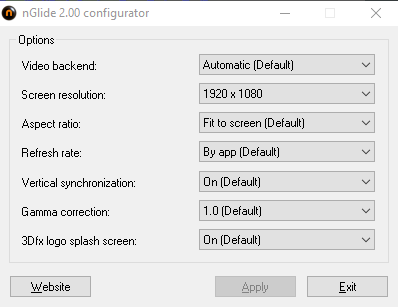
Does anything look wrong here?
Does anything look wrong here?
Re: Help with Rayman 2 GOG Graphics Issue?
No that seems fine. Have you run GXsetup as admin while using the dll? Also try XP compatibility mode. I know that sounds dumb but still. I'll switch over to windows 8 and check it out for you but I feel like it might be the version of the dll you have. I'm trying to find the one that works for you.
EDIT: Here's the dll that works: http://www.mediafire.com/file/3h28712de ... iVd1vf.dll
Also you can try turning off "3Dfx logo splash screen" to see if the undesired effects subside from GXsetup if all else fails.
EDIT2: Ah, I see what's happening here. Rayman 2 isn't 16:9 by default so it's not a valid resolution in nglide. Try using GliVd1vf.dll and put this in your ubi.ini
Then run Rayman 2 as administrator.
EDIT: Here's the dll that works: http://www.mediafire.com/file/3h28712de ... iVd1vf.dll
Also you can try turning off "3Dfx logo splash screen" to see if the undesired effects subside from GXsetup if all else fails.
EDIT2: Ah, I see what's happening here. Rayman 2 isn't 16:9 by default so it's not a valid resolution in nglide. Try using GliVd1vf.dll and put this in your ubi.ini
Code: Select all
[Rayman2]

Choose = 1

GLI_DllFile=GliVd1
GLI_Dll=Glide2
GLI_Driver=
GLI_Device=
GLI_Mode=1 - 1280 x 1024 x 16
Re: Help with Rayman 2 GOG Graphics Issue?
Okay, so it appears as if now when I run Rayman 2 as admin with the new dll, it does the weird glitch thing where the screen keeps flashing on and off and the game doesn't load. Also, GXSetup automatically runs in admin mode by default, so it has been ran in admin mode the whole time.
Re: Help with Rayman 2 GOG Graphics Issue?
Is that with the ubi.ini set up the way I posted? Also did you try disabling 3Dfx logo splash screen?screechy wrote:Okay, so it appears as if now when I run Rayman 2 as admin with the new dll, it does the weird glitch thing where the screen keeps flashing on and off and the game doesn't load. Also, GXSetup automatically runs in admin mode by default, so it has been ran in admin mode the whole time.
Just so I know what to test for you.
Re: Help with Rayman 2 GOG Graphics Issue?
Steo wrote:Is that with the ubi.ini set up the way I posted? Also did you try disabling 3Dfx logo splash screen?screechy wrote:Okay, so it appears as if now when I run Rayman 2 as admin with the new dll, it does the weird glitch thing where the screen keeps flashing on and off and the game doesn't load. Also, GXSetup automatically runs in admin mode by default, so it has been ran in admin mode the whole time.
Just so I know what to test for you.
Yup, I changed the ubi.ini to what you said, and I disabled the logo splash screen.
Re: Help with Rayman 2 GOG Graphics Issue?
OK then try changing the resolution back to the default setting in nglide configurator next and try it again. I'll do a few tests then if that still fails.
Are you using windows 10?
Are you using windows 10?
Re: Help with Rayman 2 GOG Graphics Issue?
Yes, I am using Windows 10.
Re: Help with Rayman 2 GOG Graphics Issue?
Then make sure you set Rayman 2.exe to Windows XP compatibility mode. In my case it wouldn't work in Windows 10 until I set it to that for some odd reason. Aside from that though I'll test out mine and see if it gives me the same problems you're having.
Re: Help with Rayman 2 GOG Graphics Issue?
Okay, so what just happened is weird. I set it to Windows XP Service Pack 3 compatibility (and ran it in admin mode), and it did the same flashing thing, but after it doing that for about a minute (this varies, it usually doesn't work at all) Rayman 2 displayed the loading screen (at my monitor's full resolution!!), but then once it finished it immediately crashed. Very odd indeed.
Re: Help with Rayman 2 GOG Graphics Issue?
I've heard of this issue actually. Try run GXsetup again using the same settings, XP compatibility and as Admin. Just try set it with that if it opens and choose 1280x1024 and make sure it's set to glide.
The flickering is normal, that usually happens when games are changing the resolution and Rayman 2 needs to run in 16bit colour where your desktop is 32bit colour.
If all else fails you can try use the WineD3D renderer like the Uplay version has.
EDIT: Wait, does the GoG version contain a folder in the "Rayman 2\DLL" folder named Glide?
The flickering is normal, that usually happens when games are changing the resolution and Rayman 2 needs to run in 16bit colour where your desktop is 32bit colour.
If all else fails you can try use the WineD3D renderer like the Uplay version has.
EDIT: Wait, does the GoG version contain a folder in the "Rayman 2\DLL" folder named Glide?
Last edited by Steo on Sat Jul 28, 2018 8:22 pm, edited 1 time in total.
Re: Help with Rayman 2 GOG Graphics Issue?
Steo wrote:I've heard of this issue actually. Try run GXsetup again using the same settings, XP compatibility and as Admin. Just try set it with that if it opens and choose 1280x1024 and make sure it's set to glide.
The flickering is normal, that usually happens when games are changing the resolution and Rayman 2 needs to run in 16bit colour where your desktop is 32bit colour.
If all else fails you can try use the WineD3D renderer like the Uplay version has.
EDIT: Wait, does the GoG version contain a folder in the "Rayman 2\DLL" folder named Glide?
I don't know why some of the options have a "---" instead of any real options, is that an issue? Also once again I am in windows 10, not windows 7.
Last edited by screechy on Sat Jul 28, 2018 8:40 pm, edited 1 time in total.