Rayman Control Panel (Rayman PC tools & utilities)

Discuss tools to aid in the modification and running of Rayman games.

Moderator: Modding and utilities team

Forum rules
Please keep the forum rules and guidelines in mind when creating or replying to a topic.
dr_st
General
Posts: 3008
Joined: Sat Aug 25, 2012 5:52 pm
Tings: 82518

Re: Rayman Control Panel (Rayman PC tools & utilities)

Post by dr_st »

RayCarrot wrote: Fri Jul 18, 2025 9:06 pmIn order to serialize a binary file you add a class here which inherits from BinarySerializable. You can see how the others implement it or ask me if you have any questions! I think the GBA save classes might be easiest to look at for examples.

Then once you have the serializable class you need to update the progression manager here to implement LoadSlotsAsync.
OK, I think I've pretty much finished with what I had in mind and tested it to the best of my ability. You should see the pull request shortly.
I've added a serializer utility as well, since it's pretty much "for free". I didn't add an encoder/decoder, because if I understood correctly, they are not relevant for this save type.
Lackdoom
Electoon
Posts: 3
Joined: Wed Apr 23, 2025 9:26 am
Tings: 15

Re: Rayman Control Panel (Rayman PC tools & utilities)

Post by Lackdoom »

could it also work for console? Like Xbox & PlayStation
Globalize
Lum (UbiArt)
Posts: 8
Joined: Tue Dec 02, 2025 1:19 am
Tings: 40

Re: Rayman Control Panel (Rayman PC tools & utilities)

Post by Globalize »

This program is so great. I play childhood Rayman games so easy with it. I wanna thank RayCarrot and anyone else involved.

Rayman 3 is my favorite game. I love to play it with some texture mods and fixes hehe, I use gamebanana. :D
Kathleen
Murkin
Posts: 1126
Joined: Sat Jun 08, 2013 4:21 am
Location: The Fairy Glade - Cat Girls FTW!
Tings: 1055

Re: Rayman Control Panel (Rayman PC tools & utilities)

Post by Kathleen »

I'm trying to get back into my Rayman games, and so far this software looks amazing I love it! I'm so totally glad people took the time out of their day to make this amazing software! Thanks a ton RayCarrot! :hap:

I have never done text mods before, and I would love to for Rayman 2 and Rayman 3, is gamebanana a good source for this? :hap:
RayCarrot
Carmen
Posts: 2476
Joined: Sat Jan 11, 2014 5:46 pm
Tings: 40322

Re: Rayman Control Panel (Rayman PC tools & utilities)

Post by RayCarrot »

Thanks :) I've recently together with some members from the modding community been going through and cleaning up the GameBanana pages for the Rayman games so they now have proper backgrounds, icons, categories etc. I'm hoping this can become a sort of hub for mods going forward, as it allows anyone to easily publish their own mods and have them downloadable through RCP.
Kathleen wrote: Tue Dec 02, 2025 1:45 am I have never done text mods before, and I would love to for Rayman 2 and Rayman 3, is gamebanana a good source for this? :hap:
Do you mean text or textures? If it's textures then you can use the Archive Explorer tool in RCP for that. GameBanana can be used to publish the mods, but there aren't any tools available there. I'm hoping to make some guides on there in the future though to make things easier.
Reese Riverson
Razorbeard
Posts: 40206
Joined: Wed Sep 03, 2003 5:32 pm
Location: R̸̨̧̛̝͎͔̹͉̫̞͚͎͈̫̲̘͕̞͔̼̣͍̞̤̹̫̘̼͚̤̮̟͍̺̯͍̜̹͓̤͖͎͌̀̿͗̍͌̈́̿̿͑̄̀͌̒̅͛̄̾̈͠ͅayman Pirate-Community Lodge
Contact:
Tings: 533677

Re: Rayman Control Panel (Rayman PC tools & utilities)

Post by Reese Riverson »

I've yet to perform any texture mods on Rayman 2, myself, as I've only done so for Rayman 3 along with using ReShade RT Global Illumination I've configured way back in 2021.

I think at that point I installed Rayman Control Panel, one of the HD texture packs, setup the ReShade thing, and I never had to change anything since, even when that one time Windows 10 nuked itself on me. I kept the install folder without issues. Needless to say RCP is likely severely out of date on my system.
Image


I probably should do a proper reconfiguration, so I can include Rayman 2 later. Though I don't really use DOSBOX for much anymore, as 86Box is where I've got a lot of DOS games running in now, and soon I'll use an actual MS-DOS rig for Rayman 1 anyway.


Also it sounds like you've been hard at work, RayCarrot! That's some nice dedication to see. :)
RayCarrot
Carmen
Posts: 2476
Joined: Sat Jan 11, 2014 5:46 pm
Tings: 40322

Re: Rayman Control Panel (Rayman PC tools & utilities)

Post by RayCarrot »

Oh nice! And yeah haha, RCP from 2021 is really old now 😅 It's come quite a long way over the years, starting out as me just wanting to make a tool to be able to edit the configuration files for the games, then shifting more to fixes/utilities and finally now to allow modding and more.
Reese Riverson wrote: Tue Dec 02, 2025 4:44 pm I probably should do a proper reconfiguration, so I can include Rayman 2 later. Though I don't really use DOSBOX for much anymore, as 86Box is where I've got a lot of DOS games running in now, and soon I'll use an actual MS-DOS rig for Rayman 1 anyway.
Oh wow, that's some dedication to play it on an actual MS-DOS device :o That's really cool!
Reese Riverson
Razorbeard
Posts: 40206
Joined: Wed Sep 03, 2003 5:32 pm
Location: R̸̨̧̛̝͎͔̹͉̫̞͚͎͈̫̲̘͕̞͔̼̣͍̞̤̹̫̘̼͚̤̮̟͍̺̯͍̜̹͓̤͖͎͌̀̿͗̍͌̈́̿̿͑̄̀͌̒̅͛̄̾̈͠ͅayman Pirate-Community Lodge
Contact:
Tings: 533677

Re: Rayman Control Panel (Rayman PC tools & utilities)

Post by Reese Riverson »

RayCarrot wrote: Tue Dec 02, 2025 9:54 pm Oh wow, that's some dedication to play it on an actual MS-DOS device :o That's really cool!
Thanks! Here's one of my actual MS-DOS machines pictured:
https://reeseriverson.com/ips-checkmate-retro-monitor/

It's a passion/hobby of mine with the retro computers. :)


But yeah, I'll probably try checking out the newer RCP at some point, I really hadn't needed to do anything other than the initial texture install process and I simply just launch Rayman 3 anytime I've ever needed it since. :oops2:
PluMGMK
Annetta Fish
Posts: 40508
Joined: Fri Jul 31, 2009 9:00 pm
Location: https://www.youtube.com/watch?v=cErgMJSgpv0
Contact:
Tings: 136606

Re: Rayman Control Panel (Rayman PC tools & utilities)

Post by PluMGMK »

Then there's me, playing it on MS-DOS booting natively on a PC from 2014 :hap:
Steo
Holly Luya
Posts: 36334
Joined: Sun Feb 25, 2018 3:57 pm
Location: Globox Village
Tings: 100545

Re: Rayman Control Panel (Rayman PC tools & utilities)

Post by Steo »

I still use the RCP through wine sometimes, but I definitely look forward to a Linux port in the future. :hap:
Kiza/Raybox
Romeo Patti
Posts: 306
Joined: Sun Nov 16, 2025 2:26 pm
Location: Moody Clouds
Contact:
Tings: 7052

Re: Rayman Control Panel (Rayman PC tools & utilities)

Post by Kiza/Raybox »

Ooh! That sounds pretty interesting ngl... Also I'm gonna make the extended version of the upcoming mod on R3
RayCarrot
Carmen
Posts: 2476
Joined: Sat Jan 11, 2014 5:46 pm
Tings: 40322

Re: Rayman Control Panel (Rayman PC tools & utilities)

Post by RayCarrot »

After months of work, and what started as a minor quality of life update, I've now finished up version 14.3.0 and released it :) This version has some major improvements for the mod loader which I'll go over here. Before that though I'll list some of the other additions:
• Added support for the fan-games Rayman 2 Redreamed Demo, Rayman 3 Havoc Reignited and Rayman Lum'o'Grams Demo
• Added progression for Tonic Trouble and Rayman Raving Rabbids 2
• The program has now been translated to simplified Chinese (thanks Clef!)
• Added a serializer for Rayman Legends (PS Vita) and Rayman Legends (PS4) save files
• Added a utility for generating Rayman 1 GBC passwords
• A lot of other improvements, changes and bug fixes

And now for the improved mod loader. To start with, the entire download page has now been redesigned. Mods now appear in a grid with thumbnails. The list also loads a lot faster, including when scrolling down the list.
Mod Download Page.png
Clicking on a mod now also brings it up in a separate view, showcasing more details like screenshots, credits etc. The description is now also formatted!
Mod Details.png
Other mod loader improvements include:
• Mods now get downloaded in the background, allowing multiple mods to be downloaded at the same time
• Mods can now specify other required mods as dependencies which get automatically installed alongside the mod
• Mods can now specify a minimum app version for the Rayman Control Panel
• Redesigned the game panel to show the total amount of installed and available downloadable mods

With this I've also made a big effort to tighten the GameBanana integration with RCP. I've added support for various new games, and if there are some missing then just let me know! To facilitate this I've been accepted as a game manager (essentially a moderator) on GameBanana for all the supported Rayman games. With this I've been able to improve each game page, adding proper banners, backgrounds, categories and more. These categories also show up in RCP, allowing you to easily filter the mods:
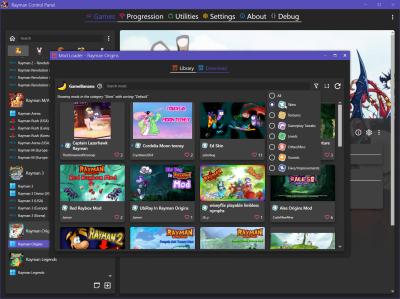
Mod Categories.png
Besides cleaning up the game pages on GameBanana I've also updated existing mods across all Rayman games to have proper categories. So if anyone sees a message that I edited their mod then that's why. On a similar note, as a game manager I'm also forced to make sure the mods follow the rules on GameBanana. So if you notice your mod has been withheld by me then that is because one of the rules were broken, usually a matter of some missing credits or use of AI-generated content without specifying the model (which is something that's required on GameBanana). Since I've had a couple of people ask, a mod being withheld does not mean it has been reported or trashed! It's simply a temporary withholding, letting the creator know something needs to be fixed. I try to specify the details of what the issue was and then once it's fixed the mod is back up again :) If you believe I incorrectly withheld your mod then just let me know.
Also if someone else wants to help out moderating the Rayman games on GameBanana then by all means! I'd gladly let someone else take over that role as I'm generally not into dealing with moderation. And ofc if anyone has any questions about anything related to the Rayman games on GameBanana then please let me know! I and other people in the community have spent a lot of hours over the past months making sure it's set up as good as possible, hoping this can become the go-to place for Rayman mods. I'm planning on making some tutorials in the future as well to make it easier to create and upload your own mods.

And speaking of mods, I've uploaded some new ones on GameBanana for the handheld games which might be of interest to some people!
• A mod to access the Ubi Cliff level in Rayman GBC without the Ubi Key: https://gamebanana.com/mods/636637
• A mod for accessing the unused multiplayer mode in Rayman Advance: https://gamebanana.com/mods/637378
• A mods to restore the proper movement speed in Rayman Advance: https://gamebanana.com/mods/637497
• A mod to restore the auto-scrolling sections in Rayman Advance: https://gamebanana.com/mods/637488
• A mod for enabling the debug mode in Raving Rabbids GBA: https://gamebanana.com/mods/637500
Rayman Advance Multiplayer.jpg
dr_st
General
Posts: 3008
Joined: Sat Aug 25, 2012 5:52 pm
Tings: 82518

Re: Rayman Control Panel (Rayman PC tools & utilities)

Post by dr_st »

Thank you for this awesome update. :up:
RayCarrot
Carmen
Posts: 2476
Joined: Sat Jan 11, 2014 5:46 pm
Tings: 40322

Re: Rayman Control Panel (Rayman PC tools & utilities)

Post by RayCarrot »

And thank you for your help with the update! :)
Hunchman801
Bad Rayman
Posts: 87621
Joined: Thu Aug 07, 2003 6:50 pm
Location: Paris, France
Contact:
Tings: 640217

Re: Rayman Control Panel (Rayman PC tools & utilities)

Post by Hunchman801 »

Congrats RayCarrot on the impressive update! And thanks to everyone who helped with it. :up:
Mortamon Saturn
Mr Sax
Posts: 3892
Joined: Mon Oct 02, 2017 10:12 pm
Location: La Grotte des Mauvais Rêves
Contact:
Tings: 62000

Re: Rayman Control Panel (Rayman PC tools & utilities)

Post by Mortamon Saturn »

In the current updates, there's a small surprise that can be found in RCP during this very specific day!
Can you find all the "raving" creatures? :hehe:
Arcxne0
Electoon
Posts: 1
Joined: Tue Apr 07, 2026 4:42 am
Tings: 5

issues with game directory and RCP

Post by Arcxne0 »

hello, im new to the community and nobody in the discord has helped me, but I have a little issue.

I want to play Rayman legends modded with RCP like everyone does, but I cant add the game to the control panel as rcp cannot locate "bundle_ipk.pc"
im aware that this file has something to do with the games files being compressed or compiled or something and RCP uses that file to edit and mod the game but i don't have much idea what it is.

the file isn't in my game directory, but ive played through the majority of game (ive done 600 or something teensies) but idk why I can't mod the game, its confusing.

but yeah, can someone tell me why I don't have that file and or how I can get the file so I can start modding? thanks guys :P :D
RayCarrot
Carmen
Posts: 2476
Joined: Sat Jan 11, 2014 5:46 pm
Tings: 40322

Re: Rayman Control Panel (Rayman PC tools & utilities)

Post by RayCarrot »

A few days ago I released a new update which adds full progression and modding support to the new 30th Anniversary Edition.

For the progression it tracks your progress across the PS1, MS-DOS, Jaguar and GBA versions. You can also import/export saves between the original versions, meaning you can for example import a GBA save from mGBA. Sadly the MS-DOS expansions can't be tracked as they don't save the progress, and the GBC version has no save system.
Rayman_Control_Panel_GZRTljViPL.png
The Archive Explorer now supports modifying the contents of the assets.pie file, allowing you to extract and modify the assets.
Rayman_Control_Panel_xI21yrbxQj.png
And finally there is full modding support through GameBanana, alongside modules for replacing specific assets in the game. Several mod are also available, fixing various issues such as:
- Making the Ubi Key bonus accessible
- Allowing access to the two locked levels in By his Fans
- Fixing the slowdowns in the MS-DOS version
- Restoring parallax background scrolling in the MS-DOS version
- Fixing the window icon not displaying
There is also a mod for every version to restore the original soundtrack. In the case of the MS-DOS version it uses the original PS1 soundtrack instead, playing a unique track per map rather than one combined track per world.
Rayman_Control_Panel_m39Um2vcIM.png
Kisha Dragon
The First King
Posts: 155
Joined: Tue Mar 13, 2007 12:34 am
Location: Melbourne
Tings: 5795

Re: Rayman Control Panel (Rayman PC tools & utilities)

Post by Kisha Dragon »

Hi everyone,
So I'm having a rather unique issue with my Rayman 1 game.
I own the GOG version and I noticed there was a big update for the Rayman control panel, so I updated it.
I downloaded all the mods it recommended and I set the "game client" to GOG...unsure if that was the right thing to do but I did it anyway.
When I open the game, I manage to get the intro screen and the menu, but when I load into my save, my mouse shows up and the game crashes on me and closes the game. I've tried many times to uninstall the gog version and reinstall it and also remove any history or files of the Rayman control panel and it seems to work fine once the mods are gone from the game, but once I try to add everything back on from the Rayman Control Panel, it tends to do the same issue. I'm thinking that it's clashing with DOSBox or something but I'm really no good at this stuff. I'd really like some help if anyone is able to fix this issue for me

I do use discord if someone is willing to help me with this and show me step by step, as I'm a real noob when it comes to modding things and I just want my Rayman dos version game to work like it did before this huge Rayman Control Panel update. The game was working perfectly fine, so I'm not sure what it is I'm doing wrong.
Hunchman801
Bad Rayman
Posts: 87621
Joined: Thu Aug 07, 2003 6:50 pm
Location: Paris, France
Contact:
Tings: 640217

Re: Rayman Control Panel (Rayman PC tools & utilities)

Post by Hunchman801 »

I'll leave it for specialists to answer your question, but I certainly did not expect your name to pop up! Hope life's been treating you well for the past, what, two decades now? Is it the recent leaks that brought you back to the series, or just a coincidence? Regardless, it's nice to see you pop by. :winkgrin:
Post Reply