
The same thing happened for some people trying to install The Emperor's New Groove game, and some old Office, CAD, or other applications.
You can try out copying game files from the CD, to your SSD/HDD. It might be in the following path (not sure):
Setup\ENG\Cd
And then run the game following all the necessary instructions in the first post.
Actually it's confirmed to work with TENG game
https://www.pcgamingwiki.com/wiki/The_E ... _correctly
I hope the files are not packed in cab files, so you won't need e.g. UniExtract 2 to extract them and it's the same case.
If you still want to hassle with 103 error:
Maybe try to open your disk with the game, and find setup.exe (might be in some subfolder, e.g. Setup folder) instead of running it from the game launcher (so not the app listed in autorun.ini on the disk), and maybe run it as admin.
Or if you cannot locate it (if there isn't setup.exe) maybe try to run the launcher executable as admin too, and then proceed (although it can be some other exe responsible for setup too, try to look around, even in subfolders like e.g. Setup)
Also, you can ensure that you're running the installation from game image mounted in the system, instead of files extracted elsewhere. Or the opposite (although I read it didn't help someone) - if you're running the installation from e.g. virtual disk image mounted (or simply CD inserted to your computer) try to copy all the files to your disk location and start installation (or extract image file, e.g. ISO file and then start installation)
For more you can read:
https://www.techyv.com/questions/setup- ... ation/amp/
Alternatively, the method relying on pasting _setup.dll manually into system location:
https://community.spiceworks.com/topic/ ... try-810959
Just the file link is no longer accessible, so maybe grab it from game disk, or if it's not available there, get similar v. 12 version like in that link.
Most importantly, make a backup of the file, if it already exists in your system. After you finish, I'd restore the old file as it was before.
Generally _setup.dll should be located near setup executable. If it's not present there, I'd copy all the installation files to your drive (e.g. folder created on desktop), place the file there manually, and then start the installation, but it would point out to some installation files corruption (bad game image) which is rather not the case here.
How to get Donald Duck: Goin' Quackers/Quack Attack working on your PC!
Moderator: Modding and utilities team
Forum rules
Please keep the forum rules and guidelines in mind when creating or replying to a topic.
Please keep the forum rules and guidelines in mind when creating or replying to a topic.

Re: How to get Donald Duck: Goin' Quackers/Quack Attack working on your PC!
Interesting. Are you running the setup as an administrator? Is the ISO mounted properly? Does this happen when choosing other languages? If you have done all of these, open the setup folder in the ISO and check for that required DLL. If it doesn't exist, try redownloading the ISO.EdFalcon wrote: Sat Nov 11, 2023 8:32 am Hello from Mindanao Philippines! I wanted desperately to install this game to my Windows 10 PC for my grandchild, but I failed. I did everything as per your instructions. But when I run Setup.exe, and I click Install now, all I get is: Choose setup language [I choose English (United Kingdom)] Then after I click OK I get only: Setup is unable to find _SETUP.DLL, which is needed to complete the installation. Error 103.
-
gordonfreeman

- Posts: 9
- Joined: Sun Feb 11, 2024 3:15 pm
- Tings: 45
Re: How to get Donald Duck: Goin' Quackers/Quack Attack working on your PC!
Hi, I was getting this issue for "English (United Kingdom)" too and fixed it by selecting just "English" by scrolling up in the language list. Hopefully this helps everyone facing this issue!EdFalcon wrote: Sat Nov 11, 2023 8:32 am Hello from Mindanao Philippines! I wanted desperately to install this game to my Windows 10 PC for my grandchild, but I failed. I did everything as per your instructions. But when I run Setup.exe, and I click Install now, all I get is: Choose setup language [I choose English (United Kingdom)] Then after I click OK I get only: Setup is unable to find _SETUP.DLL, which is needed to complete the installation. Error 103.
Also, could anyone please confirm:
- What compatibility mode the game should be run under?
- What are all the fixes included in the pack? Would be good to know the specifics for anyone trying to patch up the game from scratch in the future.
- What does this file do: "Data\World\levels\LEVELS0.DAT"
Last edited by gordonfreeman on Sun Feb 11, 2024 3:34 pm, edited 1 time in total.
Re: How to get Donald Duck: Goin' Quackers/Quack Attack working on your PC!
hey guys, so i couldn't get this to work.
i tried it twice, step by step. but it simply starts, i get a white screen for maybe 2 seconds and then the program just shutdowns. i tried compatibility mode, i tried otvdm and both didn't work. i also updated graphics driver, direct x and vc redist.
idk if important but:
- win 11 pro
- amd ryzen cpu
- amd graphics card
any suggetions?
i tried it twice, step by step. but it simply starts, i get a white screen for maybe 2 seconds and then the program just shutdowns. i tried compatibility mode, i tried otvdm and both didn't work. i also updated graphics driver, direct x and vc redist.
idk if important but:
- win 11 pro
- amd ryzen cpu
- amd graphics card
any suggetions?
-
PluMGMK

- Posts: 40581
- Joined: Fri Jul 31, 2009 9:00 pm
- Location: https://www.youtube.com/watch?v=cErgMJSgpv0
- Contact:
- Tings: 137021
Re: How to get Donald Duck: Goin' Quackers/Quack Attack working on your PC!
I wonder if it's a DEP issue... There are some tips to deal with that further down the previous page of this topic (though I'm not sure do they still apply on Win11  )
)
)Re: How to get Donald Duck: Goin' Quackers/Quack Attack working on your PC!
i tried that actually, still no success sadly. i can make it work without the resolution and fps patches, but then it'S tiny and the text and some textures are super blurry.
update: followed the yt tutorial of zitzar, sadly his links don't work but i googled everything i needed and it worked. i really have no clue what the problem is.
update: followed the yt tutorial of zitzar, sadly his links don't work but i googled everything i needed and it worked. i really have no clue what the problem is.
Last edited by PluMGMK on Fri Aug 22, 2025 4:52 pm, edited 1 time in total.
Reason: posts merged, please don't double post
Reason: posts merged, please don't double post
-
gordonfreeman
- Posts: 9
- Joined: Sun Feb 11, 2024 3:15 pm
- Tings: 45
Re: How to get Donald Duck: Goin' Quackers/Quack Attack working on your PC!
Did you try dgVoodoo2 and the other steps on https://www.pcgamingwiki.com/wiki/Donal ... 7_Quackers?seto7 wrote: Fri Aug 22, 2025 12:24 pm hey guys, so i couldn't get this to work.
i tried it twice, step by step. but it simply starts, i get a white screen for maybe 2 seconds and then the program just shutdowns. i tried compatibility mode, i tried otvdm and both didn't work. i also updated graphics driver, direct x and vc redist.
idk if important but:
- win 11 pro
- amd ryzen cpu
- amd graphics card
any suggetions?
-
PluMGMK
- Posts: 40581
- Joined: Fri Jul 31, 2009 9:00 pm
- Location: https://www.youtube.com/watch?v=cErgMJSgpv0
- Contact:
- Tings: 137021
Re: How to get Donald Duck: Goin' Quackers/Quack Attack working on your PC!
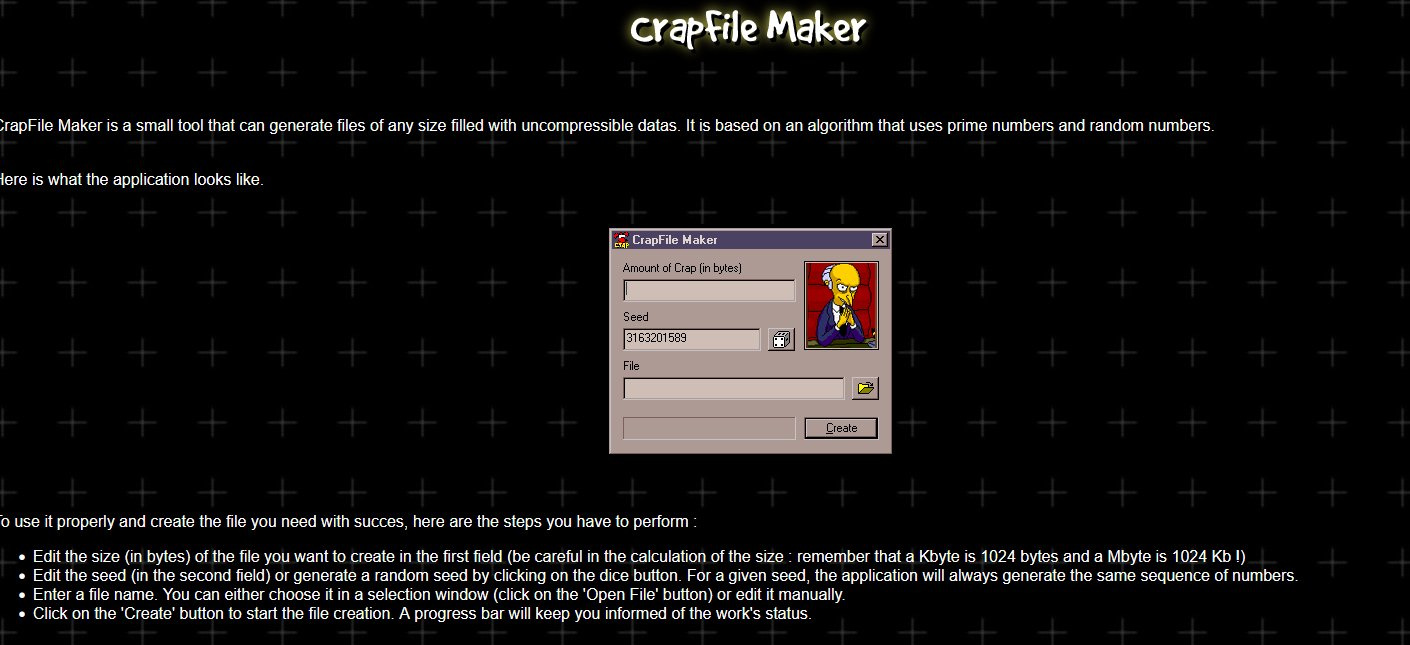
Forgot to respond to this when it was originally posted… As far as I know it's a fake file full of garbage used by the DRM code in the game to verify that you've got the right CD / otherwise legitimate copy. Probably generated using this tool:gordonfreeman wrote: Sun Feb 11, 2024 3:25 pm What does this file do: "Data\World\levels\LEVELS0.DAT"
-
gordonfreeman
- Posts: 9
- Joined: Sun Feb 11, 2024 3:15 pm
- Tings: 45
Re: How to get Donald Duck: Goin' Quackers/Quack Attack working on your PC!
Thanks, fascinating approach to DRM (although DRM itself is irritating).PluMGMK wrote: Fri Aug 22, 2025 6:33 pmForgot to respond to this when it was originally posted… As far as I know it's a fake file full of garbage used by the DRM code in the game to verify that you've got the right CD / otherwise legitimate copy. Probably generated using this tool:gordonfreeman wrote: Sun Feb 11, 2024 3:25 pm What does this file do: "Data\World\levels\LEVELS0.DAT"
-
AlphaYellow

- Posts: 36
- Joined: Tue Aug 17, 2021 12:42 am
- Contact:
- Tings: 180
Re: How to get Donald Duck: Goin' Quackers/Quack Attack working on your PC!
Was the camera culling fixed yet? The sides have disappearing objects & geometry with the widescreen changes sadly... I've tried investigating the game myself and found the code for HFOV and VFOV, but couldn't find anything for the culling issue.
Re: How to get Donald Duck: Goin' Quackers/Quack Attack working on your PC!
I did mange to fix the culling issues by editing values in fix.sna but I really don't like using that approach for widescreen patches anymore because editing the camera functions in the exe is a much better approach.AlphaYellow wrote: Sun Aug 31, 2025 5:32 pm Was the camera culling fixed yet? The sides have disappearing objects & geometry with the widescreen changes sadly... I've tried investigating the game myself and found the code for HFOV and VFOV, but couldn't find anything for the culling issue.
-
gordonfreeman
- Posts: 9
- Joined: Sun Feb 11, 2024 3:15 pm
- Tings: 45
Re: How to get Donald Duck: Goin' Quackers/Quack Attack working on your PC!
Would you consider releasing that fix as currently there's no generally available alternative?Garo wrote: Fri Oct 17, 2025 11:18 pm I did mange to fix the culling issues by editing values in fix.sna but I really don't like using that approach for widescreen patches anymore because editing the camera functions in the exe is a much better approach.
Re: How to get Donald Duck: Goin' Quackers/Quack Attack working on your PC!
Unfortunately I lost the original files for that patch but if I were to restart development on a widescreen patch I would do the exe method.gordonfreeman wrote: Sat Oct 18, 2025 3:37 pm Would you consider releasing that fix as currently there's no generally available alternative?

Re: How to get Donald Duck: Goin' Quackers/Quack Attack working on your PC!
I am currently working on a widescreen/FOV fix for this game in the form of an ASI patch. I have already managed to implement the camera function patch that Garo mentioned. Just give me some more time to implement all the other necessary fixes (e.g. making the game portable, skipping the CD check, fixing the HUD) 
-
gordonfreeman
- Posts: 9
- Joined: Sun Feb 11, 2024 3:15 pm
- Tings: 45
Re: How to get Donald Duck: Goin' Quackers/Quack Attack working on your PC!
Awesome, thanks a tonne!lk19 wrote: Sun Oct 19, 2025 3:52 pm I am currently working on a widescreen/FOV fix for this game in the form of an ASI patch. I have already managed to implement the camera function patch that Garo mentioned. Just give me some more time to implement all the other necessary fixes (e.g. making the game portable, skipping the CD check, fixing the HUD)
-
platinumb3rlitz

- Posts: 3
- Joined: Wed Oct 22, 2025 11:55 pm
- Tings: 15
Re: How to get Donald Duck: Goin' Quackers/Quack Attack working on your PC!
this might sound crazy but does anyone know how to get the no disc patch working in windows 98?
whenever i try to run it it always shows a blank "donald" window for a few seconds before closing
whenever i try to run it it always shows a blank "donald" window for a few seconds before closing
Re: How to get Donald Duck: Goin' Quackers/Quack Attack working on your PC!
Hi everyone. I have finished the Donald Duck: Goin' Quackers Widescreen & Compatibility Fix. Please check out my GitHub (https://github.com/lukek19/CPAGameFixes) for the latest release.
Please note that the fix was developed for the regular retail release of the game. The official Russian "portable" version was not tested, but should work. It simply has a few of the same patches hard-coded into the game's exe. In this case, please set CompatibilityPatch, NoCD and MakePortable to false (although it shouldn't do any harm to patch the code twice). Note that the Russian version is not really "portable", as the game stores its savegames and configuration in %appdata%\Disney\DonaldDuck.
Please do not use any pre-patched Donald.exe (e.g. for widescreen aspect ratios) with this patch. Also, please do not apply the "DonaldDuckPatcher" to the exe, as these patches are already included in the fix!
Known Issues:
Weird looking symbols in the top left corner
This is actually not a bug. The symbols are actual HUD elements, stored in this position when they are not needed. At 4:3 aspect ratio they are off-screen, but at wider aspect ratios (which the developers never intended) they become visible. If you press "9" on the keyboard, they will magically teleport to their proper position in the HUD.
To fix this, one would likely need to edit \Data\World\Levels\MapMonde\MapMonde.sna, which is currently out-of-scope for this patch.
Background elements in 2D sidescrolling levels
In the sidescrolling levels, the 3D background elements will sometimes clip in and out of view. This is likely related to the game's draw distance and I currently do not have a fix for this.
Please note that the fix was developed for the regular retail release of the game. The official Russian "portable" version was not tested, but should work. It simply has a few of the same patches hard-coded into the game's exe. In this case, please set CompatibilityPatch, NoCD and MakePortable to false (although it shouldn't do any harm to patch the code twice). Note that the Russian version is not really "portable", as the game stores its savegames and configuration in %appdata%\Disney\DonaldDuck.
Please do not use any pre-patched Donald.exe (e.g. for widescreen aspect ratios) with this patch. Also, please do not apply the "DonaldDuckPatcher" to the exe, as these patches are already included in the fix!
Known Issues:
Weird looking symbols in the top left corner
This is actually not a bug. The symbols are actual HUD elements, stored in this position when they are not needed. At 4:3 aspect ratio they are off-screen, but at wider aspect ratios (which the developers never intended) they become visible. If you press "9" on the keyboard, they will magically teleport to their proper position in the HUD.
- Object1.png (3.7 KiB) Viewed 910 times
- Object2.png (30.21 KiB) Viewed 910 times
Background elements in 2D sidescrolling levels
In the sidescrolling levels, the 3D background elements will sometimes clip in and out of view. This is likely related to the game's draw distance and I currently do not have a fix for this.
-
platinumb3rlitz
- Posts: 3
- Joined: Wed Oct 22, 2025 11:55 pm
- Tings: 15
Re: How to get Donald Duck: Goin' Quackers/Quack Attack working on your PC!
tried the patcher and followed the instructions to the letter but it keeps saying "please insert the cd" even though "NoCD" is set to true
also how would i go around getting the russian no cd fix (bugfixes.dll and all that) running on windows 98? when i try to open the game all it does is show a "donald" window that scales to the resolution and then closes after about 5 seconds
also how would i go around getting the russian no cd fix (bugfixes.dll and all that) running on windows 98? when i try to open the game all it does is show a "donald" window that scales to the resolution and then closes after about 5 seconds
Last edited by platinumb3rlitz on Thu Oct 30, 2025 4:15 am, edited 1 time in total.
Re: How to get Donald Duck: Goin' Quackers/Quack Attack working on your PC!
Are you sure you copied over the game files from the CD manually instead of running the installer? If you run the installer, the game does not copy \Donald\Data\World\Levels\LEVELS0.DAT, which is basically just a garbage file that is needed for the CD check.platinumb3rlitz wrote: Thu Oct 30, 2025 4:15 am tried the patcher and followed the instructions to the letter but it keeps saying "please insert the cd" even though "NoCD" is set to true
Also: The fix is only compatible with Windows 10/11.
Are you trying to run the game on a genuine Windows 98 system without a disc drive? Or are you trying to run it in a virtual machine. I have never managed to get these games running in a VM, because they are DirectX 6 and support for Direct3D 6 is VERY limited with the VM video drivers!platinumb3rlitz wrote: Thu Oct 30, 2025 4:15 am also how would i go around getting the russian no cd fix (bugfixes.dll and all that) running on windows 98? when i try to open the game all it does is show a "donald" window that scales to the resolution and then closes after about 5 seconds
If you are running on an real Win 98 system, then I guess the reason is that the Russian version contains some compatibility fixes that may not work on Windows 98. If you just need a No CD patched EXE, without any of the other fixes, send me a PM.
Re: How to get Donald Duck: Goin' Quackers/Quack Attack working on your PC!
Quick update: I have updated the FMV Troubleshooting guide to fix the FMVs being too small and stretched
https://github.com/lukek19/CPAGameFixes ... hooting.md
https://github.com/lukek19/CPAGameFixes ... hooting.md