
Thank you.
(PC/MS-DOS)
Ok it's not on ps1. I'm playing the level right now and there no sign at all there!
Rayman 1
Forum rules
Please keep the forum rules and guidelines in mind when creating or replying to a topic.
Please keep the forum rules and guidelines in mind when creating or replying to a topic.
-
Master

- Posts: 53542
- Joined: Sun Aug 21, 2011 10:14 am
- Location: Somewhere specific, I'd assume.
- Tings: 468310
Re: Rayman 1
Wasn't he asking about the PS1 version?
http://youtu.be/EymZ-fIg04Y?t=23s
http://youtu.be/EymZ-fIg04Y?t=23s

Re: Rayman 1
To respond to all Your questions wait for my Full tas of 1h20 to see where cages of skops stalactites are, and it's only possible to get all cages of twillight gulch on first run only on GBA because of the smaller screen which allow to get the highrr cage. On pSX and PC it,requires the running power.
-
Adsolution

- Posts: 22233
- Joined: Sat Aug 22, 2009 4:55 pm
- Contact:
- Tings: 110541
Re: Rayman 1
It's not because the screen is smaller, that doesn't make any sense. The hit radius of the rings is much larger in Rayman Advance.
Re: Rayman 1
If you wan't. By the way, soon I will upload a 8gb encode full HD of my TAS.Adsolution wrote:It's not because the screen is smaller, that doesn't make any sense. The hit radius of the rings is much larger in Rayman Advance.
-
Robotic Teensie

- Posts: 407
- Joined: Thu Aug 23, 2012 12:43 pm
- Location: Unknown
- Tings: 3130
Re: Rayman 1
8GB for 80 minutes of footage?!?!?
Re: Rayman 1
Me too I was thinking but it's a 1080p quality 1800x1200Robotic Teensie wrote:8GB for 80 minutes of footage?!?!?
-
Robotic Teensie
- Posts: 407
- Joined: Thu Aug 23, 2012 12:43 pm
- Location: Unknown
- Tings: 3130
Re: Rayman 1
If it's 1800x1200 it's 1200p... and what is the point of such a huge resolution? The GBA has a really small screen!
-
Snagglebee

- Posts: 11795
- Joined: Tue Jan 08, 2013 6:22 pm
- Location: Yes
- Tings: 2770
Re: Rayman 1
To get the Game even more pixelatedRobotic Teensie wrote:If it's 1800x1200 it's 1200p... and what is the point of such a huge resolution? The GBA has a really small screen!

Re: Rayman 1
For an example: http://www.youtube.com/watch?feature=pl ... L6VE_5PddM
Choose quality Original, go on fullscreen. You have result
Choose quality Original, go on fullscreen. You have result
-
Robotic Teensie
- Posts: 407
- Joined: Thu Aug 23, 2012 12:43 pm
- Location: Unknown
- Tings: 3130
Re: Rayman 1
Cool, I didn't know YouTube vids could have an "original" resolution.
Anyway, I have a question: If you were to download a Rayman 1 savegame from RaySaves, would you like to start the level with the default amount of lives (3 lives, 9 continues, 3 health) or would you like to begin with more?
Anyway, I have a question: If you were to download a Rayman 1 savegame from RaySaves, would you like to start the level with the default amount of lives (3 lives, 9 continues, 3 health) or would you like to begin with more?

Re: Rayman 1
I would pick default.Robotic Teensie wrote:Cool, I didn't know YouTube vids could have an "original" resolution.
Anyway, I have a question: If you were to download a Rayman 1 savegame from RaySaves, would you like to start the level with the default amount of lives (3 lives, 9 continues, 3 health) or would you like to begin with more?
-
Robotic Teensie
- Posts: 407
- Joined: Thu Aug 23, 2012 12:43 pm
- Location: Unknown
- Tings: 3130
Re: Rayman 1
Okay, I went with default and I made a whole new set of savegames. The ting count and life count are both 2 byte values and can easily be found with Cheat Engine. I couldn't find the HP value, but I didn't need to freeze it in the end - in the rare parts where the winmap cheat didn't work, I managed to avoid getting hit so I didn't lose any HP there.
-
Robotic Teensie
- Posts: 407
- Joined: Thu Aug 23, 2012 12:43 pm
- Location: Unknown
- Tings: 3130
Re: Rayman 1
I finished the Rayman 1 RaySaves page! You can now download R1 savegames here! There is also a new main page.
Re: Rayman 1
That's really nice. I like the design of the site. 
-
Adsolution
- Posts: 22233
- Joined: Sat Aug 22, 2009 4:55 pm
- Contact:
- Tings: 110541
Re: Rayman 1
I think you should use the loading screen images for the Rayman 1 world icons on the site, otherwise it's not really obvious what you're looking at until you hold your mouse over them.
-
Robotic Teensie
- Posts: 407
- Joined: Thu Aug 23, 2012 12:43 pm
- Location: Unknown
- Tings: 3130
Re: Rayman 1
An interesting idea, but the problem is... the loading screen is not an icon. It's a large, complicated image.

I don't think it would work... the icons' size is a mere 88x88 pixels, and the loading screen is just too big to fit nicely. I needed a simple icon you can take in with a single glance, but this image is filled with tiny distracting details that make you lean forward to study it more closely. It's too complex. I don't like that "loading..." text either.
It's a shame Ubisoft didn't make official icons for the levels... I tried to make icons that are both simple and closely related to their respective worlds, like the Rayman 3 icons. I think if Ubisoft had made icons, they would have gone with something simple too, rather than shrinking a big image.
I don't think it would work... the icons' size is a mere 88x88 pixels, and the loading screen is just too big to fit nicely. I needed a simple icon you can take in with a single glance, but this image is filled with tiny distracting details that make you lean forward to study it more closely. It's too complex. I don't like that "loading..." text either.
It's a shame Ubisoft didn't make official icons for the levels... I tried to make icons that are both simple and closely related to their respective worlds, like the Rayman 3 icons. I think if Ubisoft had made icons, they would have gone with something simple too, rather than shrinking a big image.
-
Adsolution
- Posts: 22233
- Joined: Sat Aug 22, 2009 4:55 pm
- Contact:
- Tings: 110541
Re: Rayman 1
Ah, I've got an idea! Ty using the icons included with Rayman Designer for representing each world. If you aren't sure what I mean, open the Mapper and the first step is picking which world to build in - you click on an icon. If you don't have access to the mapper, I can screenshot it for you.

Re: Rayman 1
Nice thought, the Mapper contains icons with the titles of the respective worlds.
-
Robotic Teensie
- Posts: 407
- Joined: Thu Aug 23, 2012 12:43 pm
- Location: Unknown
- Tings: 3130
Re: Rayman 1
Fuck! I had typed out a whole reply, then the site gave me a 502 proxy error! GAH!!
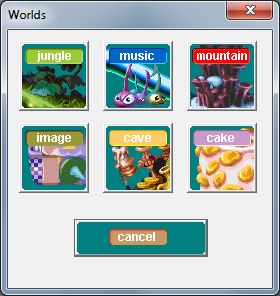
OK, I think these are the icons you meant:
I made a quick test icon:

There are some problems:
These icons work just fine in the Mapper, but I don't think it would look good if they were used on this website. It's not your fault, and I hate to be so negative... I do appreciate your feedback. Are there any other icons Ubisoft made for R1...?
OK, I think these are the icons you meant:
I made a quick test icon:
There are some problems:
- The colours are off
- The icon has an ugly Windows 95-style frame; even if I remove that, the corners are chopped off
- There is a big label on top of the icon (I need an unlabelled icon)
- The icon takes up the complete 88x88 frame (I need a transparent area around the image)
- The icon is still a little bit complicated (try zooming out the page in your browser - you won't be able to tell what the icons are from a distance)
These icons work just fine in the Mapper, but I don't think it would look good if they were used on this website. It's not your fault, and I hate to be so negative... I do appreciate your feedback. Are there any other icons Ubisoft made for R1...?