 Take as much time as you need RibShark.
Rayman 3
Forum rules
Please keep the forum rules and guidelines in mind when creating or replying to a topic.
Please keep the forum rules and guidelines in mind when creating or replying to a topic.
-
Snagglebee

- Posts: 11795
- Joined: Tue Jan 08, 2013 6:22 pm
- Location: Yes
- Tings: 2770
Re: Rayman 3
No problem Take as much time as you need RibShark.
Take as much time as you need RibShark.
Re: Rayman 3
FU** YOU.RibShark wrote:I took a small break at Christmas but I'm going to carry on working on it now.
Joking, take your time

-
J3SUSPWNDU

- Posts: 15
- Joined: Thu May 02, 2013 6:54 pm
- Tings: 75
Re: Rayman 3
does anyone know if they are gonna fix the download for the rayman 3 soundtrack on raytunes? because i rly wanna have that
-
Dart

- Posts: 4950
- Joined: Tue Aug 21, 2012 3:04 pm
- Location: The Realm Of Perpetual Sleepiness
- Tings: 49845
Re: Rayman 3
you should try to PM Drolpiraat, as that is the person who handles raytunes.

Re: Rayman 3
The download's fixed. I have no idea how the song index even got modified... I didn't do it as all I had to do to fix it was upload the version I've had on my computer for ages.J3SUSPWNDU wrote:does anyone know if they are gonna fix the download for the rayman 3 soundtrack on raytunes? because i rly wanna have that

Re: Rayman 3
Also, isn't the "unused" BoM music used for the Bégoniax fight in the PS2/GCN versions?

Re: Rayman 3
It was unused in PC Version.
-
Dart
- Posts: 4950
- Joined: Tue Aug 21, 2012 3:04 pm
- Location: The Realm Of Perpetual Sleepiness
- Tings: 49845
Re: Rayman 3
I noticed that. I'm really surprising myself with the PC version, it is a lot easier for me to rack up points on PC than my PS2 copy. not to mention it looks BEAUTIFUL in HD!
-
J3SUSPWNDU
- Posts: 15
- Joined: Thu May 02, 2013 6:54 pm
- Tings: 75
Re: Rayman 3
you can download the songs separetly, but i mean all at once like the others you just click the rayman logo and then it downloads all of them that doesnt work with r3
Re: Rayman 3
So, here's how the patch is going:
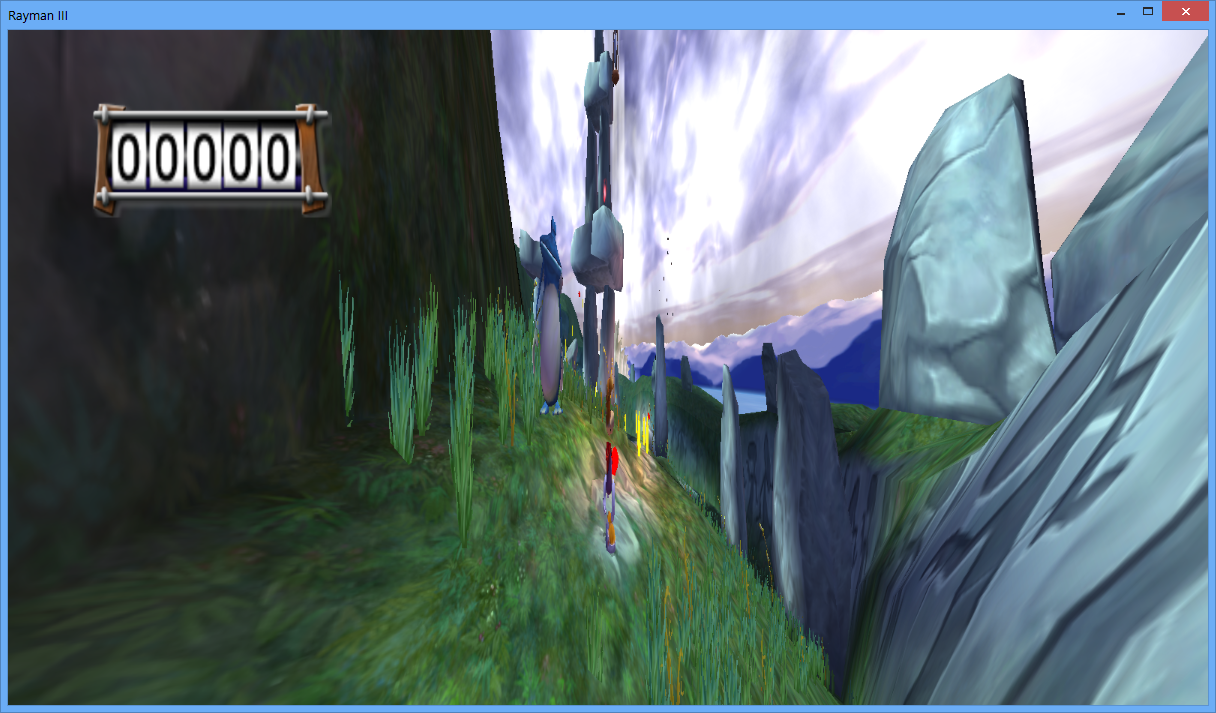
Uhh.... I can fix it.
Uhh.... I can fix it.
-
Snagglebee
- Posts: 11795
- Joined: Tue Jan 08, 2013 6:22 pm
- Location: Yes
- Tings: 2770
Re: Rayman 3
uh, ok, I guess? Just go ahead and do your fixing stuff? Oh wait, didn't we see the hud fixed before?RibShark wrote:Uhh.... I can fix it.
-
Master

- Posts: 53544
- Joined: Sun Aug 21, 2011 10:14 am
- Location: Somewhere specific, I'd assume.
- Tings: 468320
Re: Rayman 3
Ah, I can see why you believe there's some progress still required.

Re: Rayman 3
Good jokWeshKanapesh wrote:FU** YOU.RibShark wrote:I took a small break at Christmas but I'm going to carry on working on it now.
Joking, take your time

Re: Rayman 3
i installed rayman 3 to win8, and when i start it, it loads correctly, but when i start the game (create new file) everything loads correctly but the texture. every character is blurred, and half of the maps are missing. what should i do?
-
Master
- Posts: 53544
- Joined: Sun Aug 21, 2011 10:14 am
- Location: Somewhere specific, I'd assume.
- Tings: 468320
Re: Rayman 3
Ah, I think I know what issue you refer to, does it look something like this?
If it's that, you'll need to find ubi.ini, and under the Rayman 3 section, change TnL to equal 0. Where and which ubi.ini you need to change depends on what version you play and if you run as admin, I believe. For me, who plays the original disc version without admin privileges, I changed the one located in:
If it's that, you'll need to find ubi.ini, and under the Rayman 3 section, change TnL to equal 0. Where and which ubi.ini you need to change depends on what version you play and if you run as admin, I believe. For me, who plays the original disc version without admin privileges, I changed the one located in:
Code: Select all
C:\Users\YourUserNameHere\AppData\Local\VirtualStore\Windows\UbisoftRe: Rayman 3
okay, the problem is that, i'll try it
Re: Rayman 3
but i couldn't find ubi.ini. i started a search on it, but it just found the ini for raymanM and rayman2
-
Snagglebee
- Posts: 11795
- Joined: Tue Jan 08, 2013 6:22 pm
- Location: Yes
- Tings: 2770
Re: Rayman 3
Try, C:\Windows\UbiSoft\Ubi.iniraymanHUN wrote:but i couldn't find ubi.ini. i started a search on it, but it just found the ini for raymanM and rayman2
Re: Rayman 3
i just found an ubi.bak file which leads to raymanM
Re: Rayman 3
i found but it says: installed products: raymanM rayman2