Rayman emulation
Moderator: Modding and utilities team
Forum rules
Please keep the forum rules and guidelines in mind when creating or replying to a topic.
Please keep the forum rules and guidelines in mind when creating or replying to a topic.

Re: Rayman emulation
Well, I have a special cable signal on my PS2 which is a normal AV Cable but it have a port for inserting another cable inside, so I plugged those RGB cables : http://3.bp.blogspot.com/-kXg8PxgF0-Y/T ... b_ends.jpg (RGB to RGB) and connected them to my PS2

Re: Rayman emulation
Hmm... the link for the Rayman 2 PS1 version is a PAL version. Wouldn't the NTSC version be better, because of the higher framerate?
-
Snagglebee

- Posts: 11795
- Joined: Tue Jan 08, 2013 6:22 pm
- Location: Yes
- Tings: 2770
Re: Rayman emulation
That cable isn't RGB. That's Component YPbPr. And Sorry to say but EzCap doesn't support neither RGB or Component. You probably just got Composite signal thereWeshKanapesh wrote:Well, I have a special cable signal on my PS2 which is a normal AV Cable but it have a port for inserting another cable inside, so I plugged those RGB cables : http://3.bp.blogspot.com/-kXg8PxgF0-Y/T ... b_ends.jpg (RGB to RGB) and connected them to my PS2

Re: Rayman emulation
Oh my bad then. Also sorry to ask there, but someone who already completed Rayman 2 DC add me on Skype: got4n123 , I found some interesting things on. 
-
Cairnie

- Posts: 10163
- Joined: Wed Apr 04, 2007 6:05 pm
- Location: robin hood land
- Contact:
- Tings: 90485
Re: Rayman emulation
OK so I've been attempting to take screenshots from the Rabbids games on Wii via Dolphin 4.0.2, but it seems that nowadays they all just slow down to a crawl, like 5-9fps etc, what the hell?

Re: Rayman emulation
Don't use Dolphin 4. Stick to Dolphin 3. Way more faster.

Re: Rayman emulation
I don't have Skype, but I'm interested in what you have found.WeshKanapesh wrote:someone who already completed Rayman 2 DC add me on Skype: got4n123 , I found some interesting things on.

Re: Rayman emulation
I just noticed there is no guide for the N64 version setup. Any volunteers?

Re: Rayman emulation
Sure. I'll volunteer.
Re: Rayman emulation
It requires no setup.Haruka wrote:I just noticed there is no guide for the N64 version setup. Any volunteers?
Install Project64 emulator, download Rayman 2 N64 ROM, click File -Open and choose the ROM. That's all. The emulator doesn't require any modifications.
Re: Rayman emulation
If I remember well that setup is not enough to make the game fully workable. There's the Alpha thing that needs to be enabled if the Lums show up "invisible".
Re: Rayman emulation
I will do itHaruka wrote:I just noticed there is no guide for the N64 version setup. Any volunteers?


Emulator: Project64 v2.1
Works?: Yes.
Reported by: OldClassicGamer
Link (ROM): http://www.emuparadise.me/Nintendo_64_R ... 1-download
Setup instructions (version 2.1.0.1):
1. Download the ROM from the link above, extract it and place it anywhere you want on your computer.
2. Start Project 64 Emulator and you will be asked to choose language for Emulator interface.
3. Click on File and then click "Choose ROM Directory" and navigate to a place where you saved your Rayman 2 ROM.
4. Click on Options, Settings and configure plugins how you wish. I find deafult ones to work for Rayman 2 good.
5. Click on Options, and Configure controlls as well.
6. Click on the ROM on interface or navigate to File, and select open ROM.
7. If game is too fast, press F4 and it will be good speed.
8. Have fun!
Re: Rayman emulation
Thank you, OCG!


Re: Rayman emulation
Haruka, the Rayman 1 master, the R2 PS1 URL isn’t being recognized by phpBB:
I wrote:Thanks for updating it Haruka! Finally I can enjoy Rayman 2 with all its loading screens!I've shortened the link, the URL had the BBcode characters in it, causing it not to be recognized by phpBB. Please update your post.Haruka/Fifo wrote: Link (ISO): http://goo.gl/D8aTwZ
Re: Rayman emulation
Just because I'm really bored, I've corrected the grammar mistakes.OldClassicGamer wrote:
Emulator: Project64 v2.1
Works?: Yes.
Reported by: OldClassicGamer
Link (ROM): http://www.emuparadise.me/Nintendo_64_R ... 1-download
Setup instructions (version 2.1.0.1):
1. Download the ROM from the link above, extract it and place it anywhere you want on your computer.
2. Start Project 64 Emulator and you will be asked to choose language for the emulator's interface.
3. Click on File and then click "Choose ROM Directory" and navigate to the place where you saved your Rayman 2 ROM.
4. Click on Options, Settings and configure the plugins as you wish. The default ones are appropriate, it doesn't require any modifications in order to run the game.
5. Click on Options, and configure the controls as well.
6. Click on the ROM in interface or navigate to File, and select open ROM.
7. If game is too fast, press F4, then it should be OK.
8. Have fun!

-
Razorbeard

- Posts: 492
- Joined: Thu Oct 09, 2008 8:27 pm
- Location: The Crow's Nest
- Tings: 9175
Re: Rayman emulation
*comes out of the dark to post a problem, then goes back to the shadows*
So I grabbed the Saturn emulator and everything for R1, started it up, worked perfectly fine.
Started it up today, bottom (but not top, which is really strange) part of the screen just totally stopped existing.
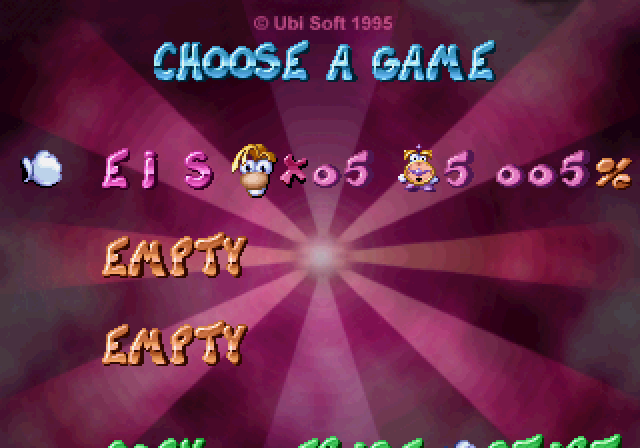
I've screwed around with a lot of options and none of them seem to have done anything particularly useful.
If anyone else would happen to know what's causing it that'd be fantastic.
From what I've seen, it seems to be based on which drive the game refers to, since I had this same problem yesterday, but messed around a bit and forced the game to refer to a different drive and it worked fine. Now, doing that doesn't work.
So I grabbed the Saturn emulator and everything for R1, started it up, worked perfectly fine.
Started it up today, bottom (but not top, which is really strange) part of the screen just totally stopped existing.
I've screwed around with a lot of options and none of them seem to have done anything particularly useful.
If anyone else would happen to know what's causing it that'd be fantastic.
From what I've seen, it seems to be based on which drive the game refers to, since I had this same problem yesterday, but messed around a bit and forced the game to refer to a different drive and it worked fine. Now, doing that doesn't work.
Re: Rayman emulation
I have video dedicated to Rayman 1 working on Sega Saturn Emulator on first page on this thread. Check it out.
-
Razorbeard
- Posts: 492
- Joined: Thu Oct 09, 2008 8:27 pm
- Location: The Crow's Nest
- Tings: 9175
Re: Rayman emulation
Oh, I have, did exactly what it said (multiple times, even) but it doesn't seem to work right.OldClassicGamer wrote:I have video dedicated to Rayman 1 working on Sega Saturn Emulator on first page on this thread. Check it out.
Re: Rayman emulation
Can someone else please try to see if it works for him? I need to know if there is some mistake I made or is it just to Razorbeard.
-
Razorbeard
- Posts: 492
- Joined: Thu Oct 09, 2008 8:27 pm
- Location: The Crow's Nest
- Tings: 9175
Re: Rayman emulation
I've searched the thread for similar problems, but it doesn't really seem to come up at all.OldClassicGamer wrote:Can someone else please try to see if it works for him? I need to know if there is some mistake I made or is it just to Razorbeard.
I'm sure something as important as the screen being 10-20 pixels lower than it should be would be something worth mentioning.
I'll sit here fiddling around with the options, and if it does get back to normal and I can from there screw it up again I'll see if I can explain how it happened.
Edit: Fresh extraction seems to have corrected it, if it happens again I'll record what options I chose and put 'em here so people know to not do that.