
Hello.
few days ago i found my r2 and r3 discs,so i tried to install them on my new pc with windows 10.
R2 problems=
game doesnt boot up.
cd finds that the game was already installed,when trying to uninstall a french error(something with impossible to uninstall) is displayed.
windows defender finds multiple false malwares in the first insert of cd,other inserts were normal.
after installment,i tried this tutorial https://www.gog.com/forum/rayman_series/rayman_2_win10,GXSetup starts, crashes.
R3=
game did boot up few times,then i tried to set some stuff in gxsetup.
GXSetup does the same thing as R2.
game tries to find binkw32.dll,even tried to get the dll but nothing happened.
if there are possible fixes,then i dont need to reflow my laptop just to play those 2 games.
Rayman 2 and Rayman 3 problems.
Forum rules
Please keep the forum rules and guidelines in mind when creating or replying to a topic.
Please keep the forum rules and guidelines in mind when creating or replying to a topic.
-
PluMGMK

- Posts: 40590
- Joined: Fri Jul 31, 2009 9:00 pm
- Location: https://www.youtube.com/watch?v=cErgMJSgpv0
- Contact:
- Tings: 137066
Re: Rayman 2 and Rayman 3 problems.
I don't know if anyone's ever gotten the CD versions to work on Windows 10 tbh! I think the best solution is just to buy the games on GOG, they're not that expensive.
Re: Rayman 2 and Rayman 3 problems.
I'll buy them when i can.
-
NyaNyaLily

- Posts: 5059
- Joined: Wed Jan 14, 2015 5:53 pm
- Tings: 25298
Re: Rayman 2 and Rayman 3 problems.
Now I'm happy that I didn't upgrade to Windows 10 

Re: Rayman 2 and Rayman 3 problems.
I don't know how to fix it really, cause I don't have the cd, I have the GOG version xD. But one thing that the GOG version uses is nglide, which as far as I know works for all computers. Try to download that and put it on the rayman files, maybe it will fix it. Again, it's just a guess 
-
PluMGMK
- Posts: 40590
- Joined: Fri Jul 31, 2009 9:00 pm
- Location: https://www.youtube.com/watch?v=cErgMJSgpv0
- Contact:
- Tings: 137066
Re: Rayman 2 and Rayman 3 problems.
Even if it works, the OP will surely face the dreaded pirate head in Rayman 2 sooner or later. I'd say the GOG version is the better option.

Re: Rayman 2 and Rayman 3 problems.
The Windows 10 has been got upgraded since its starting version, now actually to latest REDSTONE version after Threshold 2 upgrade.
If your Windows 10 is still under Build 1511, you need upgrade it to REDSTONE.
In W10 REDSTONE version, R2 can be installed normally and can play it.
Before you launch the game, do not forget to run GXSetup.exe with the compatibility Windows XP SP2 to make a file "Ubi.ini in \Windows\Ubisoft and copy the file to the game installed directory.
My Windows 10 is Build1607 now and has no problem to install and run R2.
If you still have problem to "play" R2, you may need to DrectPlay option in W10,
1. Right click Start
2. Click Programs and Features
3. Click Turn Windows features on or off
4. Make sure there is a check in Legacy Components
5. Click the + to expand
6. Check the box for DirectPlay, then OK to close the window.
7. Restart PC.
EDIT:
I also had the same problem for uninstallation of R2 in Windows10;
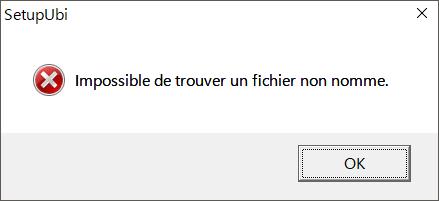
Yes, French warning popped up, but don't worry re-uninstallation attempt from control panel will delete the item R2 cause it is already uninstalled.
To play R2 in widescreen in W10, that' another thing;
viewtopic.php?t=21665
If your Windows 10 is still under Build 1511, you need upgrade it to REDSTONE.
In W10 REDSTONE version, R2 can be installed normally and can play it.
Before you launch the game, do not forget to run GXSetup.exe with the compatibility Windows XP SP2 to make a file "Ubi.ini in \Windows\Ubisoft and copy the file to the game installed directory.
My Windows 10 is Build1607 now and has no problem to install and run R2.
If you still have problem to "play" R2, you may need to DrectPlay option in W10,
1. Right click Start
2. Click Programs and Features
3. Click Turn Windows features on or off
4. Make sure there is a check in Legacy Components
5. Click the + to expand
6. Check the box for DirectPlay, then OK to close the window.
7. Restart PC.
EDIT:
I also had the same problem for uninstallation of R2 in Windows10;
Yes, French warning popped up, but don't worry re-uninstallation attempt from control panel will delete the item R2 cause it is already uninstalled.
To play R2 in widescreen in W10, that' another thing;
viewtopic.php?t=21665