Hi guys, i need help! About Rayman 2.

For discussions about the Rayman series.
Forum rules
Please keep the forum rules and guidelines in mind when creating or replying to a topic.
RayMATE
Lum (UbiArt)
Posts: 7
Joined: Tue Nov 17, 2015 11:05 am
Location: May be in games.
Tings: 35

Hi guys, i need help! About Rayman 2.

Post by RayMATE »

Hi guys, it would be helpful if you know what I could do with my Rayman 2: The Great Escape, it installs, then I trying to run it nothing happends. I got Rayman 10th Anniversary Collection (Rayman M, Rayman 2, Rayman 3 & Rayman 3 Extra stuff) for pc! (ofc) ;).

And I got an (x64, Windows 10 system)

It might not be the help thread, but then send me to the right place and I will post it there. Im new so, thanx if you can say it.
Master
Rayman 1
Posts: 53542
Joined: Sun Aug 21, 2011 10:14 am
Location: Somewhere specific, I'd assume.
Tings: 468310

Re: Hi guys, i need help! About Rayman 2.

Post by Master »

Moved to Rayman forums. I'm wondering if we should add a technical support sub-forum here, might make it easier for folk looking for solutions to find one, rather than using the search.

There may be a few patches lying about the forum, I'd search around the forums. That being said, the best and probably the most effective way to being able to play Rayman 2 on PC is getting the GoG.com version of the game if you can. You can get it here: https://www.gog.com/game/rayman_2_the_great_escape
RayMATE
Lum (UbiArt)
Posts: 7
Joined: Tue Nov 17, 2015 11:05 am
Location: May be in games.
Tings: 35

Re: Hi guys, i need help! About Rayman 2.

Post by RayMATE »

Thanx @Master. It's great to see a nice community without angry people, and a great response.
RayCarrot
Carmen
Posts: 2476
Joined: Sat Jan 11, 2014 5:46 pm
Tings: 40322

Re: Hi guys, i need help! About Rayman 2.

Post by RayCarrot »

RayMATE wrote:Thanx @Master. It's great to see a nice community without angry people, and a great response.
Welcome to RPC!
Have you tried changing some of the setting in the GXSetup and running as administrator? Sometimes that helps, but not always. Otherwise the GOG version is probably the best alternative
RayMATE
Lum (UbiArt)
Posts: 7
Joined: Tue Nov 17, 2015 11:05 am
Location: May be in games.
Tings: 35

Re: Hi guys, i need help! About Rayman 2.

Post by RayMATE »

Carrot-master wrote:
RayMATE wrote:Thanx @Master. It's great to see a nice community without angry people, and a great response.
Welcome to RPC!
Have you tried changing some of the setting in the GXSetup and running as administrator? Sometimes that helps, but not always. Otherwise the GOG version is probably the best alternative
I'll see if that works later, at work. (On School-Work), Thanx.
Shrooblord
Mr Stone
Posts: 15762
Joined: Tue Sep 07, 2010 5:07 pm
Location: The Buccaneer MK. II
Tings: 68850

Re: Hi guys, i need help! About Rayman 2.

Post by Shrooblord »

I'm wondering about the GOG version - trying to get it to run R2 in my VirtualBox Windows 10 environment at full 1920x1080 resolution. It runs... but it's *incredibly framey*. Not sure which settings to tweak yet to resolve that.
Master
Rayman 1
Posts: 53542
Joined: Sun Aug 21, 2011 10:14 am
Location: Somewhere specific, I'd assume.
Tings: 468310

Re: Hi guys, i need help! About Rayman 2.

Post by Master »

What do you mean by "incredibly framey?" Do you refer to the FPS fluctuation? I found using nGlide solved the issue.
Shrooblord
Mr Stone
Posts: 15762
Joined: Tue Sep 07, 2010 5:07 pm
Location: The Buccaneer MK. II
Tings: 68850

Re: Hi guys, i need help! About Rayman 2.

Post by Shrooblord »

Using nGlide is the problem. Maybe VirtualBox isn't liking it.
The FPS is around 5~20 if I had to estimate and it creates input latency of half a second on occasion, too.
Master
Rayman 1
Posts: 53542
Joined: Sun Aug 21, 2011 10:14 am
Location: Somewhere specific, I'd assume.
Tings: 468310

Re: Hi guys, i need help! About Rayman 2.

Post by Master »

Hmm, I know some VMs don't behave so well with GPUs, back when I used a physical CD copy of R2 on my old laptop, I ran it in a VM using Win2000 on VMware Player, that did the trick for me.
Shrooblord
Mr Stone
Posts: 15762
Joined: Tue Sep 07, 2010 5:07 pm
Location: The Buccaneer MK. II
Tings: 68850

Re: Hi guys, i need help! About Rayman 2.

Post by Shrooblord »

Yes I just recalled that my ancient and slow MacBook laptop is able to run Rayman 2 flawlessly from the GOG.com setup right out of the box, whereas this kickass iMac I'm running has severe trouble getting its frames to a reasonable level. The difference: the MacBook runs Parallels, the iMac VirtualBox. I'll play R2 exclusively on my laptop then. sad
Master
Rayman 1
Posts: 53542
Joined: Sun Aug 21, 2011 10:14 am
Location: Somewhere specific, I'd assume.
Tings: 468310

Re: Hi guys, i need help! About Rayman 2.

Post by Master »

I wish I could be of more use, but I'm not well versed with Macs. I do hope you find a viable solution, Shroob.
deton24
Art Rytus
Posts: 1194
Joined: Fri Jan 14, 2011 1:22 am
Location: Poland
Tings: 8932

Re: Hi guys, i need help! About Rayman 2.

Post by deton24 »

The Virtual Box may be main reason of bad framerate in overall.
Have you installed guest addition in VB?
Or just Glide wrapper will work fine.
gamerz31w
Green Teensy
Posts: 862
Joined: Sun Nov 22, 2015 3:35 pm
Tings: 1395

Re: Hi guys, i need help! About Rayman 2.

Post by gamerz31w »

So Rayman 2 supports only Directx6.0,but if i downgrade directx 11.2 to direct 9.0 3d ripper will be working without downgrading my windows 8.1 to windows xp or windows 98 se or virtual memories?
deton24
Art Rytus
Posts: 1194
Joined: Fri Jan 14, 2011 1:22 am
Location: Poland
Tings: 8932

Re: Hi guys, i need help! About Rayman 2.

Post by deton24 »

R2 supports DX6 and Glide (by nGlide wrapper).
DX is compatible with previous versions.
No need of any downgrade, at least not in matter of DX.
Maybe GOG version will be compulsory. (or copied old installed one from some virtual machine with XP).
RayCarrot
Carmen
Posts: 2476
Joined: Sat Jan 11, 2014 5:46 pm
Tings: 40322

Re: Hi guys, i need help! About Rayman 2.

Post by RayCarrot »

If you have the latest version of DX the config won't recognize it, though if you edit the ubi.ini file manually and set these values to this it should work:
GLI_DllFile=GliDX6
GLI_Dll=DirectX6
GLI_Device=Direct3D HAL
gamerz31w
Green Teensy
Posts: 862
Joined: Sun Nov 22, 2015 3:35 pm
Tings: 1395

Re: Hi guys, i need help! About Rayman 2.

Post by gamerz31w »

I can't find ubi.ini in located in location where I installed rayman 2 i'll try in %appdata% or somewhere else(where games is saved).
deton24
Art Rytus
Posts: 1194
Joined: Fri Jan 14, 2011 1:22 am
Location: Poland
Tings: 8932

Re: Hi guys, i need help! About Rayman 2.

Post by deton24 »

ehmm... maybe C:\Windows
So old version?...
RayCarrot
Carmen
Posts: 2476
Joined: Sat Jan 11, 2014 5:46 pm
Tings: 40322

Re: Hi guys, i need help! About Rayman 2.

Post by RayCarrot »

In the GOG version the ubi.ini file is in the install directory and in the original version it's under C:\Windows\Ubisoft
gamerz31w
Green Teensy
Posts: 862
Joined: Sun Nov 22, 2015 3:35 pm
Tings: 1395

Re: Hi guys, i need help! About Rayman 2.

Post by gamerz31w »

I have normal version.I'll find GOG.com version for free by torrent or I'll buy on gog.com
Shrooblord
Mr Stone
Posts: 15762
Joined: Tue Sep 07, 2010 5:07 pm
Location: The Buccaneer MK. II
Tings: 68850

Re: Hi guys, i need help! About Rayman 2.

Post by Shrooblord »

YES!
You guys, I found something *amazing* on the Internet.

There's this guy who made a WineSkin wrapper/tool thing that lets you play games inside MacOS like you're running a Windows machine. Here's his site's page on Rayman 2:
http://paulthetall.com/rayman-2-mac/
He also has something called the Porting Kit which has this whole page full of games on their servers that have already succesfully been ported. It's pretty good, at first glance. I was able to install Rayman 2 and play it. No lag, no virtual machine, all working fine.

The only comments I have so far is that it looks like 1990s graphics, which of course is bad, but does give me an immense sense of nostalgia because it reminds me of how Rayman 2 looked when I first played it. I'll investigate if I can up the graphics to make it more on-par with what we're used to from R2 on our current day machines.
Also, when you launch the game, the screen flickers a considerable amount of times and may fill up with a white square inside of black nothingness, which is scary at first - but then it actually runs fluently and without trouble. Great success!

Will update with future findings in this or a next post.


--UPDATE--
Managed to get it looking like Rayman 2 generally does on current-gen PCs!

What to do is this:
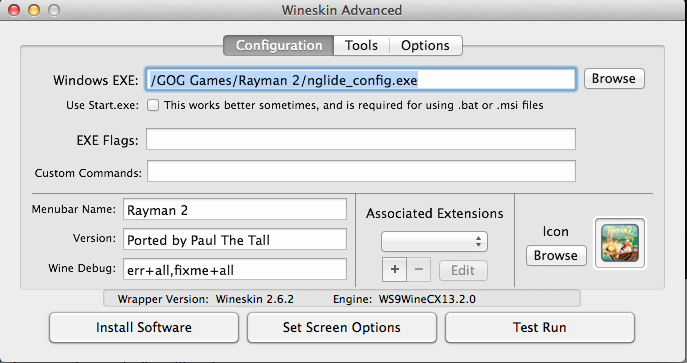
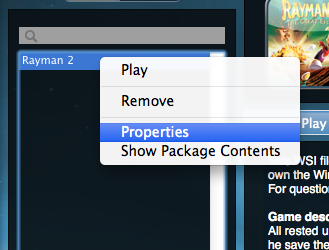
After installing the Rayman 2 app on the Porting Kit (Library > Server tab > download the wrapper > go to GOG.com > download the Windows installer and leave it in your Downloads folder > let the wrapper in the Porting Toolkit run through its installation procedure and follow all instructions, including the one telling you to press "cancel" when it prompts you for a Gecko installation - have patience; the process takes a while), go to your Local tab in Library and right click the Rayman 2 app. Select Properties.
Image
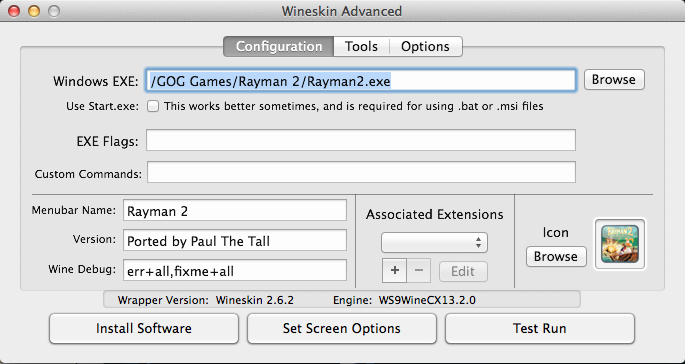
Click Advanced and Browse on the first tab in Advanced.
Image
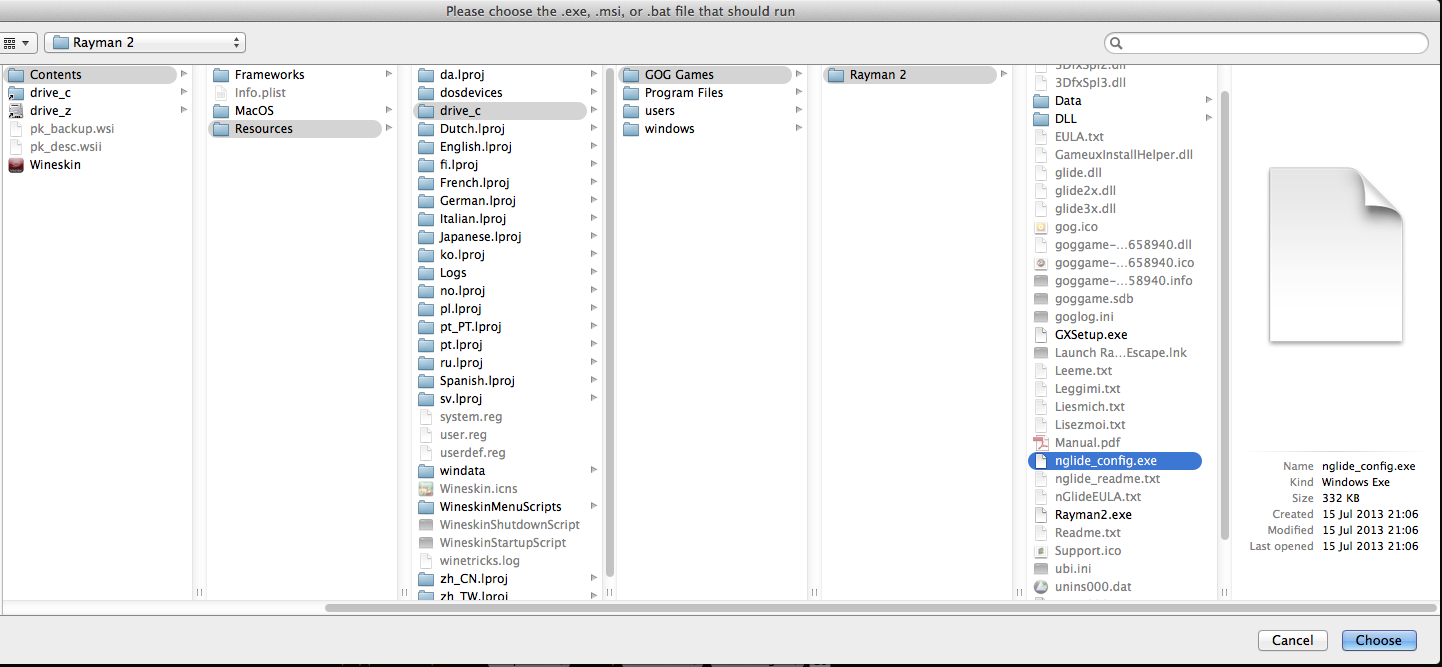
Browse to the nglide_config.exe inside the created Rayman 2 app.
Image
Test Run the nglide_config.exe.
Image
Select the following options:
Screen Resoltion - By Desktop
Aspect Ratio - 4:3
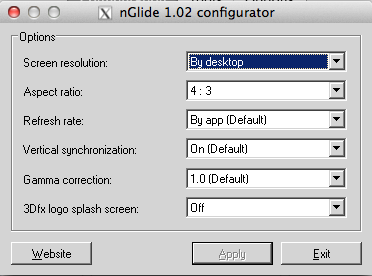
Image
Next, set the WineSkin options to emulate a Windows XP computer ( Tools tab > Config Utility (winecfg) ). Apply and close.
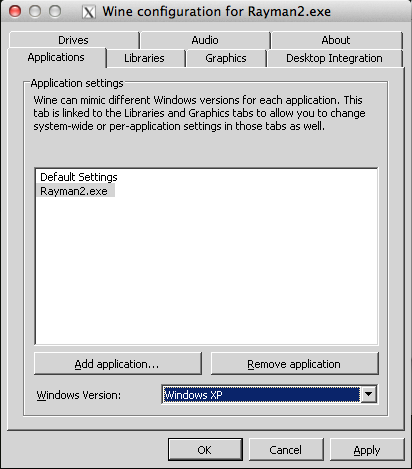
Image
And finally, on the Configuration tab, Browse back to your Rayman2.exe executable inside the Rayman 2 app's directory (clicking Browse automatically takes you inside the app dir).
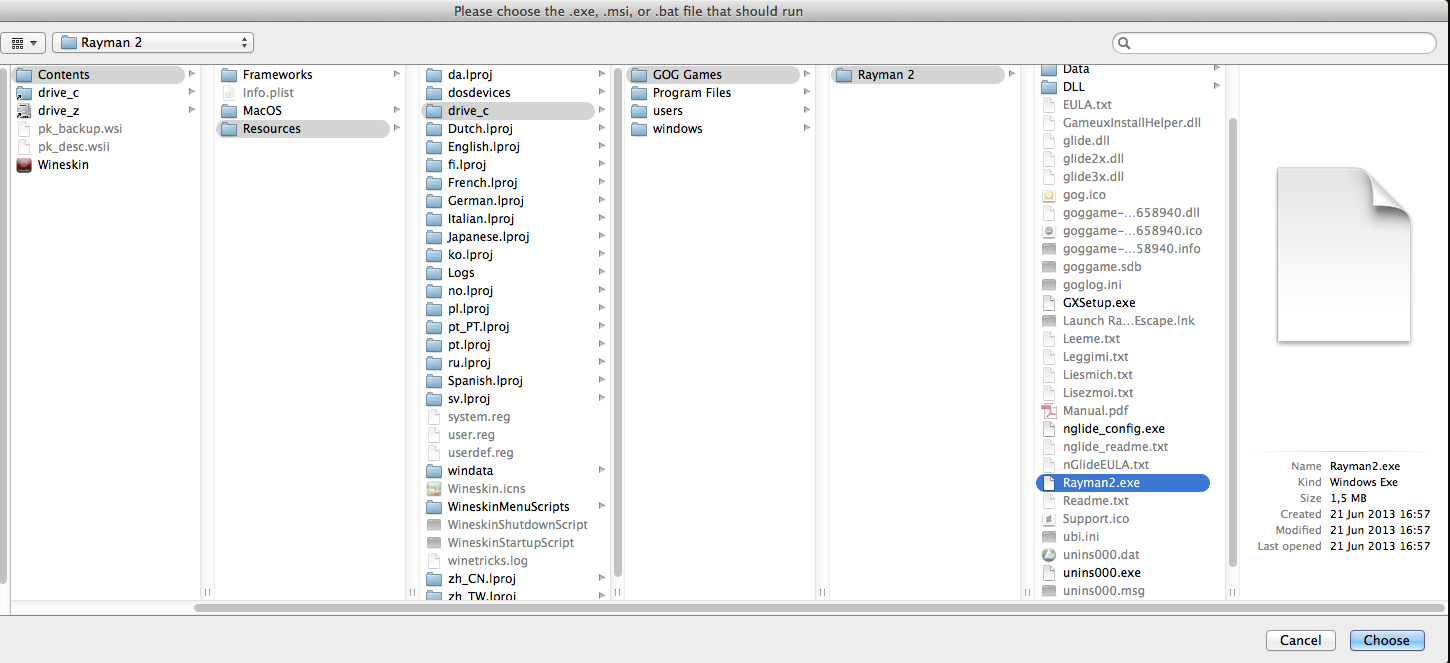
Image
Click Test Run to see if it works. If it does, close this Advanced Wineskin window and from hereon forwards, whenever you click Play in the Porting Kit, you'll have Rayman 2 running on your Mac desktop like it were a Windows XP computer, with correct aspect ratio and using your screen's resolution.
Note: there will still be the status bar at the top of the screen. If you find that annoying, feel free to experiment and tell me how to remove it if you find a way. I don't find it annoying so I didn't bother finding out how - sorry.

This will get Rayman 2 running on your Mac and looking like a current-gen computer running it. It will still just be 4:3, not widescreen, and not have fancy graphics. Now, I am content with this and thus did not pursue further tweakings following this process. You, however, are more than welcome trying deton24's various instructions on how to get this game working in widescreen, using a similar approach as I've done here. Good luck. Let me know if it works. :)

The benefit of this Rayman 2 version over normal Windows machines running the game: you can minimise the window and the game will turn into Rayman II - paused like on Windows, but instead, it won't crash when you try to reopen the game from minimisation. :P
Post Reply