Ablue peccata tua, non erit innocens malus vobis.Shadowrayman wrote:The 5xBR v3.7 looks pretty good for the game, in Rayman Optimum it has an option where you can do that might try it out. Oh and welcome ElPrimordial!
Rayman emulation
Moderator: Modding and utilities team
Forum rules
Please keep the forum rules and guidelines in mind when creating or replying to a topic.
-
Harpic fraîcheur

- Posts: 26130
- Joined: Sat Jan 18, 2014 7:57 pm
- Location: Au pays des prouts
- Tings: 375180
Re: Rayman emulation
I know it's not technically a Rayman game, but I'm having a right mare trying to extract music from Rabbids Go Home and I need assistance. I'm using the Dolphin emulator if that helps.
-
PluMGMK

- Posts: 40508
- Joined: Fri Jul 31, 2009 9:00 pm
- Location: https://www.youtube.com/watch?v=cErgMJSgpv0
- Contact:
- Tings: 136606
Re: Rayman emulation
What method are you using?
Re: Rayman emulation
What do you mean? I've tried clicking the Movie > Dump Audio button but since that hasn't done anything I suspect there must be another way.PluMGMK wrote:What method are you using?
I have the game for the Wii and I've always been interested in ripping the full OST from the game.
-
Rudie Radio Waves

- Posts: 86
- Joined: Wed Oct 03, 2018 1:48 pm
- Location: Italy
- Tings: 420
Re: Rayman emulation
Small bump, but I wanted to report that Rayman 2 on Dreamcast emulated via Redream (redream.io) works flawlessly on my shitty-ass computer (much better than NullDC, Demul, or others). If you wanted to try DC Rayman 2, that might be the emulator you were looking for!
-
Shadowrayman

- Posts: 310
- Joined: Mon Nov 07, 2016 11:33 am
- Location: Los Angeles
- Contact:
- Tings: 5288
Re: Rayman emulation
Just bumping this thread since it's so inactive
Re: Rayman emulation
As for this redream.io emulator, they want 5$ for "high definition rendering".
But lite version should enough for testing purpopses.
Re: Rayman emulation
If anyone is trying to get Rayman Origins to work on Linux, but gallium nine still has issues for you, d9vk seems to be working perfectly for me on an AMD GPU. All I had to do was use protontricks/winetricks to "Install a Windows DLL or component" then chose "d9vk". Since this is the type of topic for it, I'll post here what I had posted in the Rayman Origins thread not too long ago.
___
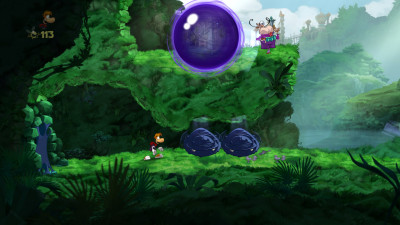
I've tried the game on both Fedora 30 and Debian 10 so far, I'm playing the Steam version and using Proton. Basically after using protontricks (or winetricks if you're not using Steam) to enable d9vk, I've had zero issues with missing sprites. With galliumnine there were still some issues with some long sprites for me like so:
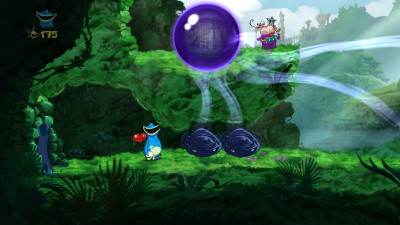
With d9vk on AMD everything seems to be working really well. It's worth mentioning that I was using d9vk012 and noticed some minor transparency issues, but d9vk013 seems to have solved that, so I took a new screenshot:
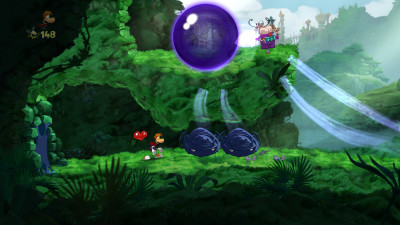
I have an AMD GPU (VEGA 64), but d9vk also works on NVIDIA GPU's, as I've tested it (with a 1070Ti) to make sure. The downside for now is that NVIDIA seems to still have slight breaks in the trails leading to the cages, but it's still much better than galliumnine was, especially for NVIDIA users:
I know galliumnine also didn't work on Nvidia proprietary drivers, only on Nouveau ones, which resulted in terrible performance. Since d9vk actually works on NVIDIA drivers, it performs really well. I feel like your mileage may vary on NVIDIA though.
___
I've tried the game on both Fedora 30 and Debian 10 so far, I'm playing the Steam version and using Proton. Basically after using protontricks (or winetricks if you're not using Steam) to enable d9vk, I've had zero issues with missing sprites. With galliumnine there were still some issues with some long sprites for me like so:
With d9vk on AMD everything seems to be working really well. It's worth mentioning that I was using d9vk012 and noticed some minor transparency issues, but d9vk013 seems to have solved that, so I took a new screenshot:
I have an AMD GPU (VEGA 64), but d9vk also works on NVIDIA GPU's, as I've tested it (with a 1070Ti) to make sure. The downside for now is that NVIDIA seems to still have slight breaks in the trails leading to the cages, but it's still much better than galliumnine was, especially for NVIDIA users:
I know galliumnine also didn't work on Nvidia proprietary drivers, only on Nouveau ones, which resulted in terrible performance. Since d9vk actually works on NVIDIA drivers, it performs really well. I feel like your mileage may vary on NVIDIA though.
Re: Rayman emulation
Just an update regarding Rayman Origins as of proton 4.11-4.
It seems that the majority of the long sprites have now been fixed without the need for D9VK. The issue with the cage trails from the post above has now been fixed, regardless of which GPU you have.
There are still very minor graphical glitches though, where an AMD GPU using mesa drivers and D9VK still works slightly better. One example is the air currents on the Desert of Dijiridoos. On proton 4.11-4, they have breaks in their trails, while on D9VK with an AMD GPU, they're rendered correctly. It's far from being a major issue, so the game isn't far from working perfect out of the box on Linux.
NOTE: The game won't start with D9VK as of proton 4.11-3, meaning you'll have to roll back to 4.2-9 if you want to use it.
The air currents on proton 4.11-4 (without D9VK): The air currents on proton 4.2-9 (using D9VK with an AMD GPU): Proton 4.11-4 actually works better for NVIDIA than using D9VK did, so this is good news for NVIDIA users that are on Linux.
EDIT: D9VK will work on proton 4.11-4 if you just set your steam launch options for Origins to "PROTON_USE_D9VK=1 %command%" instead of using protontricks.
It seems that the majority of the long sprites have now been fixed without the need for D9VK. The issue with the cage trails from the post above has now been fixed, regardless of which GPU you have.
There are still very minor graphical glitches though, where an AMD GPU using mesa drivers and D9VK still works slightly better. One example is the air currents on the Desert of Dijiridoos. On proton 4.11-4, they have breaks in their trails, while on D9VK with an AMD GPU, they're rendered correctly. It's far from being a major issue, so the game isn't far from working perfect out of the box on Linux.
NOTE: The game won't start with D9VK as of proton 4.11-3, meaning you'll have to roll back to 4.2-9 if you want to use it.
The air currents on proton 4.11-4 (without D9VK): The air currents on proton 4.2-9 (using D9VK with an AMD GPU): Proton 4.11-4 actually works better for NVIDIA than using D9VK did, so this is good news for NVIDIA users that are on Linux.
EDIT: D9VK will work on proton 4.11-4 if you just set your steam launch options for Origins to "PROTON_USE_D9VK=1 %command%" instead of using protontricks.
Re: Rayman emulation
Hey Guys, Can anyone help me?
I'm trying to Run Rayman(one) on ePSXe. Audio and Video seems to be working fine however I can't get the game to stop asking for a controller.
I have a PS4 controller plugged in via USB.
The controller works fine in the Windows USB game controller setup, The buttons and sticks are all assigning fine in the ePSXe config,
I can even skip the games Intro by Pressing (X)
But then It says "Please Insert a standard Sony ps1 controller into port 1"
I've tried all the different controller types in the config: Digital, Dualanalog, DualShock etc. (with and without Analog on)
I'm not an emulation wizz I just kinda of hope it works most of the time
If anyone knows their way about this stuff can you help me? I'd very much appreciate it thanks.
I'm trying to Run Rayman(one) on ePSXe. Audio and Video seems to be working fine however I can't get the game to stop asking for a controller.
I have a PS4 controller plugged in via USB.
The controller works fine in the Windows USB game controller setup, The buttons and sticks are all assigning fine in the ePSXe config,
I can even skip the games Intro by Pressing (X)
But then It says "Please Insert a standard Sony ps1 controller into port 1"
I've tried all the different controller types in the config: Digital, Dualanalog, DualShock etc. (with and without Analog on)
I'm not an emulation wizz I just kinda of hope it works most of the time
If anyone knows their way about this stuff can you help me? I'd very much appreciate it thanks.
Re: Rayman emulation
That's unusual, do you have the option to select a different controller plugin? On the real console, it works with a DualShock 1 or 2, regardless as to whether analog is on or off.
Re: Rayman emulation
I only have the Input Port 1 plugin option: ePSXe INPUT core 2.0.0.
Re: Rayman emulation
It doesn't seem to happen when I try it. Are you using epsxe 2.0.5, and does it still happen when the buttons are mapped to the keyboard? Mine is set to directinput.
Re: Rayman emulation
Yeah, it's ePSXe 2.0.5. Just tried It with Keyboard mapping and it's still asking for controller 
Re: Rayman emulation
Show us a screenshot of your controller config and we may be able to tell what’s wrong.
Re: Rayman emulation
Where it says the controller type at the top, there's another box that says Keyboard, Directinput, or Xinput. Is this one set to Directinput? It probably doesn't make a difference, but that's what mine is set to and mine seems to be working.
Also yeah, a screenshot would make it easier, though I still don't see why it would have an option that makes it not work.
Re: Rayman emulation
Sure, heres a screenshot. but honestly I've tried all the different types. so I don't know how it could help
Re: Rayman emulation
This is honestly weird. I would have said try using a BIOS file, but I don't know why that would make a difference and I used the default HLE BIOS.
Re: Rayman emulation
It really is, No worries though. and yes I use the default BIOS aswell
Re: Rayman emulation
I tried it on my Windows 10 laptop with all settings default and the NTSC version of Rayman and it just worked. Try retroarch with a psx core and see how that works for you, that's if you don't mind using another emulator. The Beetle PSX HW (hardware) core is good, but you need the bios file for it. Either of the 3 cores should work, just see if the game stops asking for a controller.


