
Thank you, everything works now. I have a different problem in Rayman 2 though, the game crashes during the loading screen after the slide on the first level. I didn't have this issue before but after the level loaded the pirate head appeared, so i installed the patch for it and now this issue occurs. I've seen your old post about DEP exception fixing it but that didn't work for medeton24 wrote: Sun Apr 16, 2023 9:49 pm Known issue. Read that:
https://www.pcgamingwiki.com/wiki/Rayma ... ts.5B10.5D
One or more of these steps performed one by one should fix the issue eventually.
Rayman 2 Crashing
Moderator: Modding and utilities team
Forum rules
Please keep the forum rules and guidelines in mind when creating or replying to a topic.
Please keep the forum rules and guidelines in mind when creating or replying to a topic.
Rayman 2 Crashing

Re: Rayman 2 Crashing
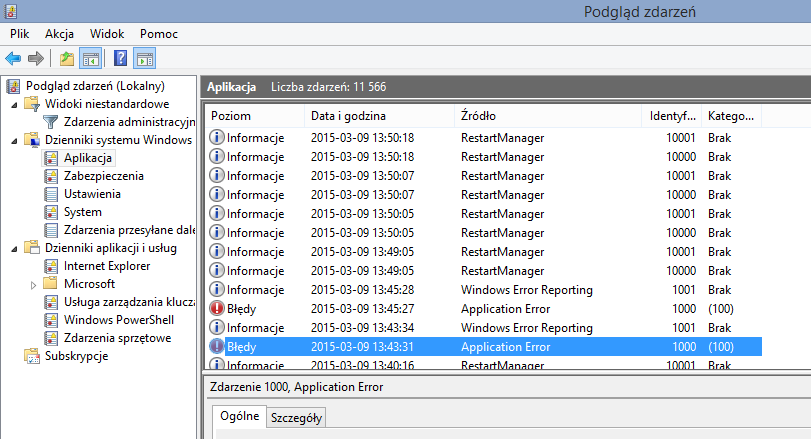
Go to Event Log and try to paste error log here, but if it's on Woods of Light, it seems like still DEP issue.
(EN) https://www.howtogeek.com/wp-content/up ... im=2,2,2,2
(PL) https://www.download.net.pl/uploaded/Ne ... darzen.png
IRC, after every DEP setting change, you need to restart the PC.
By default, DEP should be set like this:
https://i.stack.imgur.com/N9P74.png
And it shouldn't cause any problems that way.
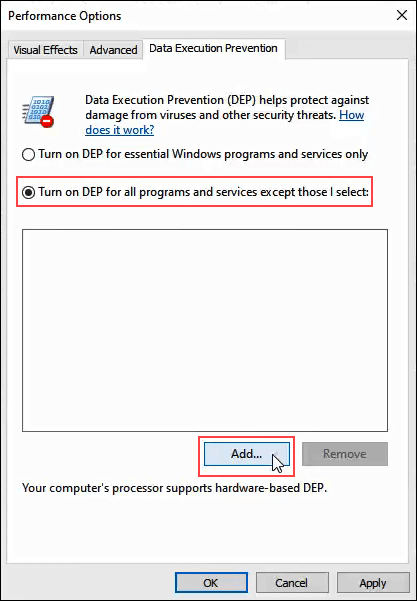
Optionally, it might also be set like this and this causes the problem:
https://www.online-tech-tips.com/wp-con ... ns-add.png
And in this window, you can also add Rayman2.exe to fix it.
(EN) https://www.howtogeek.com/wp-content/up ... im=2,2,2,2
(PL) https://www.download.net.pl/uploaded/Ne ... darzen.png
IRC, after every DEP setting change, you need to restart the PC.
By default, DEP should be set like this:
https://i.stack.imgur.com/N9P74.png
And it shouldn't cause any problems that way.
Optionally, it might also be set like this and this causes the problem:
https://www.online-tech-tips.com/wp-con ... ns-add.png
And in this window, you can also add Rayman2.exe to fix it.
Re: Rayman 2 Crashing
I added Rayman2.exe but that didn't fix itdeton24 wrote: Mon Apr 17, 2023 2:49 am Go to Event Log and try to paste error log here, but if it's on Woods of Light, it seems like still DEP issue.
(EN) https://www.howtogeek.com/wp-content/up ... im=2,2,2,2
(PL) https://www.download.net.pl/uploaded/Ne ... darzen.png
IRC, after every DEP setting change, you need to restart the PC.
By default, DEP should be set like this:
https://i.stack.imgur.com/N9P74.png
And it shouldn't cause any problems that way.
Optionally, it might also be set like this and this causes the problem:
https://www.online-tech-tips.com/wp-con ... ns-add.png
And in this window, you can also add Rayman2.exe to fix it.
Here's the error log
Nazwa aplikacji powodującej błąd: Rayman2.exe, wersja: 0.0.0.0, sygnatura czasowa: 0x3807b68b
Nazwa modułu powodującego błąd: Rayman2.exe, wersja: 0.0.0.0, sygnatura czasowa: 0x3807b68b
Kod wyjątku: 0xc0000005
Przesunięcie błędu: 0x00042acd
Identyfikator procesu powodującego błąd: 0x2b40
Godzina uruchomienia aplikacji powodującej błąd: 0x01d971581df64f47
Ścieżka aplikacji powodującej błąd: E:\Games\Ubisoft\Rayman 2\Rayman2.exe
Ścieżka modułu powodującego błąd: E:\Games\Ubisoft\Rayman 2\Rayman2.exe
Identyfikator raportu: a8ef3c24-4a2a-4d31-9a96-6e301cadee40
Pełna nazwa pakietu powodującego błąd:
Identyfikator aplikacji względem pakietu powodującego błąd:
Rayman 2 Crashing
Hello, i have a problem where the game crashes during the loading screen after the slide on the first level, how could i fix this? I didn't have this problem at first but the pirate head appeared so i installed the patch on RCP, but after i did that the issue that i'm describing appeared. I saw an old thread on this but adding Rayman2.exe to DEP didn't help



Re: Rayman 2 Crashing
Make sure your DEP settings are default, then reinstall Rayman 2. Try applying the DRM patch before launching the game.
Re: Rayman 2 Crashing
What's your Windows version?
What's your Rayman 2 version?
Is it old GOG version or current downloaded from GOG? They differ.
Test Fairly Glade and Whale Bay if they crash as well
and check whether Sanctuary of Stone and Fire, Echoing Caves cinematic, The Menhir Hills PT1 work fine.
Press ESC during the game and write "gothere" and go choose the level.
If that's exactly what's happening, it seems to be the same issue.
Still, read the possible solutions: (assuming you've restarted PC after changing DEP settings, and it's not DEP fault, although it's the same 0xc0000005 error code as when DEP was improperly configured - still I met with one case when the problem with this code wasn't DEP related, but seems like the same levels don't load here as well)
1. Try using game binary from here:
viewtopic.php?t=21665
2. If still nothing, try out this step:
https://www.pcgamingwiki.com/wiki/Rayma ... 8Retail.29
3. Maybe disable temporarily AV, Control Flow Guard and most importantly if it's Windows 11 - Core isolation (but we haven't had such issue related to W11 before).
I moved posts from previous topic here, since you made another one.
What's your Rayman 2 version?
Is it old GOG version or current downloaded from GOG? They differ.
Test Fairly Glade and Whale Bay if they crash as well
and check whether Sanctuary of Stone and Fire, Echoing Caves cinematic, The Menhir Hills PT1 work fine.
Press ESC during the game and write "gothere" and go choose the level.
If that's exactly what's happening, it seems to be the same issue.
Still, read the possible solutions: (assuming you've restarted PC after changing DEP settings, and it's not DEP fault, although it's the same 0xc0000005 error code as when DEP was improperly configured - still I met with one case when the problem with this code wasn't DEP related, but seems like the same levels don't load here as well)
1. Try using game binary from here:
viewtopic.php?t=21665
2. If still nothing, try out this step:
https://www.pcgamingwiki.com/wiki/Rayma ... 8Retail.29
3. Maybe disable temporarily AV, Control Flow Guard and most importantly if it's Windows 11 - Core isolation (but we haven't had such issue related to W11 before).
I moved posts from previous topic here, since you made another one.
Re: Rayman 2 Crashing
Thank you, i've managed to fix this. Seems like it wasn't an issue with DEP, i restored its default setting and reinstalled Rayman, then following another user's advice i insalled the pirate head drm before launching the game for the first time and that solved the issue. After that my textures were extremely blocky but Rayfix has solved that as well. The only problem i have left now is that the dgvoodoo watermark dosen't disappear from the corner of my screen even though i've turned it offdeton24 wrote: Wed Apr 19, 2023 4:09 pm What's your Windows version?
What's your Rayman 2 version?
Is it old GOG version or current downloaded from GOG? They differ.
Test Fairly Glade and Whale Bay if they crash as well
and check whether Sanctuary of Stone and Fire, Echoing Caves cinematic, The Menhir Hills PT1 work fine.
Press ESC during the game and write "gothere" and go choose the level.
If that's exactly what's happening, it seems to be the same issue.
Still, read the possible solutions: (assuming you've restarted PC after changing DEP settings, and it's not DEP fault, although it's the same 0xc0000005 error code as when DEP was improperly configured - still I met with one case when the problem with this code wasn't DEP related, but seems like the same levels don't load here as well)
1. Try using game binary from here:
viewtopic.php?t=21665
2. If still nothing, try out this step:
https://www.pcgamingwiki.com/wiki/Rayma ... 8Retail.29
3. Maybe disable temporarily AV, Control Flow Guard and most importantly if it's Windows 11 - Core isolation (but we haven't had such issue related to W11 before).
I moved posts from previous topic here, since you made another one.
Re: Rayman 2 Crashing
Open dgVoodoo.conf near game executable, and seek for:
dgVoodooWatermark
and
3DfxWatermark
and check whether they're both set to false.
dgVoodooWatermark
and
3DfxWatermark
and check whether they're both set to false.
Re: Rayman 2 Crashing
They're both set to falsedeton24 wrote: Wed Apr 19, 2023 4:32 pm Open dgVoodoo.conf near game executable, and seek for:
dgVoodooWatermark
and
3DfxWatermark
and check whether they're both set to false.
Re: Rayman 2 Crashing
Try to move your dgVoodoo.conf file to %AppData% (Roaming)
(source: https://www.reddit.com/r/FFXIPrivateSer ... &context=3)
(source: https://www.reddit.com/r/FFXIPrivateSer ... &context=3)
Re: Rayman 2 Crashing
That didn't help. Weird, before i installed Rayfix i didn't have this issuedeton24 wrote: Wed Apr 19, 2023 5:00 pm Try to move your dgVoodoo.conf file to %AppData% (Roaming)
(source: https://www.reddit.com/r/FFXIPrivateSer ... &context=3)
Every setting aside from the hide watermark one works
-
dragonking134

- Posts: 6
- Joined: Thu Nov 16, 2023 7:00 am
- Tings: 30
Re: Rayman 2 Crashing
I have tried all of these fixes but none of them have worked
-
RaymanfanCZ

- Posts: 16
- Joined: Sat Feb 07, 2026 3:29 pm
- Location: Czech Republic
- Tings: 80
Re: Rayman 2 Crashing
Hello, Im playing Rayman 2 for first time, but I rxperienced a bad thing. I am using Ray2fix, game runs in widescreen, full HD, and works only in opening section, game always crashes when loading level after Rayman and Globox fell off the ship on start of game. Tried many confings in Ray2fix, dgVoodoo and GXsetup but not succesful. Any ideas?
Thanks.
Thanks.
Re: Rayman 2 Crashing
The same thing happened to me when I had bad DEP settings in the system:
https://www.pcgamingwiki.com/wiki/Rayma ... to_desktop
I think it's been fixed in the latest GOG version.
https://www.pcgamingwiki.com/wiki/Rayma ... to_desktop
I think it's been fixed in the latest GOG version.
-
RaymanfanCZ
- Posts: 16
- Joined: Sat Feb 07, 2026 3:29 pm
- Location: Czech Republic
- Tings: 80
Re: Rayman 2 Crashing
Thanks for you answer, it really works! Only strange thing is game sometimes runs pretty smooth but in certain section, like when theres big amouth of water, screen looks like lagging, it is not game breaking a very rare but I never noticed this in Rayman 3 for example.
Re: Rayman 2 Crashing
Find and replace these libraries in the game's subfolders:
https://www.vogons.org/download/file.php?id=83792
https://www.vogons.org/download/file.php?id=83792
-
RaymanfanCZ
- Posts: 16
- Joined: Sat Feb 07, 2026 3:29 pm
- Location: Czech Republic
- Tings: 80
Re: Rayman 2 Crashing
Thank you, everything works now