You are using an out of date browser. It may not display this or other websites correctly.
You should upgrade or use an alternative browser.
You should upgrade or use an alternative browser.
Rayman 2
- Thread starter Xenon
- Start date


- Messages
- 862
- Tings
- 1,395
Anyway I still don't know which file of RayMap will be readme file in github. What if something went wrong with importing Rayman Revolution maps by using different method I mean tool inside pcx2 emulator version 0.9.8 emulator itself extracted level maps as .obj.
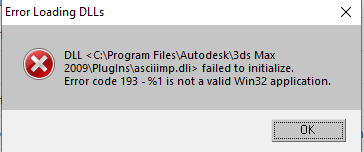
I downloaded older version of 3DS Max 2009 because why would I need both versions like in this thread?
I downloaded older version of 3DS Max 2009 because why would I need both versions like in this thread?

- Messages
- 2,213
- Tings
- 25,652
Can you show me?

- Messages
- 3,521
- Tings
- 151,050
Look at these moments:Can you show me?
Rayman Revolution Trailer min. 1:22
Rayman Adventures (2000) min. 0:58
The background is different, but everything else is pretty much the same.

- Messages
- 144
- Tings
- 10,868
Sure, sorry I should have posted it with my previous message:Can you show me?
(They are in the timestamps with the same animations)
Adventures
Revolution
Adventures
Revolution
- Messages
- 2,213
- Tings
- 25,652
Okay, i see
Thats kinda wired
Thats kinda wired

PluMGMK
Administrator
- Messages
- 40,592
- Tings
- 137,076
I finally got around to trying the J cheat for full energy, and it took a few tries for me to get it right, but wow! The animation is unique too: first the red bit fills up with yellow, then the yellow keeps growing until it gets to the full size! I wonder who thought of adding that…OK, somehow I've never heard of that, but when I tried to check it out just now I found Rayman 2 no longer launches on my PC. Why is everything going wrong today??
As for why my game wasn't working, it seems that it suddenly needed to use nGlide, but wasn't set up to do so. When using the normal Wine renderer, the "available memory" was negative, which obviously made it crash. No idea what I did to screw it up, or even whether or not I was using nGlide before. I had the widescreen patch in place, so maybe I'd been messing with that, but I'm pretty sure I'd used it successfully in the past. Maybe a Wine update broke things…

- Messages
- 294
- Tings
- 13,017
How to solve this RayTwol a'la Unity problem myself or Raymap a'la Unity problem?
I don't know but my laptop has got Unity but the version is too newer (but not much) that I couldn't use well.

Speaking of Rayman 2, the day after tomorrow this game will be 20 years after its premiere.

- Messages
- 5,368
- Tings
- 68,960
I'm working on Raymap, so I can probably help, but I don't really understand the problem. Can you describe it again? What are you trying to do?How to solve this RayTwol a'la Unity problem myself or Raymap a'la Unity problem?
- Messages
- 5,368
- Tings
- 68,960
You'll have to figure out the extraction yourself, but this is how to open Revolution in raymap:I want to extract all Rayman Revolution level maps and import it to Unreal Engine/Editor 1.
1. For Revolution, you have to first use openspace-ps2-extractor (you need Java to run it) on the GAME.BF file to get the files.
2. Download the latest version of raymap from github and open it in Unity. If it doesn't open the MapViewer scene automatically, open that scene.
3. Open the Raymap settings window (1 in the screenshot below) and select the Rayman 2PS2 mode (2 in the screenshot).
4. Configure the directory of the game next to Rayman 2 (PS2) in the directory list. This should be the directory that contains all the level directories (air_00, astro_00, etc).
5. Select the level next to "Map name" in the Raymap settings window.
6. Now you can run the game and it'll load the map you've selected.
Robin, the other Raymap developer, is working on export and import to Blender, but for Revolution it doesn't work yet. So again, I can't help you with the extraction yet.
- Messages
- 5,368
- Tings
- 68,960
This is not a bug with Raymap or Unity - you just didn't open the project correctly.I'll be waiting for any future further updates of Raymap bug fixes in Unity.
 A few things that I'm noticing from your screenshot:
1. You're using Unity 2017. To open the latest version of Raymap, you also need the latest version of Unity (2019). (Unity should have warned you about that when opening the project, no?)
2. If after installing Unity 2019, you still get the error related to C# 6, I believe you need .NET framework 4.5.
2. Raymap should be in a separate directory, and openspace-ps2-extractor should be in its own directory as well.