Technical information
This page is for any technical information regarding any of the Rayman games. If any information you're seeking isn't available here you can ask for help on the forums or in the discussion. Remember to always keep a copy of the original files when replacing any in case they don't work.
Rayman 1 (PC)
Rayman 1 on PC was created for MS-DOS and requires an emulator, such as DosBox, to run on modern operating systems.
Save files:
- RAYMAN{Slot number}.SAV - install directory - Each save file represents one of the save slots.
- RAYMAN.CFG - install directory - Contains all in-game settings such as controls and volume.
Missing soundtrack
Due to the limited space on discs, some of the ports, such as Rayman Forever, are missing a lot of the soundtrack. In Rayman Forever the soundtrack files can easily be replaced with the full soundtrack files.
Rayman Forever full soundtrack files
Rayman Gold/Designer
Rayman Designer, also known as Rayman Gold, is featured in several packs such as Rayman Forever and Rayman Collector. While the game itself runs on MS-DOS like Rayman 1, the actual Mapper program is a normal .exe file.
Save files:
- .SCT files - {install directory}\PCMAP - Save data for the new levels.
- RAYKIT.CFG - install directory - Contains all in-game settings such as controls and volume.
- Levels are saved within the world folders in the install directory.
Configuration files:
- Ubi.ini - {install directory}\ubisoft

Failed installation
On some copies of the game, most notably Rayman Gold, the installer may report that the installation failed. Despite this, sometimes it will actually succeed. To keep the installed files you'll need to close the installer using the task manager, otherwise it will automatically remove them.
Importing map errors
Sometimes the Mapper program won't import maps if they're from another directory. This can easily be fixed by placing the map file in the RayKit directory and then importing from there.
-
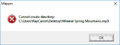 Importing map error

Trojan in RayKit files
Many programs have detected trojans in the RayKit directory, most notably in the Mapper file, in the GOG version of Rayman Forever. According to GOG it's false, but for anyone who feels insecure you can easily replace the files by the ones from any other version of Rayman Designer.
Missing configuration file (ubi.ini)
Sometimes the configuration file isn't added properly during installation. To add it manually you'll have to create a folder called "ubisoft" in the RayKit directory and then create a file named ubi.ini in this newly created directory containing this text:
[OSD]
Directory=.\ubisoft\osd
Valid=TRUE

[INSTALLED PRODUCTS]
RAYKIT

[RAYKIT]
SrcDataPath=\
Directory=.\
Rayman 2 (PC)
Rayman 2 can be made to run on Mac by following this tutorial: Rayman 2 Mac
Save files:
- Slot{Slot number} - {install directory}\Data\SaveGame - Save data for save slots.
- Current.cfg - {install directory}\Data\Options - In-game options and save slot display info.
Note: If you want to copy saves from one PC to another it is recommended to copy the config file as well due to it containing the save slot names. It can however be adjusted manually in the game afterwards as well.
Configuration files:
- Ubi.ini - C:\Windows\Ubisoft or in install directory
Installer not running
The installer for the game won't run on any 64-bit computers below Windows 8. To play the game you'll have to manually copy over the files from the disc to your computer. Note: The game won't show up under installed programs by doing this making it impossible to uninstall normally. To remove the game you'll have to manually remove the files you added.
No CD error
This issue was fixed in the GOG version.
Changing resolution
The game resolution can be changed by manually editing the ubi.ini file or running the configuration program. Setting the aspect ratio to anything other than 4:3 will automatically stretch the game. To prevent it from doing this there's a patch allowing for true widescreen on all textures except the HUD.
DirectX not listed
For some users the option to run the game with DirectX doesn't appear on Windows 10. To fix this you'll have to manually edit the ubi.ini file with this:
GLI_DllFile=GliDX6
GLI_Dll=DirectX6
GLI_Device=Direct3D HAL
Controller not recognized
Place the following .dll file in the game directory. Rayman 2 controller patch
Wrong speed
If the game is running using nGlide the speed can be changed by changing the refresh rate. Usually you'll want to set it 120hz to fix any speedups.
Rayman M/Arena (PC)
While Rayman M and Arena share many similarities, their file structure differs. Save files won't work between the two games.
Save files:
- raymanm.sav - {install directory}\Menu\SaveGame - Save data for all save slots.
Configuration files:
Ubi.ini - C:\Windows\Ubisoft
Missing textures
Set TnL to 0 in the ubi.ini file.
Changing resolution
The game resolution can be changed by manually editing the ubi.ini file or running the configuration program. Setting the aspect ratio to anything other than 4:3 will mess up the menus. To prevent it from doing this there's a patch allowing for true widescreen.
Rayman M widescreen patch Rayman Arena widescreen patch
Rayman 3 (PC)
Save files:
- {Slot name} - {install directory}\GAMEDATA - Save data for save slots.
- ? - ? - In-game options.
Configuration files:
Ubi.ini - C:\Windows\Ubisoft or C:\Users\{USERNAME}\AppData\Local\VirtualStore\Windows\Ubisoft
Main patches:
- Better Rayman 3 by RibShark
Missing textures
Set TnL to 0 in the ubi.ini file.
Changing resolution
The game resolution can be changed by manually editing the ubi.ini file or running the configuration program. Setting the aspect ratio to anything other than 4:3 will mess up the menus. The Better Rayman 3 patch fixes this issue by allowing true widescreen.
Controller not recognized
Place the following .dll file in the game directory. Rayman 3 controller patch
Changing camera controls
Sometimes the game may not recognize when you've changed the camera controls in the configuration program. This is most likely due to the configuration program only changing one ubi.ini file while the game is reading the other one. Simply copy over all content from the one being changed to the other one to have the changes come into effect in the game.
Windowed mode
In the ubi.ini file, by changing the number before the resolution from 1 to 0 you can enable the game to run in windowed mode.
Rayman Raving Rabbids (PC)
Save files:
- {Slot name} - C:\Users\{username}\AppData\Local\VirtualStore\Program Files (x86)\Ubisoft\Rayman Raving Rabbids - Save data.
Configuration files:
- HKEY_CURRENT_USER\Software\Ubisoft\Rayman4\HKEY_CU RRENT_USER\SOFTWARE\Ubisoft\Rayman4\ - Configuration information in the registry.
jade_enr.exe error
This is a known error with no current solution. The GOG version does not fix this issue.
Windowed mode
Go to the registry editor (regedit) and find:
HKEY_CURRENT_USER\Software\Ubisoft\Rayman4\HKEY_CU RRENT_USER\SOFTWARE\Ubisoft\Rayman4\{05D2C1BC-A857-4493-9BDA-C7707CACB937}\Basic video
From there you'll only need to change WindowedMode to 1 instead of the default 0. Note: It's not recommend changing the other values as they can be changed properly from the game's main configuration tool instead.
Rayman Origins (PC)
Main patches:
- Version 1.02 (Not included in all versions).
Save files:
- {Slot name} - C:\Users\{username}\Documents\My games\Rayman origins\Savegame - Save data.
Configuration files:
- HKEY_CURRENT_USER\Software\Ubisoft\RaymanOrigins\Settings\ - Configuration information in the registry.
Using controller
The button mapping has to be manually changed when plugging in a controller.
Higher quality videos
Replace existing videos with the ones from the PS3 version for higher quality and framerate.