Rayman Adventures hacking: Difference between revisions
Hunchman801 (talk | contribs) m Hunchman801 moved page Rayman Adventures Hacking to Rayman Adventures hacking |
Hunchman801 (talk | contribs) No edit summary |
||
| (4 intermediate revisions by 2 users not shown) | |||
| Line 1: | Line 1: | ||
The mobile game [[Rayman Adventures]] was shut in June | The mobile game ''[[Rayman Adventures]]'' was shut down in June 2023, but players have discovered ways to hack the game. | ||
== Save | == Save files == | ||
A | A save file is located at <code>Android/data/com.ubisoft.raymanadventures/files/DefaultSavegameName_0.sav</code> on Android. On iOS, it is harder to access save files, as it has more security. The save file stores the information listed below: | ||
* Adventure Number/ID | |||
Adventure Number/ID | * Current equipped skin | ||
Current | * [[Incrediball]]s | ||
* [[Sacred Tree]] height | |||
Sacred Tree | * Adventure levels | ||
Adventure | * Beatbox tracks | ||
Beatbox | * Achievements | ||
Achievements | |||
This list may be incomplete and get changed over time. | |||
This list may be | |||
=== Archived | === Archived saves === | ||
Dude to the game's servers being shutdown in June of 2023, many people have lost their devices, deleted the game and forgot about it. It is very difficult to find save files. | |||
==== Adventure 12 ==== | ==== Adventure 12 ==== | ||
<gallery widths="320px" heights="200px"> | <gallery widths="320px" heights="200px"> | ||
Adventure 12 Title Screen.png|The | Adventure 12 Title Screen.png|The title screen in Adventure 12. | ||
Adventure 12 Adventure Map.png|The | Adventure 12 Adventure Map.png|The [[Adventure Map]] on Adventure 12. | ||
</gallery> | |||
==== Adventure 19 ==== | |||
<gallery widths="320px" heights="200px"> | |||
Adventure 19 Title Screen.png|The title screen in Adventure 19. | |||
Adventure 19 Adventure Map.png|The [[Adventure Map]] on Adventure 19. | |||
Adventure 19 Level 1.png|The first level in Adenture 19. | |||
Adventure 19 Level 2.png|The second level in Adenture 19. | |||
Adventure 19 Level 3.png|The third level in Adenture 19. | |||
Adventure 19 Level 4.png|The fourth level in Adenture 19. | |||
</gallery> | </gallery> | ||
==== Adventure 31 ==== | ==== Adventure 31 ==== | ||
{{Rewrite-expand}} | |||
==== Adventure 223 ==== | ==== Adventure 223 ==== | ||
{{Rewrite-expand}} | |||
==== Adventure 509 ==== | ==== Adventure 509 ==== | ||
=== Loading | {{Rewrite-expand}} | ||
== Adventure Map | |||
By modifying the [[Adventure Map]] | === Loading error === | ||
If the save file is modified without proper tools (deleting random symbols), the game will act like the player starts a new slot, but before that it will give this error, probably used for debugging. | |||
<gallery widths="300px" heights="150px"> | |||
Save-File Error.png|An error obtained when loading a corrupt save file. | |||
</gallery> | |||
== Adventure Map replacement == | |||
By modifying the [[Adventure Map]] in the three <code>bundleonboardingadvNUMBER_PLATFORM.ipk</code> files and replacing the normal one with a map from another world, the game will load a map with three or four levels (depending on the selected map) instead of the regular two levels in Adventure 1 and three levels in Adventure 2. | |||
=== Adventure Map === | === Adventure Map === | ||
The player can play new levels if they modify the [[Adventure Map]]. For example, in Adventure 1, the game has three levels stored in <code>bundleonboardingadv1_PLATFORM.ipk</code> (one of them was the old tutorial level, which is not in Adventure 1 anymore), but the other selected map may have three or four levels. This causes the game to place random levels from [[Teensies In Trouble#Rayman Adventures|Medieval Mayhem]]. | |||
<gallery widths="300px" heights="150px"> | <gallery widths="300px" heights="150px"> | ||
Adventures-Modified-Map-1.png|[[Olympus Maximus]] | Adventures-Modified-Map-1.png|[[Olympus Maximus]] map instead of the normal one | ||
Adventures-Modified-Map-2.png|[[20, | Adventures-Modified-Map-2.png|[[20,000 Lums Under the Sea#Rayman Adventures|Sea of Serendipity]] map instead of the normal one | ||
Adventures-Modified-Map-3.png|[[ | Adventures-Modified-Map-3.png|[[Toad Story#Rayman Adventures|Toad Story]] map instead of the normal one | ||
Adventures-Modified-Map-4.png|Adventure 2 with a | Adventures-Modified-Map-4.png|Adventure 2 with a Bronze Egg | ||
</gallery> | </gallery> | ||
=== Creature | |||
The player can also obtain new [[ | === Creature bugs === | ||
The player can also obtain new [[Incrediball]]s like Hedgeworth and Ram, finish the [[Incrediball#The Green Pieces|Green Pieces]] family, or not be able to obtain the Sniffer [[Incrediball]]s. | |||
<gallery widths="300px" heights="150px"> | <gallery widths="300px" heights="150px"> | ||
Adventures-Modified-Incredibals-1.png|A new [[Incrediball]] that | Adventures-Modified-Incredibals-1.png|A new [[Incrediball]] that cannot be obtained normally | ||
Adventures-Modified-Incredibals-2.png|The | Adventures-Modified-Incredibals-2.png|The Purple Egg from Adventure 3 in the [[Incubator]] | ||
Adventures-Modified-Incredibals-3.png|The [[Incrediball]] hatched from the | Adventures-Modified-Incredibals-3.png|The [[Incrediball]] hatched from the Purple Egg | ||
Adventures-Modified-Incredibals-4.png|The game asking the player to rate the game in Adventure 3 | Adventures-Modified-Incredibals-4.png|The game asking the player to rate the game in Adventure 3 | ||
</gallery> | </gallery> | ||
== Level | == Level replacement == | ||
Editing any level files (.isc for scenes and .sgs for scene congif) with a file from <code>bundleonboardingadvNUMBER_PLATFORM</code> can load the level. The music and rewards do not update. This might result in too many or very little [[Lum (UbiArt games)|Lums]] depending on the chosen level. This also allows to load scrapped and/or unused levels and beta and/or test levels from the early build. | |||
=== Marathons === | === Marathons === | ||
Trying to load a marathon will result in a failure as the bricks will not generate. The music, fire and the starter brick appear and work fine. | |||
<gallery widths="300px" heights="150px"> | |||
LOTLD Marathon Fail.png|The [[Land of the Livid Dead (UbiArt games)|Land of the Livid Dead]] without any bricks spawning. | |||
</gallery> | |||
== Android and iOS mods == | |||
By editing code in the <code>classes4.dex</code> file that can be found in the APK (rename <code>.apk</code> to <code>.zip</code> and extract it), one can disable the OBB integrity check. This checks the MD5 and size in kilobytes of the OBB to verify if the OBB has been modified. Disabling this allows the player to edit levels, textures, PBKs (only by fully replacing them), and more. | |||
== Level force replacement == | |||
In the scene file for the [[Medieval Mayhem]] [[Adventure Map]], there are paths that tell the game which level to load. Changing these file paths will force the game to load a different level. This process is similar to modifying the scene files for levels, but it ensures that the music, rewards, and other assets are loaded properly. This method can be used to access stages such as the [[Land of the Livid Dead (UbiArt games)|Land of the Livid Dead]] Challenge. | |||
[[Category:Other]] | |||
Latest revision as of 17:25, 5 May 2026
The mobile game Rayman Adventures was shut down in June 2023, but players have discovered ways to hack the game.
Save files
A save file is located at Android/data/com.ubisoft.raymanadventures/files/DefaultSavegameName_0.sav on Android. On iOS, it is harder to access save files, as it has more security. The save file stores the information listed below:
- Adventure Number/ID
- Current equipped skin
- Incrediballs
- Sacred Tree height
- Adventure levels
- Beatbox tracks
- Achievements
This list may be incomplete and get changed over time.
Archived saves
Dude to the game's servers being shutdown in June of 2023, many people have lost their devices, deleted the game and forgot about it. It is very difficult to find save files.
Adventure 12
-
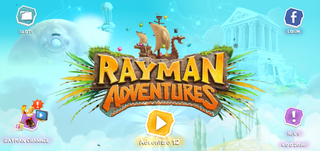 The title screen in Adventure 12.
 -
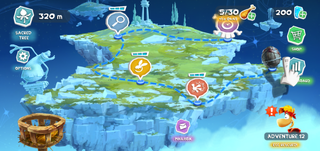 The Adventure Map on Adventure 12.


Adventure 19
-
The title screen in Adventure 19.
-
The Adventure Map on Adventure 19.
-
The first level in Adenture 19.
-
The second level in Adenture 19.
-
The third level in Adenture 19.
-
The fourth level in Adenture 19.
Adventure 31
| This article or section needs to be rewritten and/or expanded. |
Adventure 223
| This article or section needs to be rewritten and/or expanded. |
Adventure 509
| This article or section needs to be rewritten and/or expanded. |
Loading error
If the save file is modified without proper tools (deleting random symbols), the game will act like the player starts a new slot, but before that it will give this error, probably used for debugging.
-
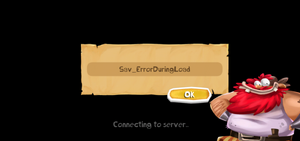 An error obtained when loading a corrupt save file.

Adventure Map replacement
By modifying the Adventure Map in the three bundleonboardingadvNUMBER_PLATFORM.ipk files and replacing the normal one with a map from another world, the game will load a map with three or four levels (depending on the selected map) instead of the regular two levels in Adventure 1 and three levels in Adventure 2.
Adventure Map
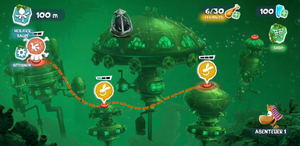
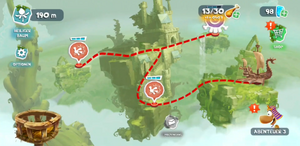
The player can play new levels if they modify the Adventure Map. For example, in Adventure 1, the game has three levels stored in bundleonboardingadv1_PLATFORM.ipk (one of them was the old tutorial level, which is not in Adventure 1 anymore), but the other selected map may have three or four levels. This causes the game to place random levels from Medieval Mayhem.
-
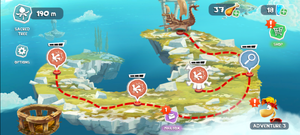 Olympus Maximus map instead of the normal one
 -
 Sea of Serendipity map instead of the normal one
 -
 Toad Story map instead of the normal one
 -
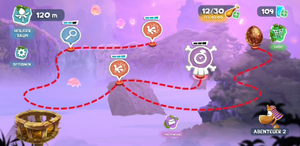 Adventure 2 with a Bronze Egg


Creature bugs
The player can also obtain new Incrediballs like Hedgeworth and Ram, finish the Green Pieces family, or not be able to obtain the Sniffer Incrediballs.
-
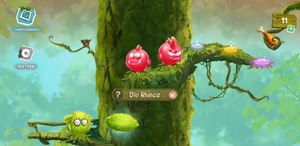 A new Incrediball that cannot be obtained normally
 -
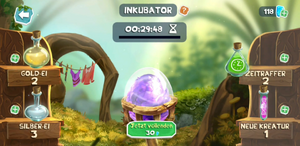 The Purple Egg from Adventure 3 in the Incubator
 -
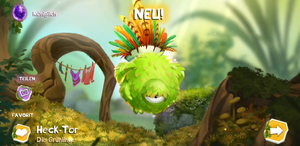 The Incrediball hatched from the Purple Egg
 -
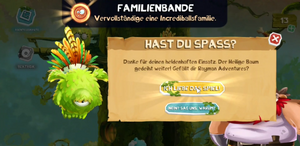 The game asking the player to rate the game in Adventure 3


Level replacement
Editing any level files (.isc for scenes and .sgs for scene congif) with a file from bundleonboardingadvNUMBER_PLATFORM can load the level. The music and rewards do not update. This might result in too many or very little Lums depending on the chosen level. This also allows to load scrapped and/or unused levels and beta and/or test levels from the early build.
Marathons
Trying to load a marathon will result in a failure as the bricks will not generate. The music, fire and the starter brick appear and work fine.
-
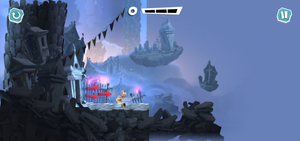 The Land of the Livid Dead without any bricks spawning.


Android and iOS mods
By editing code in the classes4.dex file that can be found in the APK (rename .apk to .zip and extract it), one can disable the OBB integrity check. This checks the MD5 and size in kilobytes of the OBB to verify if the OBB has been modified. Disabling this allows the player to edit levels, textures, PBKs (only by fully replacing them), and more.
Level force replacement
In the scene file for the Medieval Mayhem Adventure Map, there are paths that tell the game which level to load. Changing these file paths will force the game to load a different level. This process is similar to modifying the scene files for levels, but it ensures that the music, rewards, and other assets are loaded properly. This method can be used to access stages such as the Land of the Livid Dead Challenge.