Rayman 3 Print Studio: Difference between revisions
No edit summary |
Improvements |
||
| Line 10: | Line 10: | ||
}} | }} | ||
'''''Rayman 3 | '''''Rayman 3 Print Studio''''' is an interactive creativity package for the PC that was published in 2003 by Focus Multimedia, to coincide with [[Rayman 3|the major game of the same name]]. Unlike most PC software, it does not need to be installed, but still needs to be ran from the CD, and a printer is required for the user to print out their selected items. | ||
==Items to make== | ==Items to make== | ||
Using some of the ''Rayman 3'' artworks provided, the user can choose to print a paper based item from five main categories: | Using some of the ''[[Rayman 3]]'' artworks provided, the user can choose to print a paper based item from five main categories: | ||
* Greeting Cards | * Greeting Cards | ||
| Line 19: | Line 19: | ||
* Stickers and Name tags (preferably with the use of adhesive paper) | * Stickers and Name tags (preferably with the use of adhesive paper) | ||
* Bookmarks and Door Hangers | * Bookmarks and Door Hangers | ||
* Calenders (only the years 2003 and 2004 are available except for the version that comes with | * Calenders (only the years 2003 and 2004 are available except for the version that comes with the PC version of the ''[[Rayman 10th Anniversary]]'' which has the years 2006 and 2007) | ||
The user can then choose what artwork they'd like to use for their item, as well as messages and other writings (e.g. "Happy Birthday"). | The user can then choose what artwork they'd like to use for their item, as well as messages and other writings (e.g. "Happy Birthday"). Depending on what type of item is chosen, the user may then have to construct it themselves with glue. | ||
==Gallery== | ==Gallery== | ||
<gallery widths="320px" heights="240px"> | |||
R3 - Print Studio.jpg|The language selection menu. | |||
R3 Print Studio - FR.jpg|The game. | |||
</gallery> | |||
==System Requirements== | ==System Requirements== | ||
Revision as of 20:11, 19 September 2017
| Rayman 3: Hoodlum Havoc Print Studio | ||
|---|---|---|

| ||
| Published by | Focus Multimedia | |
| Developed by | Unknown | |
| Release date | 2003 | |
| Genre | Creativity package | |
| Gameplay mode | n/a | |
| Platforms | PC | |
Rayman 3 Print Studio is an interactive creativity package for the PC that was published in 2003 by Focus Multimedia, to coincide with the major game of the same name. Unlike most PC software, it does not need to be installed, but still needs to be ran from the CD, and a printer is required for the user to print out their selected items.
Items to make
Using some of the Rayman 3 artworks provided, the user can choose to print a paper based item from five main categories:
- Greeting Cards
- Writing Papers
- Stickers and Name tags (preferably with the use of adhesive paper)
- Bookmarks and Door Hangers
- Calenders (only the years 2003 and 2004 are available except for the version that comes with the PC version of the Rayman 10th Anniversary which has the years 2006 and 2007)
The user can then choose what artwork they'd like to use for their item, as well as messages and other writings (e.g. "Happy Birthday"). Depending on what type of item is chosen, the user may then have to construct it themselves with glue.
Gallery
-
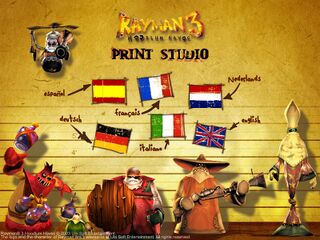 The language selection menu.
 -
 The game.


System Requirements
Operating System: Windows 95/98/Me/2000/XP
CPU Type and Speed: Pentium 75 or equivalent
Hard Drive Space: 2MB
Memory: 16MB (32MB for Windows 2000/XP)
Graphics: 800x600x16bit colour
CD-ROM Speed: 4x or faster
Audio: Not required
Printer: Required