Rayman Raving Rabbids Activity Centre: Difference between revisions
mNo edit summary |
I think the side template image was too big |
||
| (15 intermediate revisions by 9 users not shown) | |||
| Line 1: | Line 1: | ||
Rayman Raving Rabbids Activity Centre | {{Game | ||
| name = Rayman Raving Rabbids Activity Centre | |||
| image = [[File:Rayman Raving Rabbids Activity Centre Cover.jpg|240px|Rayman Raving Rabbids Activity Centre]] | |||
| published by = [[Ubisoft]] | |||
| developed by = [[Ubisoft]] | |||
| gameplay mode = Single player | |||
| platforms = Windows | |||
| distribution media = CD-ROM | |||
}} | |||
'''''Rayman Raving Rabbids Activity Centre''''' is a spin-off PC game of ''[[Rayman Raving Rabbids]]''. It contains 4 small games with interaction of the keyboard and mouse: Flying Rabbids, Freeze!, Paintorama and Hit'em!, a wallpaper studio where the player can create a ''[[Rayman Raving Rabbids]]'' wallpaper, a video booth where the player can see some of the videos related with the ''[[Rayman Raving Rabbids]]'' game and a print studio to create stickers, memos, postcards and other things also related with ''[[Rayman Raving Rabbids]]''. The game may be played in English, French, Spanish, German or Italian. | |||
''' | ==Plot== | ||
{{Quote|text=The [[Rabbid]]s have come from outerspace in their [[Rabbids' ship|mothership]] with plans of invasion. Your mission is to help [[Rayman]] free [[Glade of Dreams|his world]] of the [[rabbid]]s by putting them back in their [[Rabbids' ship|mothership]] and banishing them from [[Glade of Dreams|his world]]. Play the games and get rid of the [[rabbid]]s.|sign=Game cover|source=''Rayman Raving Rabbids Activity Centre''}} | |||
Game progress is achieved by playing the mini-games. Each of the 4 games contributes 25% towards the game completion. Partial score is possible. The current progression percentage is displayed in the bar to the left of the [[Rabbids' ship|mothership]] on the main screen. The other activities (wallpaper studio, print studio and video booth) do not contribute to completion. Once the game is 100% completed, the [[Rabbids' ship|mothership]] can be launched into outer space by clicking its glowing red cycloptic eye. This triggers the end-game video sequence, after which the game goes back to the language selection screen. | |||
==The games== | |||
===Flying [[Rabbid]]s=== | |||
The objective of the game is to swing the [[Rabbid]] with the mouse in circles, aiming with the help of a moving arrow and throw the [[Rabbid]] to the target. There are 10 [[Rabbid]]s total. To hit the target the mouse button must be let go when the arrow points at the right direction, and when the swing is at top speed. All 10 [[Rabbid]]s must hit the target for completion. | |||
The objective of the game is to bring | ===Freeze!=== | ||
The objective of the game is to bring [[Rabbid]]s to the other side without being noticed by [[Sergueï]] (named as "Butcher" on the game). To walk the player must repeatedly tap the right arrow key and to stop and hide when [[Sergueï]] is looking in his direction. The player has 2:45 minutes to bring as many [[Rabbid]]s as possible. 8 [[Rabbid]]s are required for completion. | |||
===Paintorama=== | |||
There is no main objective in this game. The player can choose 1 of the 6 available pictures and to colour them with the pallet disponible. The player can print the pictures or print the black and white picture to colour. The game is completed after all 6 pictures have been coloured. | |||
===Hit'em!=== | |||
The objective of the game is to slap the [[Rabbid]]s that appear to the surface by poiting to the [[Rabbid]] and clicking on the left button from the mouse. The player has 1:30 minutes to slap as many [[Rabbid]]s as possible. The [[Rabbid]]s will appear faster towards the end of the clock. Successfully slapping 100 of them constitutes completion. | |||
' | ==Gallery== | ||
=== Screenshots === | |||
<gallery widths="320px" heights="240px"> | |||
Rrractivitycentre menu.JPG|The main menu. | |||
Rrractivitycentre flyingrabbidsgame.JPG|Flying [[Rabbid]]s. | |||
Rrractivitycentre freezegame.JPG|Freeze! | |||
Rrractivitycentre hit'emgame.JPG|Hit'em! | |||
Rrractivitycentre paintoramagame.JPG|Paintorama. | |||
Rrractivitycentre printstudio.JPG|Print studio. | |||
Rrractivitycentre videobooth.JPG|Video booth. | |||
Rrractivitycentre wallpaperstudio.JPG|Wallpaper studio. | |||
Rrractivitycentre credits.JPG|Credits. | |||
</gallery> | |||
=== Artworks === | |||
<gallery> | |||
Rabbids Activity Center Background 1.png | |||
Rabbids Activity Center Background 2.png | |||
Rabbids Activity Center Background 3.png | |||
Rabbids Activity Center Background 4.png | |||
Rabbids Activity Center Character 1.png | |||
Rabbids Activity Center Character 2.png | |||
Rabbids Activity Center Character 3.png | |||
Rabbids Activity Center Character 4.png | |||
Rabbids Activity Center Character 5.png | |||
Rabbids Activity Center Character 6.png | |||
Rabbids Activity Center Logo 1.png | |||
Rabbids Activity Center Logo 2.png | |||
</gallery> | |||
==Trivia== | ==Trivia== | ||
* [[Rayman]] has a design error in this game: his shirt has half-white circles on the sides. | |||
{{Rayman series}} | |||
{{Rabbids series}} | |||
[[pl:Rayman Raving Rabbids Activity Centre]] | |||
[[Category:Other software]] | |||
[[Category:Rayman games]] | |||
[[Category:Rabbids games]] | |||
Latest revision as of 21:54, 7 March 2026
| Rayman Raving Rabbids Activity Centre | ||
|---|---|---|

| ||
| Published by | Ubisoft | |
| Developed by | Ubisoft | |
| Gameplay mode | Single player | |
| Platforms | Windows | |
| Distribution media | CD-ROM | |
Rayman Raving Rabbids Activity Centre is a spin-off PC game of Rayman Raving Rabbids. It contains 4 small games with interaction of the keyboard and mouse: Flying Rabbids, Freeze!, Paintorama and Hit'em!, a wallpaper studio where the player can create a Rayman Raving Rabbids wallpaper, a video booth where the player can see some of the videos related with the Rayman Raving Rabbids game and a print studio to create stickers, memos, postcards and other things also related with Rayman Raving Rabbids. The game may be played in English, French, Spanish, German or Italian.
Plot
The Rabbids have come from outerspace in their mothership with plans of invasion. Your mission is to help Rayman free his world of the rabbids by putting them back in their mothership and banishing them from his world. Play the games and get rid of the rabbids.—Game cover, Rayman Raving Rabbids Activity Centre
Game progress is achieved by playing the mini-games. Each of the 4 games contributes 25% towards the game completion. Partial score is possible. The current progression percentage is displayed in the bar to the left of the mothership on the main screen. The other activities (wallpaper studio, print studio and video booth) do not contribute to completion. Once the game is 100% completed, the mothership can be launched into outer space by clicking its glowing red cycloptic eye. This triggers the end-game video sequence, after which the game goes back to the language selection screen.
The games
Flying Rabbids
The objective of the game is to swing the Rabbid with the mouse in circles, aiming with the help of a moving arrow and throw the Rabbid to the target. There are 10 Rabbids total. To hit the target the mouse button must be let go when the arrow points at the right direction, and when the swing is at top speed. All 10 Rabbids must hit the target for completion.
Freeze!
The objective of the game is to bring Rabbids to the other side without being noticed by Sergueï (named as "Butcher" on the game). To walk the player must repeatedly tap the right arrow key and to stop and hide when Sergueï is looking in his direction. The player has 2:45 minutes to bring as many Rabbids as possible. 8 Rabbids are required for completion.
Paintorama
There is no main objective in this game. The player can choose 1 of the 6 available pictures and to colour them with the pallet disponible. The player can print the pictures or print the black and white picture to colour. The game is completed after all 6 pictures have been coloured.
Hit'em!
The objective of the game is to slap the Rabbids that appear to the surface by poiting to the Rabbid and clicking on the left button from the mouse. The player has 1:30 minutes to slap as many Rabbids as possible. The Rabbids will appear faster towards the end of the clock. Successfully slapping 100 of them constitutes completion.
Gallery
Screenshots
-
 The main menu.
 -
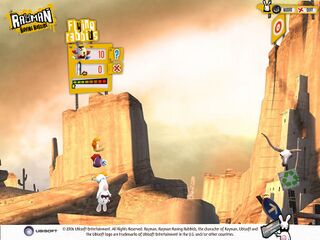 Flying Rabbids.
 -
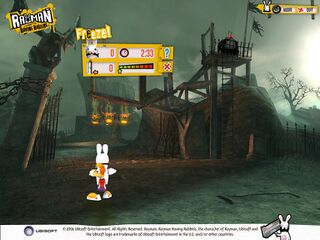 Freeze!
 -
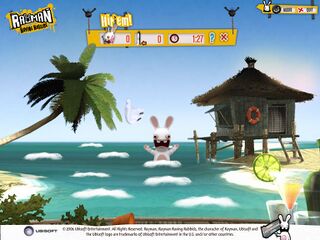 Hit'em!
 -
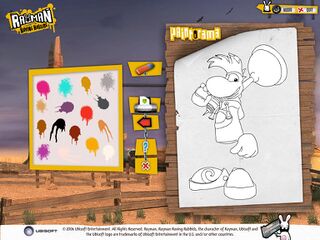 Paintorama.
 -
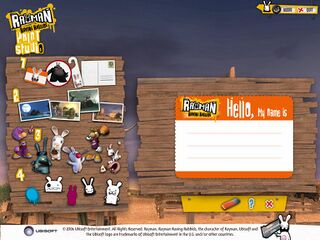 Print studio.
 -
 Video booth.
 -
 Wallpaper studio.
 -
 Credits.


Artworks


Trivia
- Rayman has a design error in this game: his shirt has half-white circles on the sides.