Rayman Designer hacking: Difference between revisions
Tidied it up a small bit. Better late than never. |
Hunchman801 (talk | contribs) m Fixed links to redirects |
||
| (25 intermediate revisions by 6 users not shown) | |||
| Line 1: | Line 1: | ||
'''''[[Rayman Designer]]'' hacking''' is the process of modifying the program files of the game in order to change the appearance and the | '''''[[Rayman Designer]]'' hacking''' is the process of modifying the program files of the game in order to change the appearance and the behavior of in-game events and sceneries. | ||
==Graphics== | ==Graphics== | ||
=== Tiles === | |||
In every world-folder (for example "[[The Dream Forest|jungle]]" or "[[Band Land|music]]") of the game, there is a .PCX graphic file. It contains all the graphic tiles which are used by the Mapper and the levels created from it. Tiles can be changed and added, but the following should not be changed: | |||
*The color palette used in the file. This palette is additionally used for the background and event sprites, meaning they will change their colors too. | |||
*The color palette used in the file. | |||
*The first tile on the top-left corner, which is used to set the transparent color in the file. | *The first tile on the top-left corner, which is used to set the transparent color in the file. | ||
*The lowest row of tiles, which are reserved for the Mapper's "types mode". | *The lowest row of tiles, which are reserved for the Mapper's "types mode". | ||
| Line 13: | Line 12: | ||
Also note that all custom maps will use the new graphics if the standard tiles are replaced. However, the 24 levels which come with the game have built-in graphics, and are not affected by PCX changes. | Also note that all custom maps will use the new graphics if the standard tiles are replaced. However, the 24 levels which come with the game have built-in graphics, and are not affected by PCX changes. | ||
=== | === Sprites === | ||
All animated | All animated sprites of the game (for example, [[Rayman]] himself and enemies) are stored in the .DES files, short for ''dessin'', French for drawing. These files are packed in the .WLD, AllFix and BigRay files, which are stored in the "pcmap" folder. The .DES files contain the image data and animation information. | ||
ETA files, short for ''état'', French for state, are stored in the same files. They contain information about the event states, specified by Etat and SubEtat. | |||
The names | The file names for the .DES and .ETA files are only included in ''[[Rayman Designer]]'' and its spin-offs. In all previous games they are only refereed to by the index they're loaded into the game. | ||
=== | ==[[Event (Rayman Designer)|Events]]== | ||
In every world-folder of the game, there is a file called EVE.MLT. It contains | === Editing events === | ||
In every world-folder of the game, there is a file called EVE.MLT. It contains the manifest of the events of the current world and can be modified using a text editor. The events are structured in this way: | |||
{| width="auto" align="center" style="border-style:dotted;border-width:1mm;border-color:green;text-align:left" | {| width="auto" align="center" style="border-style:dotted;border-width:1mm;border-color:green;text-align:left" | ||
|œdef, | |œdef,ms_name,DES_FILE,display_prio, | ||
FILE.ETA, | FILE.ETA, | ||
eventCommands, | |||
main_X_pos, main_Y_pos, | main_X_pos, main_Y_pos, | ||
| Line 54: | Line 43: | ||
'''Caption:''' | '''Caption:''' | ||
*œdef = | *œdef = defines the beginning of an event definition | ||
* | *ms_name = the internal event name. This is used to specify the event in the editor as well as to get the localized name. | ||
*DES_FILE = name of the graphic file which should be used for the event (without the extension ".DES") | *DES_FILE = name of the graphic file which should be used for the event (without the extension ".DES") | ||
* | *display_prio = the display priority, specifying the order the sprite should be drawn on screen (a value between 1-7) | ||
*FILE.ETA = name of the | *FILE.ETA = name of the state file which should be used | ||
* | *eventCommands = the non-compiled event commands (these have to use local offsets due to not having been compiled with label offsets yet) | ||
*main_X_pos = main x coordinate of the event (irrelevant since the player places the object themselves) | |||
*main_X_pos = main x coordinate of the event | *main_Y_pos = main y coordinate of the event (irrelevant since the player places the object themselves) | ||
*main_Y_pos = main y coordinate of the event | *etat = the primary event state | ||
*etat = | *sub_etat = the secondary event state | ||
*sub_etat = | *Offset_BX = the x position of the pivot | ||
*Offset_BX = | *Offset_BY = the y position of the pivot | ||
*Offset_BY = | *Offset_HY = the y coordinate of the point on the sprite on which Rayman can stand if Follow_enabled is true, relative to the follow_sprite | ||
*Offset_HY = | *Follow_enabled = indicates whether or not Rayman can stand on this event ("follow" its movement), either 0 or 1 (true or false) | ||
*Follow_enabled = whether or not | *follow_sprite = the sprite index which the player can stand on if Follow_enabled is true | ||
*follow_sprite = | *hitpoints = for enemies like [[hunter]]s, how much [[resistance]] the event has. However, for many events this number has a different meaning, such as specifying if the sprite should appear flipped, the palette offset etc. | ||
*hitpoints = for enemies like [[hunter]]s, how much [[resistance]] the event has. However, for many events this number has a different meaning. | *obj_type = this is the event object type. All types are hard-coded in the engine and specifies how the event should be treated. | ||
*obj_type = this | *hit_sprite = if below 253 it specifies the sprite which is treated as a hitbox. If above 253 it specifies the event uses the hitbox belonging to the obj_type. | ||
*hit_sprite = | |||
*group = in which group the event can be found in the Events Editor. For example, the "Enemies" group is group 5. | *group = in which group the event can be found in the Events Editor. For example, the "Enemies" group is group 5. | ||
'''Event commands''' | |||
The event commands will repeat themselves when they come to the end. Ones marked as self-handled will have different behavior depending on the object type and current state. The command names come from leftover debug information in the GameBoy Advance version. The complete list is as follows: | |||
{| class="wikitable" | |||
|- | |||
!Command | |||
!Name | |||
!Effect | |||
|- | |||
| 0, {arg1} | |||
| GO_LEFT | |||
| (Self-handled) Object moves left | |||
|- | |||
| 1, {arg1} | |||
| GO_RIGHT | |||
| (Self-handled) Object moves right | |||
|- | |||
| 2 | |||
| GO_WAIT | |||
| (Self-handled) Object stops moving | |||
|- | |||
| 3, {arg1} | |||
| GO_UP | |||
| (Self-handled) Sprite moves up | |||
|- | |||
| 4, {arg1} | |||
| GO_DOWN | |||
| (Self-handled) Sprite moves down | |||
|- | |||
| 5, {arg1} | |||
| GO_SUBSTATE | |||
| Set object SubEtat (secondary state) to {arg1} | |||
|- | |||
| 6, {arg1} | |||
| GO_SKIP | |||
| Skips {arg1} commands | |||
|- | |||
| 7 | |||
| GO_ADD | |||
| (Self-handled) ? | |||
|- | |||
| 8, {arg1} | |||
| GO_STATE | |||
| Set object Etat (primary state) to {arg1} | |||
|- | |||
| 9, {arg1} | |||
| GO_PREPARELOOP | |||
| Saves the current position and prepares a loop which loops with {arg1} being the amount of times to loop | |||
|- | |||
| 10 | |||
| GO_DOLOOP | |||
| Perform the loop | |||
|- | |||
| 11, {arg1} | |||
| GO_LABEL | |||
| Sets label {arg1} | |||
|- | |||
| 12, {arg1} | |||
| GO_GOTO | |||
| Skips to label {arg1} | |||
|- | |||
| 13, {arg1} | |||
| GO_GOSUB | |||
| Saves the current position and starts executing from label {arg1} until GO_RETURN | |||
|- | |||
| 14 | |||
| GO_RETURN | |||
| Returns from a GOSUB command execution | |||
|- | |||
| 15, {arg1} | |||
| GO_BRANCHTRUE | |||
| Skips to label {arg1} if TEST is true | |||
|- | |||
| 16, {arg1} | |||
| GO_BRANCHFALSE | |||
| Skips to label {arg1} if TEST is false | |||
|- | |||
| 17, {arg1}[, {arg2}] | |||
| GO_TEST | |||
| Sets the TEST flag depending on {arg1}. If {arg1} <= 4 then {arg2} is used in the validation, otherwise only one argument is expected. | |||
|- | |||
| 18, {arg1} | |||
| GO_SETTEST | |||
| Sets the TEST flag to {arg1}, treated as a boolean | |||
|- | |||
| 19, {arg1} | |||
| GO_WAITSTATE | |||
| Waits {arg1} | |||
|- | |||
| 20, {arg1}, {arg2}, {arg3} | |||
| GO_SPEED | |||
| (Self-handled) Moves {arg1} with speed X {arg2} and Y {arg3} | |||
|- | |||
| 21, {arg1}, {arg2} | |||
| GO_X | |||
| Sets the X position to {arg1}{arg2} | |||
|- | |||
| 22, {arg1}, {arg2} | |||
| GO_Y | |||
| Sets the Y position to {arg1}{arg2} | |||
|- | |||
| 23, {arg1} | |||
| RESERVED_GO_SKIP | |||
| Skips to LabelOffsets[{arg1}] | |||
|- | |||
| 24, {arg1} | |||
| RESERVED_GO_GOTO | |||
| Same as RESERVED_GO_SKIP | |||
|- | |||
| 25, {arg1} | |||
| RESERVED_GO_GOSUB | |||
| Saves the current position and starts executing from LabelOffsets[{arg1}] until GO_RETURN | |||
|- | |||
| 26, {arg1} | |||
| RESERVED_GO_GOTOT | |||
| Skips to LabelOffsets[{arg1}] if TEST is true | |||
|- | |||
| 27, {arg1} | |||
| RESERVED_GO_GOTOF | |||
| Skips to LabelOffsets[{arg1}] if TEST is false | |||
|- | |||
| 28, {arg1} | |||
| RESERVED_GO_SKIPT | |||
| Same as RESERVED_GO_GOTOT | |||
|- | |||
| 29, {arg1} | |||
| RESERVED_GO_SKIPF | |||
| Same as RESERVED_GO_GOTOF | |||
|- | |||
| 30 | |||
| GO_NOP | |||
| (Self-handled) ? | |||
|- | |||
| 31, {arg1} | |||
| GO_SKIPTRUE | |||
| Skips {arg1} commands if TEST is true | |||
|- | |||
| 32, {arg1} | |||
| GO_SKIPFALSE | |||
| Skips {arg1} commands if TEST is false | |||
|- | |||
| 33, {arg1} | |||
| INVALID_CMD | |||
| Terminates the commands and loops back, {arg1} is always 0xFF which is used as the command buffer terminator | |||
|} | |||
=== Unused events === | |||
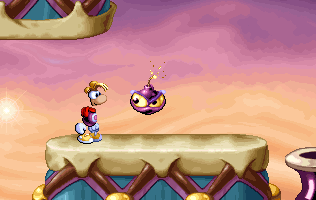
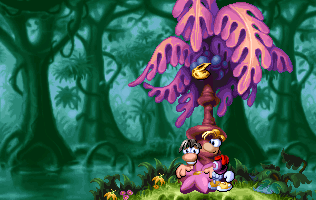
A bunch of unused events have been discovered. They can be added to the game by adding their code to the EVE.MLT file. A lot of these events are taken from [[Rayman 1|the original game]], such as a fully functioning [[Tarayzan]] and an unstable version of [[Rayman]] riding [[Bzzit]]. A lot of other events are however not used in the original game, although many can still be found in its files. | |||
'' | <gallery widths="316px" heights="200px" class="sprite"> | ||
GiantLavaBall.png|A giant [[lava rock]], acting as scenery. | |||
BetaClouds.png|[[Cloud]]s with a face (known from the Atari Jaguar version). The ones to the right act like disappearing clouds. | |||
SmallLivingstonePlum.png|A [[little Livingstone]] on a bouncing [[plum]]. | |||
Big rock.png|A giant [[rock]]. | |||
Bouncing Mr. Sax obstacle.png|A [[wrong note]] from [[Mr Sax]]. Here it can be punched to move like a [[plum]]. | |||
Clocks.png|The clocks from the [[continue]] screen, acting as scenery. | |||
Insta-kill events.png|Several red insta-kill events, previously seen in ''[[Maths and English with Rayman]]''. | |||
Road signs.png|A bunch of colored road signs, acting as scenery. | |||
Tarayzan Designer.png|[[Tarayzan]] as a functioning event, except for the text not displaying when he gives [[Rayman]] the [[Magic seed|seed]]. | |||
Music sign.png|An [[exit sign]] with a note. | |||
</gallery> | |||
== Map properties == | |||
For each created map there's an configuration file, named MAP.INI with the basic map properties. Example: | |||
{| width="auto" align="center" style="border-style:dotted;border-width:1mm;border-color:green;text-align:left" | |||
|[Map]<br /> | |||
World=<br /> | |||
Title=<br /> | |||
Author=<br /> | |||
Comment=<br /> | |||
[Game]<br /> | |||
Level=<br /> | |||
[Power]<br /> | |||
Hanging=<br /> | |||
Fist=<br /> | |||
Helico=<br /> | |||
SuperHelico=<br /> | |||
Run=<br /> | |||
Seed=<br /> | |||
[LevelBackGround]<br /> | |||
Filename=<br /> | |||
[CD]<br /> | |||
Track=<br /> | |||
|} | |||
Most values here can simply be changed using the Mapper program. However, the Mapper program only gives two options for the background and music, while in fact there are usually several ones which can be used. Setting the track to 3 will play the [[Bonus level (Rayman 1)|bonus level]] music. | |||
==The Extended ''Rayman Designer'' Editor== | ==The Extended ''Rayman Designer'' Editor== | ||
This is an | This is an unofficial tool that makes ''[[Rayman Designer]]'' modding much easier. It also comes with a large content package which includes a great deal of content from ''[[Rayman 1|Rayman]]'' and ''[[Maths and English with Rayman]]'' that was not available in ''Rayman Designer'', and also some new unofficial content. | ||
*Download: http://www.rayman-fanpage.de/character/raymans_world_designer/RDeditor.exe | *Download: http://www.rayman-fanpage.de/character/raymans_world_designer/RDeditor.exe | ||
==Trivia== | ==Trivia== | ||
Through some editing of the game, the following things have been discovered: | Through some editing of the game, the following things have been discovered: | ||
*If events are placed in groups beyond group 9, it is found that these groups have the same names as the game's levels. This reveals the names of six additional levels. It seems that they have been cut from the final game (or never been finished): "The Gates of the Jungle" ([[Dream Forest]]), "Diabolical Tunes" ([[Band Land]]), "The Fire Avalanche" ([[ | *If events are placed in groups beyond group 9, it is found that these groups have the same names as the game's levels. This reveals the names of six additional levels. It seems that they have been cut from the final game (or never been finished): "The Gates of the Jungle" ([[The Dream Forest]]), "Diabolical Tunes" ([[Band Land]]), "The Fire Avalanche" ([[Blue Mountains]]), "Miniature Madness" ([[Picture City]]), "Cloud of Doom" ([[The Caves of Skops]]) and "Dessert Anyone?" ([[Candy Château]]). | ||
*A sprite from [[Rayman 2 ( | *A sprite from [[Rayman 2 (cancelled prototype)|the 2D version of ''Rayman 2'']] could be found in the sprite files (a small platform that looks like a teleporter). | ||
*The spritefiles also contain a considerable amount of content from the ''[[Rayman | *The spritefiles also contain a considerable amount of content from the ''[[Maths and English with Rayman]]'' (such as the world map icons) and some never-before-seen sprites. | ||
{{Rayman 1}} | |||
[[Category:Other]] | [[Category:Other]] | ||
Latest revision as of 06:29, 20 August 2025
Rayman Designer hacking is the process of modifying the program files of the game in order to change the appearance and the behavior of in-game events and sceneries.
Graphics
Tiles
In every world-folder (for example "jungle" or "music") of the game, there is a .PCX graphic file. It contains all the graphic tiles which are used by the Mapper and the levels created from it. Tiles can be changed and added, but the following should not be changed:
- The color palette used in the file. This palette is additionally used for the background and event sprites, meaning they will change their colors too.
- The first tile on the top-left corner, which is used to set the transparent color in the file.
- The lowest row of tiles, which are reserved for the Mapper's "types mode".
- The image size, otherwise the Mapper will not work.
Also note that all custom maps will use the new graphics if the standard tiles are replaced. However, the 24 levels which come with the game have built-in graphics, and are not affected by PCX changes.
Sprites
All animated sprites of the game (for example, Rayman himself and enemies) are stored in the .DES files, short for dessin, French for drawing. These files are packed in the .WLD, AllFix and BigRay files, which are stored in the "pcmap" folder. The .DES files contain the image data and animation information.
ETA files, short for état, French for state, are stored in the same files. They contain information about the event states, specified by Etat and SubEtat.
The file names for the .DES and .ETA files are only included in Rayman Designer and its spin-offs. In all previous games they are only refereed to by the index they're loaded into the game.
Events
Editing events
In every world-folder of the game, there is a file called EVE.MLT. It contains the manifest of the events of the current world and can be modified using a text editor. The events are structured in this way:
| œdef,ms_name,DES_FILE,display_prio,
FILE.ETA, eventCommands, main_X_pos, main_Y_pos, etat, sub_etat, Offset_BX, Offset_BY, Offset_HY, Follow_enabled, follow_sprite, hitpoints, obj_type , hit_sprite, group, |
Caption:
- œdef = defines the beginning of an event definition
- ms_name = the internal event name. This is used to specify the event in the editor as well as to get the localized name.
- DES_FILE = name of the graphic file which should be used for the event (without the extension ".DES")
- display_prio = the display priority, specifying the order the sprite should be drawn on screen (a value between 1-7)
- FILE.ETA = name of the state file which should be used
- eventCommands = the non-compiled event commands (these have to use local offsets due to not having been compiled with label offsets yet)
- main_X_pos = main x coordinate of the event (irrelevant since the player places the object themselves)
- main_Y_pos = main y coordinate of the event (irrelevant since the player places the object themselves)
- etat = the primary event state
- sub_etat = the secondary event state
- Offset_BX = the x position of the pivot
- Offset_BY = the y position of the pivot
- Offset_HY = the y coordinate of the point on the sprite on which Rayman can stand if Follow_enabled is true, relative to the follow_sprite
- Follow_enabled = indicates whether or not Rayman can stand on this event ("follow" its movement), either 0 or 1 (true or false)
- follow_sprite = the sprite index which the player can stand on if Follow_enabled is true
- hitpoints = for enemies like hunters, how much resistance the event has. However, for many events this number has a different meaning, such as specifying if the sprite should appear flipped, the palette offset etc.
- obj_type = this is the event object type. All types are hard-coded in the engine and specifies how the event should be treated.
- hit_sprite = if below 253 it specifies the sprite which is treated as a hitbox. If above 253 it specifies the event uses the hitbox belonging to the obj_type.
- group = in which group the event can be found in the Events Editor. For example, the "Enemies" group is group 5.
Event commands
The event commands will repeat themselves when they come to the end. Ones marked as self-handled will have different behavior depending on the object type and current state. The command names come from leftover debug information in the GameBoy Advance version. The complete list is as follows:
| Command | Name | Effect |
|---|---|---|
| 0, {arg1} | GO_LEFT | (Self-handled) Object moves left |
| 1, {arg1} | GO_RIGHT | (Self-handled) Object moves right |
| 2 | GO_WAIT | (Self-handled) Object stops moving |
| 3, {arg1} | GO_UP | (Self-handled) Sprite moves up |
| 4, {arg1} | GO_DOWN | (Self-handled) Sprite moves down |
| 5, {arg1} | GO_SUBSTATE | Set object SubEtat (secondary state) to {arg1} |
| 6, {arg1} | GO_SKIP | Skips {arg1} commands |
| 7 | GO_ADD | (Self-handled) ? |
| 8, {arg1} | GO_STATE | Set object Etat (primary state) to {arg1} |
| 9, {arg1} | GO_PREPARELOOP | Saves the current position and prepares a loop which loops with {arg1} being the amount of times to loop |
| 10 | GO_DOLOOP | Perform the loop |
| 11, {arg1} | GO_LABEL | Sets label {arg1} |
| 12, {arg1} | GO_GOTO | Skips to label {arg1} |
| 13, {arg1} | GO_GOSUB | Saves the current position and starts executing from label {arg1} until GO_RETURN |
| 14 | GO_RETURN | Returns from a GOSUB command execution |
| 15, {arg1} | GO_BRANCHTRUE | Skips to label {arg1} if TEST is true |
| 16, {arg1} | GO_BRANCHFALSE | Skips to label {arg1} if TEST is false |
| 17, {arg1}[, {arg2}] | GO_TEST | Sets the TEST flag depending on {arg1}. If {arg1} <= 4 then {arg2} is used in the validation, otherwise only one argument is expected. |
| 18, {arg1} | GO_SETTEST | Sets the TEST flag to {arg1}, treated as a boolean |
| 19, {arg1} | GO_WAITSTATE | Waits {arg1} |
| 20, {arg1}, {arg2}, {arg3} | GO_SPEED | (Self-handled) Moves {arg1} with speed X {arg2} and Y {arg3} |
| 21, {arg1}, {arg2} | GO_X | Sets the X position to {arg1}{arg2} |
| 22, {arg1}, {arg2} | GO_Y | Sets the Y position to {arg1}{arg2} |
| 23, {arg1} | RESERVED_GO_SKIP | Skips to LabelOffsets[{arg1}] |
| 24, {arg1} | RESERVED_GO_GOTO | Same as RESERVED_GO_SKIP |
| 25, {arg1} | RESERVED_GO_GOSUB | Saves the current position and starts executing from LabelOffsets[{arg1}] until GO_RETURN |
| 26, {arg1} | RESERVED_GO_GOTOT | Skips to LabelOffsets[{arg1}] if TEST is true |
| 27, {arg1} | RESERVED_GO_GOTOF | Skips to LabelOffsets[{arg1}] if TEST is false |
| 28, {arg1} | RESERVED_GO_SKIPT | Same as RESERVED_GO_GOTOT |
| 29, {arg1} | RESERVED_GO_SKIPF | Same as RESERVED_GO_GOTOF |
| 30 | GO_NOP | (Self-handled) ? |
| 31, {arg1} | GO_SKIPTRUE | Skips {arg1} commands if TEST is true |
| 32, {arg1} | GO_SKIPFALSE | Skips {arg1} commands if TEST is false |
| 33, {arg1} | INVALID_CMD | Terminates the commands and loops back, {arg1} is always 0xFF which is used as the command buffer terminator |
Unused events
A bunch of unused events have been discovered. They can be added to the game by adding their code to the EVE.MLT file. A lot of these events are taken from the original game, such as a fully functioning Tarayzan and an unstable version of Rayman riding Bzzit. A lot of other events are however not used in the original game, although many can still be found in its files.
-
 A giant lava rock, acting as scenery.
 -
 Clouds with a face (known from the Atari Jaguar version). The ones to the right act like disappearing clouds.
 -
 A little Livingstone on a bouncing plum.
 -
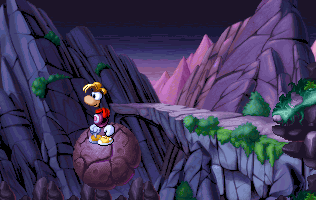 A giant rock.
 -
-
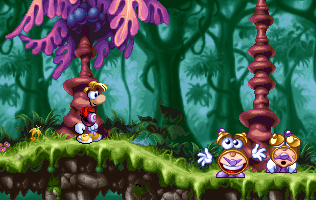 The clocks from the continue screen, acting as scenery.
 -
 Several red insta-kill events, previously seen in Maths and English with Rayman.
 -
 A bunch of colored road signs, acting as scenery.
 -
-
 An exit sign with a note.


Map properties
For each created map there's an configuration file, named MAP.INI with the basic map properties. Example:
| [Map] World= [Game] [Power] [LevelBackGround] [CD] |
Most values here can simply be changed using the Mapper program. However, the Mapper program only gives two options for the background and music, while in fact there are usually several ones which can be used. Setting the track to 3 will play the bonus level music.
The Extended Rayman Designer Editor
This is an unofficial tool that makes Rayman Designer modding much easier. It also comes with a large content package which includes a great deal of content from Rayman and Maths and English with Rayman that was not available in Rayman Designer, and also some new unofficial content.
Trivia
Through some editing of the game, the following things have been discovered:
- If events are placed in groups beyond group 9, it is found that these groups have the same names as the game's levels. This reveals the names of six additional levels. It seems that they have been cut from the final game (or never been finished): "The Gates of the Jungle" (The Dream Forest), "Diabolical Tunes" (Band Land), "The Fire Avalanche" (Blue Mountains), "Miniature Madness" (Picture City), "Cloud of Doom" (The Caves of Skops) and "Dessert Anyone?" (Candy Château).
- A sprite from the 2D version of Rayman 2 could be found in the sprite files (a small platform that looks like a teleporter).
- The spritefiles also contain a considerable amount of content from the Maths and English with Rayman (such as the world map icons) and some never-before-seen sprites.